16 | BDIUSA.COM CORRIDOR L-DESK 6531
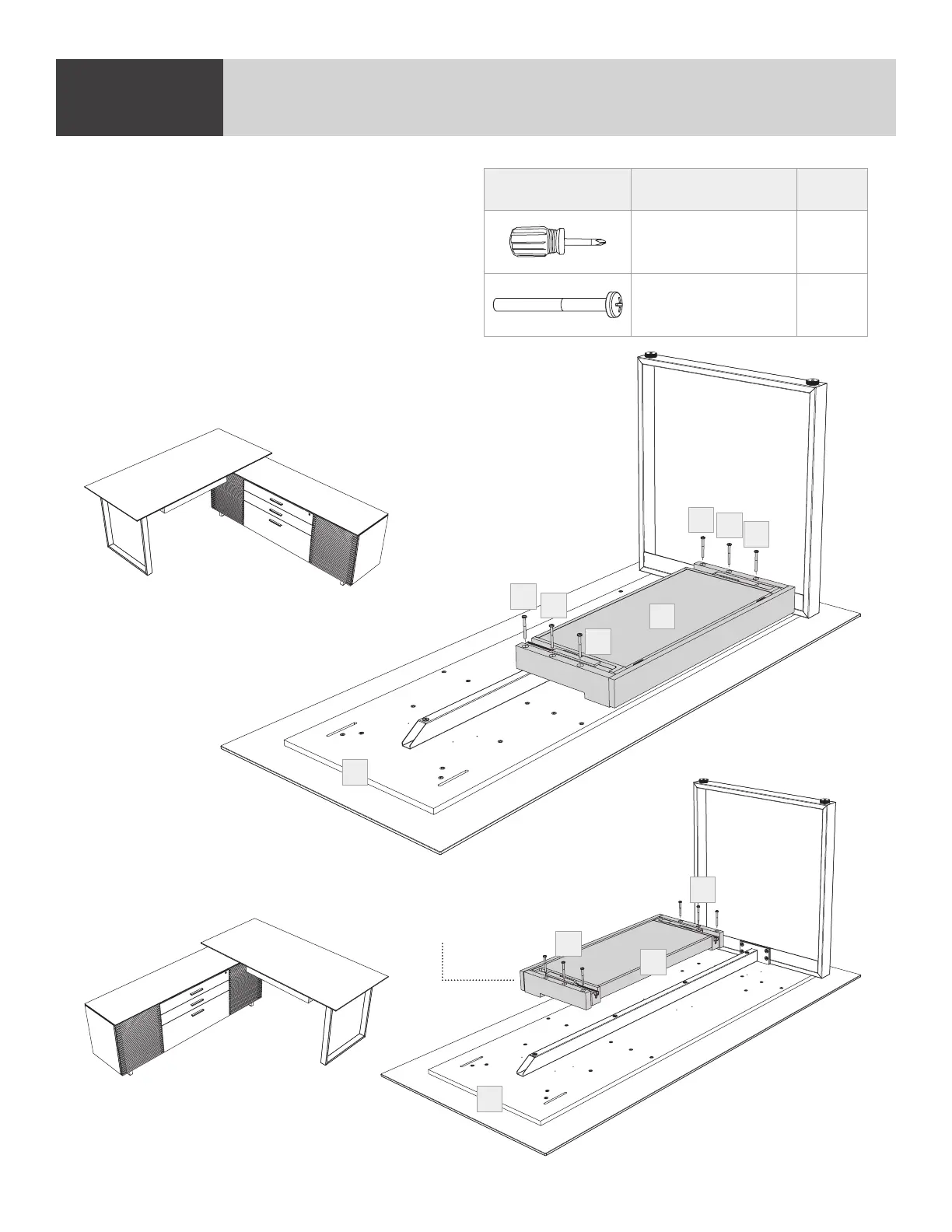
Place the (C3) Keyboard Drawer on the
(C2) Desktop panel’s appropriate position
relative to where the desk will be mounted to the
cabinet. The (C3) Keyboard Drawer should be
facing the middle of the cabinet when the desk is
mounted. Fasten the (C3) Keyboard Drawer to
the (C2) Desktop with 6 (H9) Panhead Screws
using the (T2) Phillips Screwdriver.
STEP 9. INSTALL KEYBOARD DRAWERASSEMBLY
PART/DESCRIPTION QTY
T2-PHILLIPS
SCREWDRIVER
1
H9-SCREW 6
Keyboard drawer
on other side
Full left assembly
Full right assembly
C2
C2
C3
C3
H9
H9
H9
H9
H9
H9
H9
H9


 To Next Page