Need help?
Do you have a question about the Be-Tech 3001D Series and is the answer not in the manual?
Step-by-step instructions for correctly installing batteries into the safe.
Procedure for setting the initial owner code for the smart safe.
Steps to modify or update the existing owner code.
Instructions on how to unlock the safe using the owner code.
Guide for setting up service codes for additional access.
This document is a user manual for the 3001D Smart Safe, available in models 3001D-1HL, 3001D-3HL, and 3001D-5HL. The manual provides essential information for the correct and secure use of the smart safe, highlighting its advantages over general safes in terms of security and convenience.
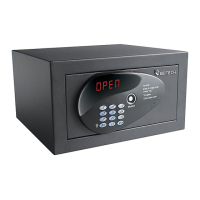
The 3001D Smart Safe is an electronic safe designed for secure storage. It features a numerical keypad, a display, and a lock mechanism for electronic access. In addition to electronic access, it includes a mechanical key for manual override in case of forgotten codes or electronic malfunction. The safe supports both an owner code and multiple service codes, offering flexible access control. It can operate in two modes: Share Mode and Privacy Mode, each with distinct closing and opening procedures.
The smart safe operates on 4 AA alkaline batteries.
Dimensions:
Installation and Positioning: The safe should be placed on a level and covert surface, in a cool and dry place, away from direct sunlight. It can be fastened to furniture or inside a cabinet using the provided wooden screws. There are four pre-drilled holes for mounting: two on the back wall and two on the horizontal surface.
Battery Installation: Batteries are ordered separately. To install, remove the protective lid by unscrewing the screws and fit the 4 AA alkaline batteries into their seats, ensuring correct polarity.
Code Management:
*, 0, #, input the original owner code 123456, then press #.*, 0, # again. When "1St" is displayed, input a new owner code (4-9 digits) and press #.#.*, 0, #, input the current owner code, then press #.*, 0, #.#.#.*, 0, #, input the owner code, then press #.*, 1, #.#.#.*, 2 (or 3, 4, 5), #, input the code, and confirm.*, 0, #, input the owner code, then press #.*, *, 1 (or 2, 3, 4, 5), #.dEL2, etc.) is displayed, input the owner code and press #.*, 0, #, input the owner code, then press #.*, *, *, #.#.Opening the Safe:
*, 0, #, input the owner code, then press #. "OPEn" will be displayed.*, 1 (to 5), #, input the corresponding service code, then press #. "OPEn" will be displayed.Operating Modes:
#. "CLSd" will be displayed.* to delete wrong digits. One-Time Codes can be changed during any closing/opening cycle.#. "CLSd" will be displayed.*, 0, # prefix). For Service Codes, you must key in *, 1 (to 5), # before inputting the service code. One-Time Codes are not available in Privacy Mode.Security Features:
* before inputting the secret code. The LED screen will not display code numbers, showing "-" instead.Mechanical Key Override: In case of forgotten owner or service codes, the safe can be opened manually. Remove the front adhesive from the door, insert the mechanical key (provided with the product) into the lock, and turn to open.
Universal Socket (Optional): An optional universal power socket can be provided inside the door. This allows connecting various devices (e.g., PC, phone charger) to the power mains. The power supply cable exits from the back of the safe with three small cables (phase, neutral, earth) for direct connection to a wiring system or a normal plug. If directly connected, the wiring system must have a complete line cut-off device with a contact opening distance of at least 3.5mm. If using a normal plug, it must be easily accessible.
General Notices:
Error Messages: The display shows various error codes to assist with troubleshooting:
Power Supply Cable: If the power supply cable is damaged, disconnect it from the power supply system and contact sales service.
Important Warning: Never leave the mechanical key or the hand terminal inside the safe.

 To Next Page
 General