75.5892.04 KEYPADS 20201007 Page 3 of 8
PROGRAMMING TIPS
-
+
}
-
+
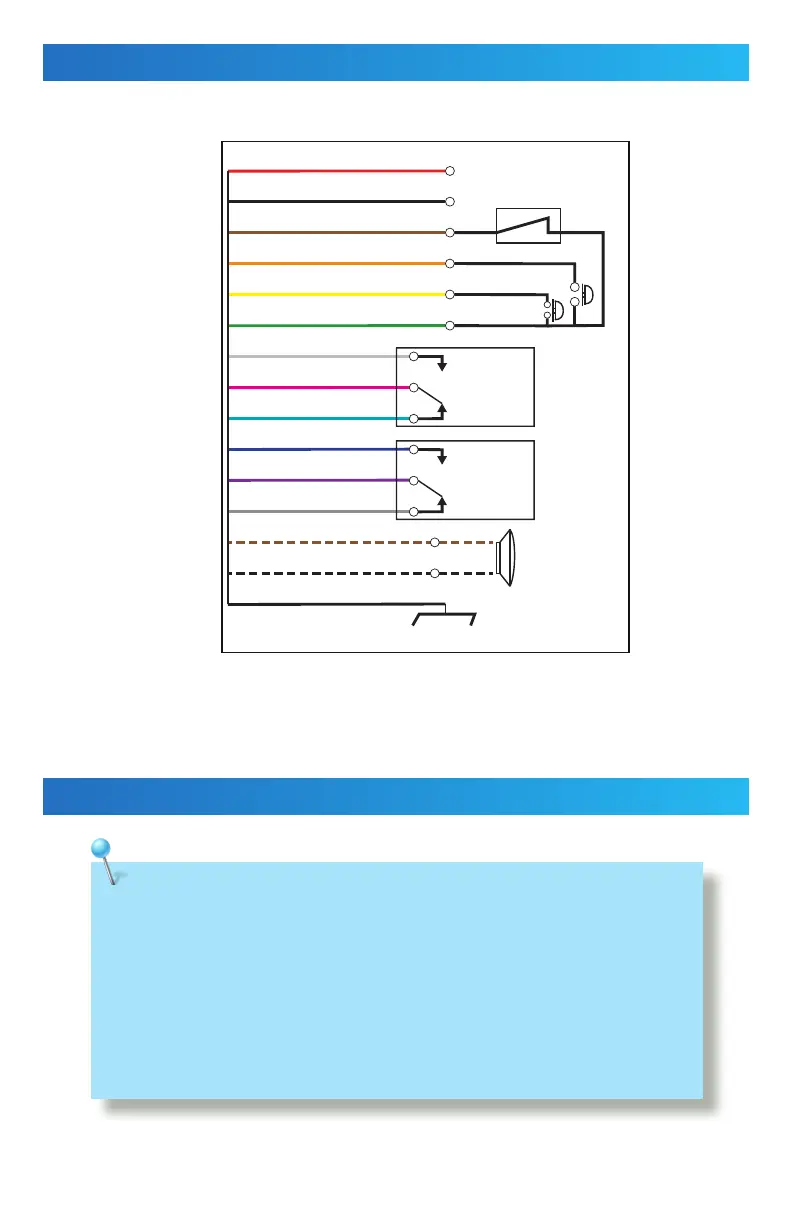
1 Red (power +)
2 Black (power ground)
3 Brown (door magnet)
4 Orange (zone 1 exit button)
5 Yellow (zone 2 exit button)
6 Green (exit button – COM)
7 White (NO)
8 Pink (COM)
9 Aqua (NC)
10 Blue (NO)
11 Purple (COM)
12 Gray (NC)
8”
0.5W recommended
13 Brown/White (door bell)
14 Black/White (door bell)
Shielding line
Input DC: 12V to 24V
Input AC: 12V to 24V
Shield ground
Zone 1
UNLOCK
(dry)
Zone 2
UNLOCK
(dry)
WIRING
PROGRAMMING
Connect the wires based on the wiring diagram below.
When wiring is complete, mount the keypad to the back cover by using the provided screws.
• If you forget the administration code, turn off the power, press and hold “#” key, and then
turn the power back on. A short beep will be heard and the administration code has been
restored back to 1234.
• If no buttons are pressed within 30 seconds while in “setup” mode, the device will turn
back to normal function automatically. Mode LED turns green.
• If any incorrect key combinations are entered, a continuous beep will be heard.


 To Next Page