

EasyManua.ls Logo

BEA 10KEYPADU - User Manual

BEA 10KEYPADU
8 pages
Print Icon
To Next Page IconTo Next Page
Loading...
QR CODE
UNIVERSAL KEYPAD FAMILY
21 3
4
3
4
21
75.5892.04 KEYPADS 20201007 Page 1 of 8
Stand-alone access control keypads
ENGLISH
DESCRIPTION
Visit website for
available languages of
this document.
1. Door LED
2. Mode LED
3. Matrix keypad
4. Case screw
(bottom of case)
10KEYPADU 10KEYPADUSL
(slimline)
TECHNICAL SPECIFICATIONS
Supply voltage: 12 – 24 VAC/VDC
WARNING: Product will be damaged and warranty will be voided if
supply voltage exceeds 30VDC or 24VAC.
This product shall not be used with a BEA part number 1024VAC
transformer or any standard, non-regulated 24VAC transformer as the
measured voltage exceeds 24 VAC.
Standby current: ≤ 30 mA
Working current: ≤ 160 mA
Max user codes: 1010 ( zone 1: 1000 users, zone 2: 10 users)
Relock time: 0 – 99 seconds
Output: 2 relays (free of potential change-over contact)
Max. contact voltage: 42 VAC/VDC
Max. contact current: 1 A (resistive)
Max. switching power: 30 W (VDC) / 48 VA (VAC)
Cable length: 3 ft
Operating temperature: -22 – 158 °F
Operating humidity: 0 – 95% (non-condensing)
IP rating: IP66 (waterproof and dustproof)
Dimension: 10KEYPADU: 3.0” (W) x 4.7” (H) x 0.9” (D) – (76 mm x 120 mm x 22 mm)
10KEYPADUSL: 1.7” (W) x 5.9” (H) x 0.95” (D) – (44 mm x 150 mm x 24 mm)
Certification: CE, RoHS
Backlight: Blue keypad illumination
Specifications are subject to change without prior notice.
All values measured in specific conditions.

Other manuals for BEA 10KEYPADU

Question and Answer IconNeed help?

Do you have a question about the BEA 10KEYPADU and is the answer not in the manual?

Summary

Technical Specifications

IP Rating

Denotes the device's protection against dust and water ingress.

Mounting

Backcase Screw Removal

Instructions on using a hex key to remove the backcase screw from the keypad bottom.

Drilling and Mounting Holes

Guidance on drilling holes for surface or single-gang box mounting, noting the tamper sensor.

Mounting the Backcase

Instructions for attaching the backcase to the wall and routing the cable.

Wiring

Programming

Getting Started

Enter Setup Mode

Procedure to enter the device's setup mode using the default administration code.

Admin Codes

Modify Admin Code

Steps to change the existing administrator code to a new 4-digit code.

Change Admin Code Length

Process to alter the length of the admin code, which resets user codes.

User Codes

Add User Code to Zone 1

Instructions for adding a user code to the first zone, specifying location and code.

Add User Code to Zone 2

Instructions for adding a user code to the second zone, specifying location and code.

Remove One User Code

Remove All User Codes

Summary

Technical Specifications

IP Rating

Denotes the device's protection against dust and water ingress.

Mounting

Backcase Screw Removal

Instructions on using a hex key to remove the backcase screw from the keypad bottom.

Drilling and Mounting Holes

Guidance on drilling holes for surface or single-gang box mounting, noting the tamper sensor.

Mounting the Backcase

Instructions for attaching the backcase to the wall and routing the cable.

Wiring

Programming

Getting Started

Enter Setup Mode

Procedure to enter the device's setup mode using the default administration code.

Admin Codes

Modify Admin Code

Steps to change the existing administrator code to a new 4-digit code.

Change Admin Code Length

Process to alter the length of the admin code, which resets user codes.

User Codes

Add User Code to Zone 1

Instructions for adding a user code to the first zone, specifying location and code.

Add User Code to Zone 2

Instructions for adding a user code to the second zone, specifying location and code.

Remove One User Code

Remove All User Codes

Overview

The Universal Keypad Family offers stand-alone access control keypads, available in two models: the 10KEYPADU and the slimmer 10KEYPADUSL. These devices are designed for secure entry management, featuring a matrix keypad for user input, a Door LED to indicate door status, and a Mode LED to show the current operating mode. A case screw, located at the bottom of the case, secures the device.

Technical Specifications:

  • Supply Voltage: 12–24 VAC/VDC. It's crucial to note that the product will be damaged, and the warranty voided, if the supply voltage exceeds 30VDC or 24VAC. The keypad should not be used with a BEA part number 1024VAC transformer or any standard, non-regulated 24VAC transformer, as the measured voltage from these sources exceeds 24 VAC.
  • Standby Current: ≤ 30 mA
  • Working Current: ≤ 160 mA
  • Max User Codes: 1010 (1000 users for Zone 1, 10 users for Zone 2).
  • Relock Time: Adjustable from 0 to 99 seconds.
  • Output: Two relays with free of potential change-over contacts.
    • Max. contact voltage: 42 VAC/VDC
    • Max. contact current: 1 A (resistive)
    • Max. switching power: 30 W (VDC) / 48 VA (VAC)
  • Cable Length: 3 ft
  • Operating Temperature: -22 to 158 °F (-30 to 70 °C)
  • Operating Humidity: 0–95% (non-condensing)
  • IP Rating: IP66 (waterproof and dustproof), ensuring protection against dust and strong jets of water.
  • Dimensions:
    • 10KEYPADU: 3.0″ (W) x 4.7″ (H) x 0.9″ (D) – (76 mm x 120 mm x 22 mm)
    • 10KEYPADUSL: 1.7″ (W) x 5.9″ (H) x 0.95″ (D) – (44 mm x 150 mm x 24 mm)
  • Certification: CE, RoHS compliant.
  • Backlight: Blue keypad illumination for visibility in low-light conditions.

Usage Features:

The keypads offer comprehensive programming options accessible through a "setup" mode, which is entered by inputting the administration code twice. The default administration code is 1234. If forgotten, the administration code can be reset to 1234 by powering off the device, pressing and holding the "#" key, and then powering it back on.

  • Admin Code Management:
    • Modify Admin Code: Users can change the 4-digit administration code (0000–9999).
    • Change Length of Admin Code: The admin code length can be adjusted from 2 to 6 digits. Changing the length will delete all existing user codes and reset the admin code to a sequential number matching the new length (e.g., 123456 for a 6-digit code).
  • User Code Management:
    • Add User Code to Zone 1: Up to 1000 user codes (000–999 for electronic location) can be added to Zone 1. User codes must be different from the admin code and have the same length as the admin code. When Zone 1 output relay is activated, the door indicator LED turns green.
    • Add User Code to Zone 2: Up to 10 user codes (00–99 for electronic location) can be added to Zone 2. These must be different from the admin code and Zone 1 user codes, and have the same length as the admin code. When Zone 2 output relay is activated, the door indicator LED turns red.
    • Remove One User Code: Individual user codes can be deleted by entering their 3-digit location.
    • Remove All User Codes: All user codes can be deleted simultaneously.
  • Unlocking Times:
    • Set Unlocking Time for Zone 1 and Zone 2: The "unlock time" can be set from 00 to 99 seconds. "00" sets the relay to toggle mode (open and close the door), while "01"–"99" sets the unlock time in seconds.
  • Optional Programming:
    • Program a Door Bell: An external speaker (8Ω, 0.5W) can be connected to the brown/white and black/white wires to function as a doorbell.
    • Tamper Alarm: A built-in buzzer activates if the keypad is removed from the wall. The alarm stops automatically after 60 seconds or if the admin code is entered within that timeframe. This feature is OFF by default but can be turned ON or OFF through programming.

Maintenance Features:

  • Factory Restore: The device can be restored to its factory default settings, including the administration code (1234) and all other programmed parameters.
  • Installation Tips:
    • Handle the equipment with care.
    • Apply threadlocker to all screws before installation.
    • Firmly tighten screws.
  • Wiring: The manual provides a detailed wiring diagram for connecting the keypad to power, door magnet, exit buttons, and unlock relays for both Zone 1 and Zone 2, as well as a doorbell. Shielding line and shield ground connections are also specified.
  • Mounting: The device comes with a hex key to remove the backcase screw for mounting. A drilling template is provided for surface mounting (4 corner holes) or single-gang box mounting (2 asterisk-marked holes). It is important not to damage the tamper sensor during mounting. The backcase is mounted with provided screws, ensuring the keypad cable is pulled through the center hole and the keypad remains horizontal.

User Operation:

Users simply enter their assigned user code to gain access. If three consecutive invalid keyboard entries occur, the keypad will be disabled for 60 seconds as a security measure.

Precautions:

  • Always shut off all power before wiring.
  • Maintain a clean and safe work environment.
  • Verify all wiring placements to prevent damage from moving door parts.
  • Ensure compliance with all applicable safety standards (e.g., ANSI A156.10) upon completion of installation.

Specifications are subject to change without prior notice, and all values are measured in specific conditions.
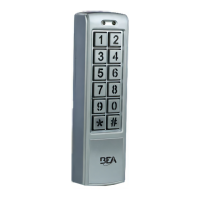
BEA 10KEYPADU Specifications

General IconGeneral
BrandBEA
Model10KEYPADU
CategoryKeypad
LanguageEnglish