30
Menu Adjustments
Channel Settings
The Channel m enu provides the setup / changes of your television to receive broadcast channels, store your favorite
chan nels, add or skip channels in memory and label or name channels.
How to Navigate:
Press the MENU button on the remote control. Navigate using arrow buttons to select Channel. Press the
down button to highlight your preferences.
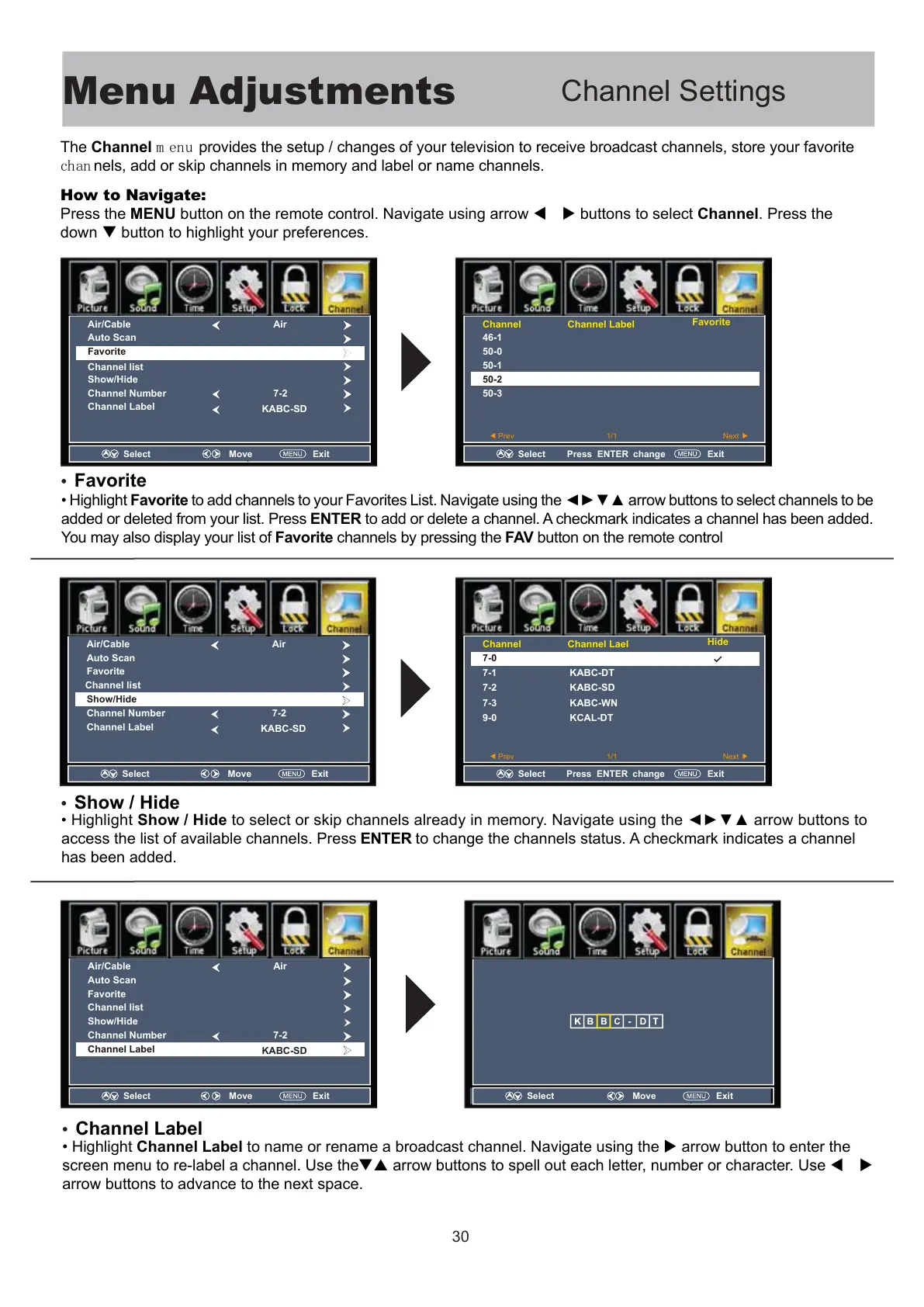
Highlight Favorite to add channels to your Favorites List. Navigate using the arrow buttons to select channels to be
added or deleted from your list. Press ENTER to add or delete a channel. A
checkmark indicates a channel has been added.
You may also display your list of Favorite channels by pressing the FAV button on the remote control
Highlight Show / Hide to select or skip channels already in memory. Navigate using the arrow buttons to
access the list of available channels. Press ENTER to change the channels status. A checkmark indicates a channel
has been added.
ihiht Channel Label to name or rename a broadcast channel. Navigate using the arrow button to enter the
screen menu to re-label a channel. Use the arrow buttons to spell out each letter, number or character. Use
arrow buttons to advance to the next space.
•
Favorite
•
Show / Hide
•
Channel Label
Select Move Exit
Air/Cable
Auto Scan
Favorite
Show/Hide
Channel list
Channel Number
Channel Label
Air
7-2
KABC-SD
Select Press ENTER change Exit
Channel Channel Label
46-1
50-0
50-1
50-2
50-3
Favorite
Select Press ENTER change Exit
Channel Channel Lael
7-0
7-1
7-2
7-3
9-0
KABC-DT
KABC-SD
KABC-WN
KCAL-DT
Hide
Select Move Exit
Air/Cable
Auto Scan
Favorite
Show/Hide
Channel list
Channel Number
Channel Label
Air
7-2
KABC-SD
Select Move Exit
Select Move Exit
Air/Cable
Auto Scan
Favorite
Show/Hide
Channel list
Channel Number
Channel Label
Air
7-2
KABC-SD
Prev 1/1 Next
Prev 1/1 Next



 To Next Page