23
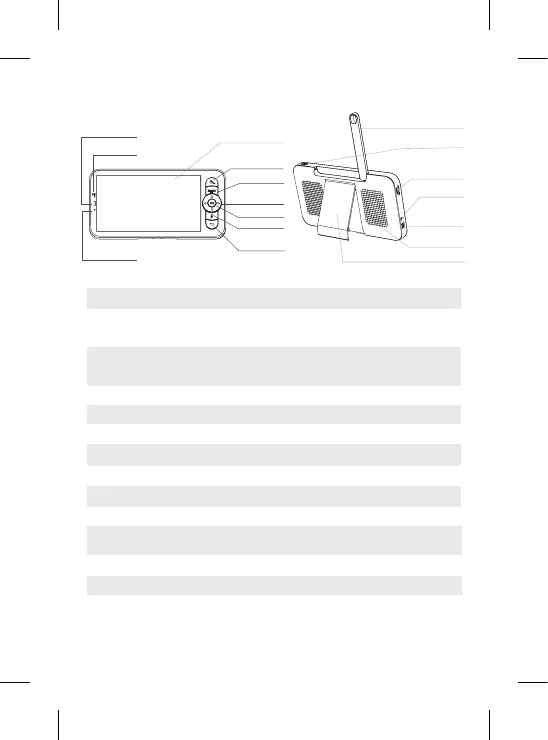
V. DESCRIPTION RECEIVER – PARENT UNIT
Antenna
ON/OFF button
Slot for SD card*
Reset
Micro USB
power port
Loudspeakers
Screen support
Micro USB power
port
Charging light
ON/OFF light
Microphone
Antenna
ON/OFF button
Zoom in/out
Menu
Direction buttons
OK
Call
Slot for SD* card
Reset
Return button
5V/ 1A DC
Capture sound from your video
Adjust the position of the antenna to receive the signal
Press for 5 seconds to switch the Receiver on and off
Zoom x1, x2 or x4 on the image
Control the camera’s direction (horizontally and vertically)
Conrm your choice
Press the button to activate walkie-talkie mode. Press the button again
to deactivate walkie-talkie mode.
Compatible with a SD* card (max 128 Go)
Press with the reset pin to reset the Receiver
Press to go back; On the home screen press and hold to stop the music
Press the Menu button to enter the Menu interface.
• Orange light: Charging
• Green light: Receiver recharged
• Yellow light: The receiver is switched on
• No light: The receiver is switched off
Microphone
Charging light
Zoom in/out
Menu
Direction
buttons
OK
Call
Return
button
Display screen
ON/OFF light


 To Next Page
 Loading...