XII. TROUBLESHOOTING - FAQ
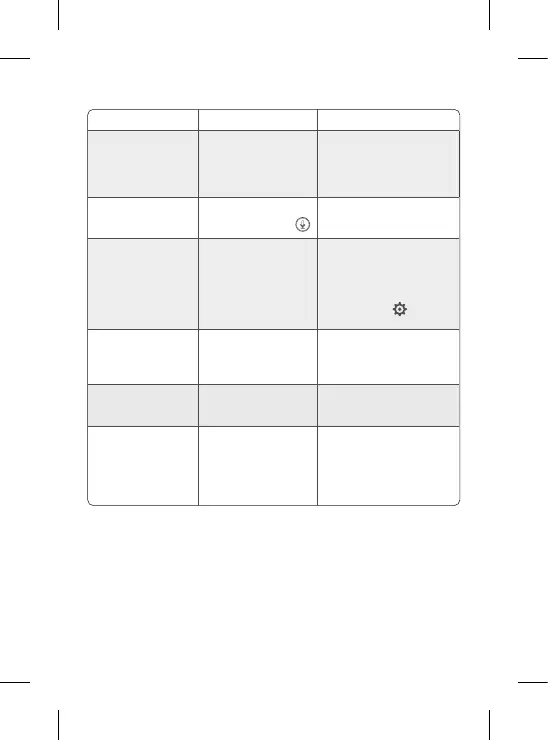
Problems Possible causes Solutions
If the signal is not stable:
(loss of signal)
Interferences disturb the signal
or the receiver is too far from
the camera
Move the camera and receivers
away from devices operating in Wi
that may interfere with the signal /
use the application to access the
camera from the smartphone
The image lmed by the
camera is not displayed on
the receiver's screen
Check that the receiver is
connected to the camera.
If this is not the case, start by pairing
the camera and the receiver.
Unable to nd the pairing
button
The pairing button is the
button on the front part of the
camera.
Press and hold the button for 3
seconds, then follow the instructions
on the screen. (To access the
screen's pairing screen, press
the Menu button on the display
screen and select
> Manage
cameras.
What to do if the screen is
blocked and does not work
when you press a button?
You must reset your display
screen.
Press the reset button on your
screen with a pin, then press and
hold the power button on your
screen to restart it.
Why is the camera or the
screen unable to identify
the SD* card?
Check that the SD* card is
inserted correctly
The format must be FAT32
Why am I unable to receive
notications with my mobile
phone app when I connect
the camera to the screen?
Notications are probably
deactivated on the phone.
Please check that the app is
running on the phone and that the
corresponding notications have
been activated.


 To Next Page
 Loading...