71020 & 70554 Chipper Shredder Owners ManualPage 14
5.1 REMOVING DISCHARGE SCREEN
1. Remove the discharge screen by removing the two
5/16 in. retaining bolts from the bottom of the screen.
2. Pull the bottom of the screen outward. This will
cause the screen to rotate off the lip and fall.
3. To reinstall the discharge screen, place the top lip of
the screen into the slot under the top slope.
4. Rotate the screen so that the bolt holes align with
the holes in the chipper base and the plate butts
against the kicker bar.
5. Reinstall bolts and torque to proper specs.
5.2 SHARPENING CHIPPER BLADES
The chipper blades will eventually become dull, making
chipping difficult. It is recommended that the chipper
blades are sharpened every 5-15 hours of chipper
operation. To remove the chipping blades for sharpening:
1. Remove the discharge screen by removing the 5/16
inch retaining bolt and pulling the screen outward.
2. Romove the access cover on the chipper chute side
of the machine.
3. Rotate the rotor so that the bolts holding the chipper
blade are most accessable.
4. Remove the two hex head bolts holding the blade it-
self. Repeat for all four blades.
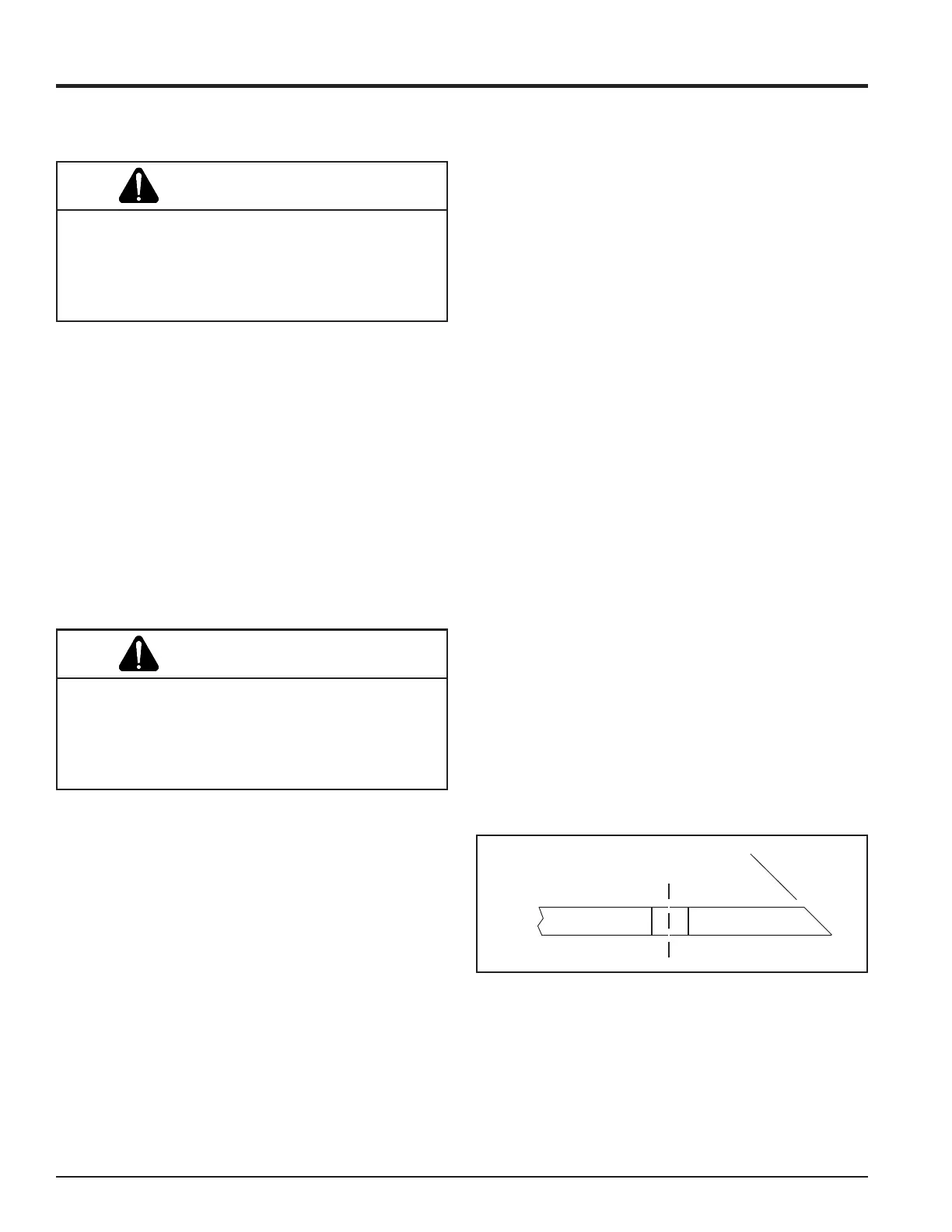
5. Grind the angled edge of the chipping blade to 45 de-
grees. Grind the blades on a slow-speed wet grinder if
possible, or have them sharpened by a professional. If
you use a bench grinder, be careful when grinding so
that the blade material does not get too hot and change
colorthis will remove the blade's special heat treated
properties. Use short grinding times and cool with wa-
ter. Try to remove an equal amount off each blade to
maintain balance.
6. Replace the chipping blades and tighten bolts to 20 ft.
lbs.
5.3 CHIPPING BLADE SHARPENING
TIPS
Poor chipping performance is usually a result of dull
chipping blades. If your chipper's performance has
decreased, check for the following symptoms:
1. Severe vibration when feeding material into the
chipper.
2. Small diameter branches do not self-feed.
3. Chips discharge unevenly or have stringy tails
especially when chipping green branches.
Before you sharpen the chipping blades, check for
permanent damage. Replace the blade if:
1. The blade is cracked (especially around the bolt
holes) or the edges are too deeply chipped to be
ground smooth.
2. The base of the cutting edge is worn or has been re-
sharpened so that it is too close to the rotor chipping
slot.
Service and Maintenance
Before inspecting or servicing any part of the machine,
shut off the engine, and make sure all moving parts
have come to a complete stop. The chipping blades
are sharp! Use care when working on machine to avoid
injury.
WARNING
Never sharpen the back side of the chipper blade. This
will cause the edge to roll and the chipping blade will
be damaged, causing poor chipping and feeding of
material. Small imperfections, nicks, burrs, etc. on the
flat side of the blade will not affect performance.
WARNING
45
0
Fig. #13, blade sharpening



 To Next Page