Device Configuration
Interface Setup – Wireless 2.4GHz & 5GHz
BEC 6500 Series User Manual
Wireless 2.4GHz & 5GHz
This section introduces the wireless LAN and some basic configurations. Wireless LANs can be as
complex as a number of computers with wireless LAN cards communicating through access points
which bridge network traffic to the wired LAN.
NOTE: WLAN1 / 2 / 3 / 4 Interface refers to as SSID1 / 2 / 3 / 4 Wi-Fi networks.
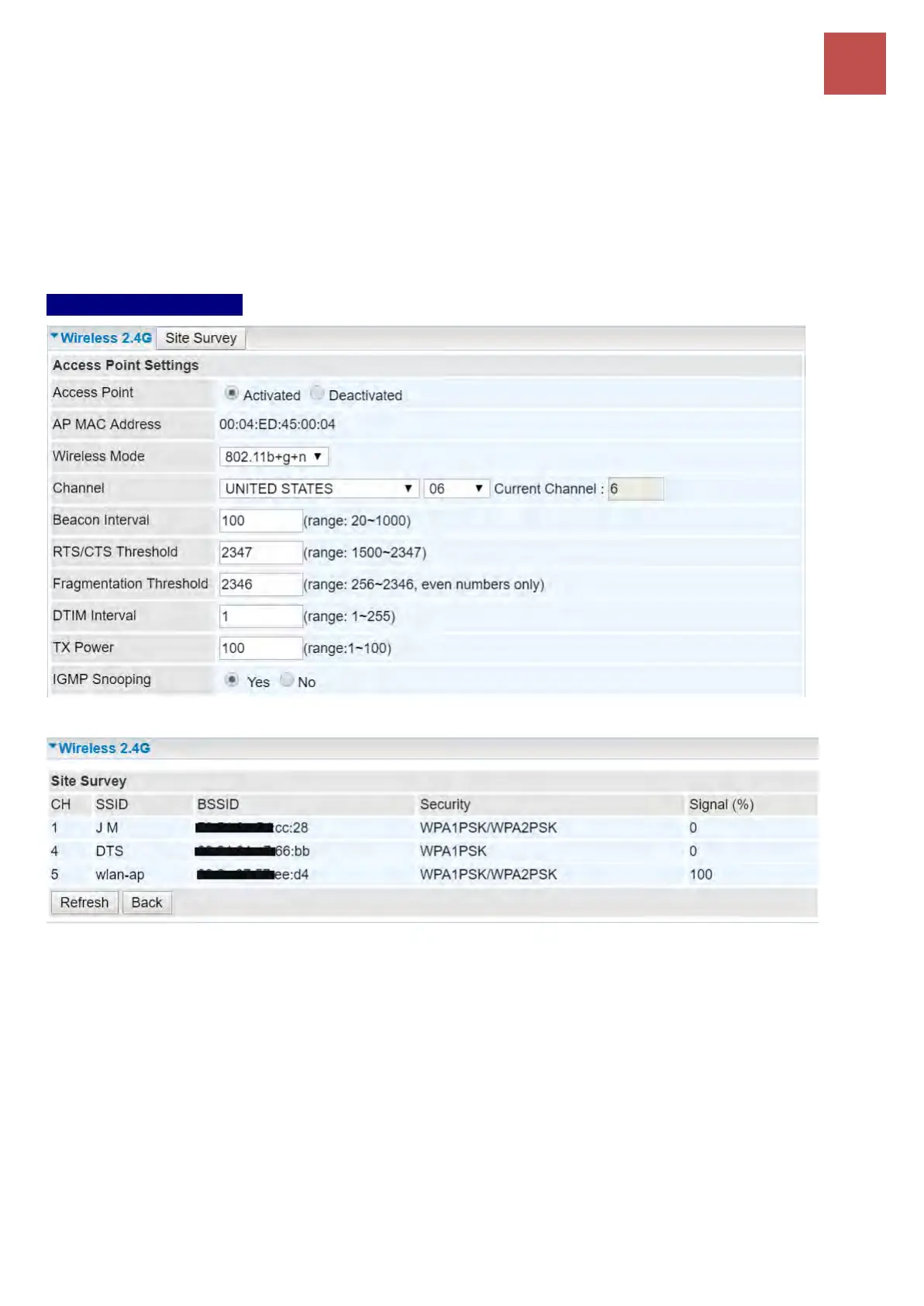
Access Point Settings
Site Survey: Click to view all other available Wireless-AP devices near the BEC 6500.
CH (Channel): Channel ID used.
SSID: The name of the wireless AP.
BSSID: The MAC address of the wireless AP.
Security: The security mode in the wireless AP.
Singal (%): Singal strength of the wireless AP. Signal incrases means the wireless AP is closer
to your BEC 6500 and may cause interferences.
Access Point: Default setting is set to Activated. If you want to close the wireless interface, select
Deactivated.
AP MAC Address: The MAC address of wireless AP.
Wireless Mode: The default setting is 802.11b+g+n (Mixed mode). If you do not know or have both
11g and 11b devices in your network, then keep the default in mixed mode. From the drop-down


 To Next Page