Device Configuration
Interface Setup – Wireless 2.4GHz & 5GHz
BEC 6500 Series User Manual
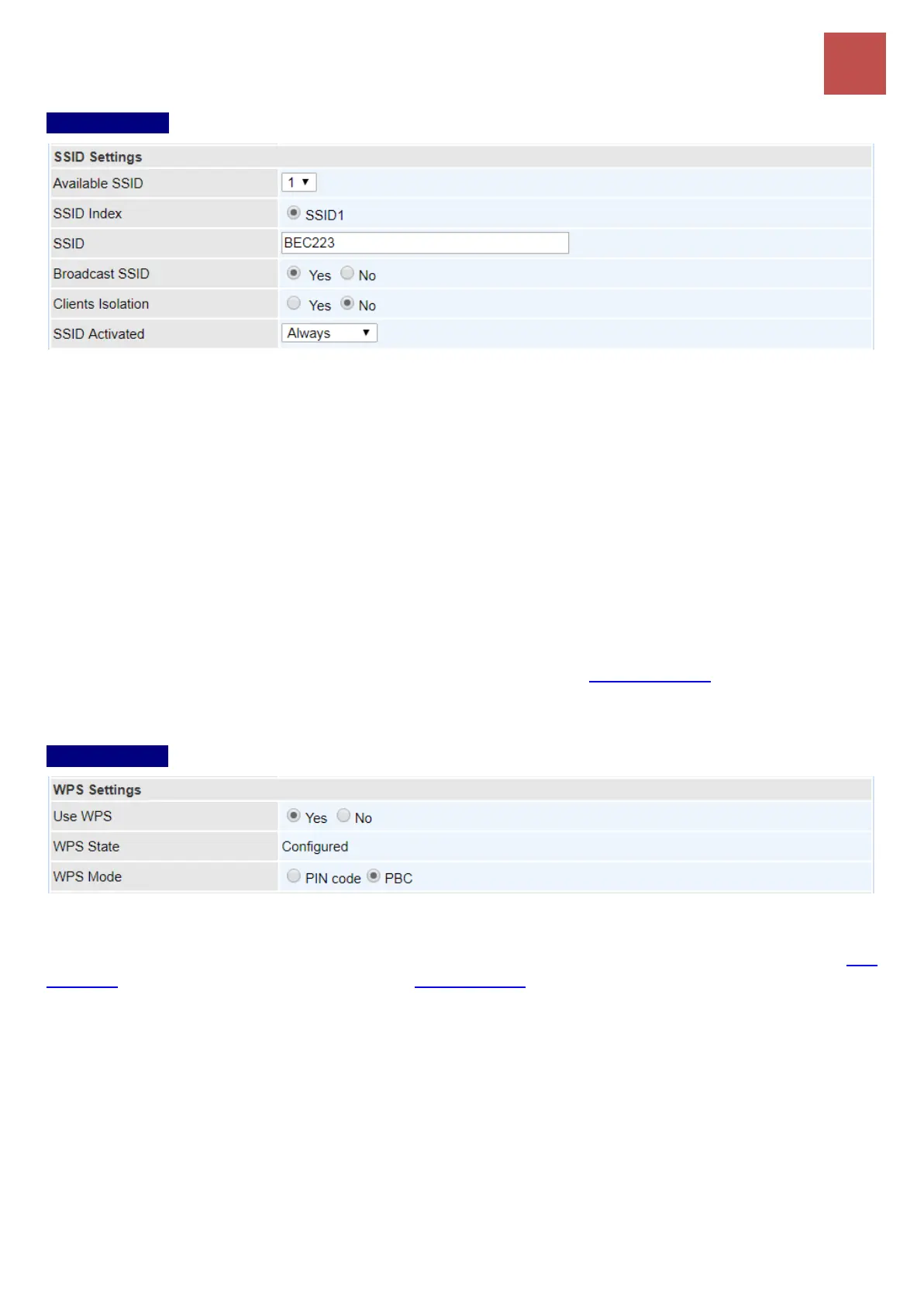
SSID Settings
Available SSID: User can determine how many virtual SSIDs to be used. Default is 1, maximum is 4.
SSID Index: Select the number of SSIDs you want to use; up to 4 SSIDs are available in the list.
SSID: The SSID is the unique name of a wireless access point (AP) to be distinguished from another.
For security propose, change the default wlan-ap to a unique ID name to the AP which is already
built-in to the router’s wireless interface. Make sure your wireless clients have exactly the SSID as the
device, in order to get connected to your network.
Broadcast SSID: Select Yes to make the SSID visible so a station can obtain the SSID through
passive scanning. Select No to hide the SSID in so a station cannot obtain the SSID through passive
scanning.
Client Isolation: (Known as AP Isolation) After enabling this feature, all Wi-Fi clients connect to the
same Access Point, in the same local wireless network, cannot interact with each another.
SSID Activated: Select the time period during which the SSID is active. Default is always which
means the SSID will be active all the time without time control. See Time Schedule to set the timeslot to
flexibly control when the SSID functions.
WPS Settings
WPS (Wi-Fi Protected Setup) feature is a standard protocol created by Wi-Fi Alliance. This feature
greatly simplifies the steps needed to create a Wi-Fi network for a residential or an office setting. WPS
supports 2 types of configuration methods which are commonly known among consumers: PIN
Method (Personal Information Number) & PBC Method (Push Button Configuration).
Use WPS: Enable this feature by choosing the ”YES” radio button.
WPS State: Display whether the WPS is configured or unconfigured.
WPS Mode: Select the mode which to start WPS, choose between PIN Code and PBC (Push Button).
Selecting Pin Code mode will require you to know the enrollee PIN code.
To future understand the two modes of configuration; please refer to the example of the Wi-Fi
Protected Setup.


 To Next Page