fr
en
de
nl
SETTING
INTERMEDIATEPOSITION,VENTILATION/REVERSE,PROGENDLIMIT
(Time/position programming)
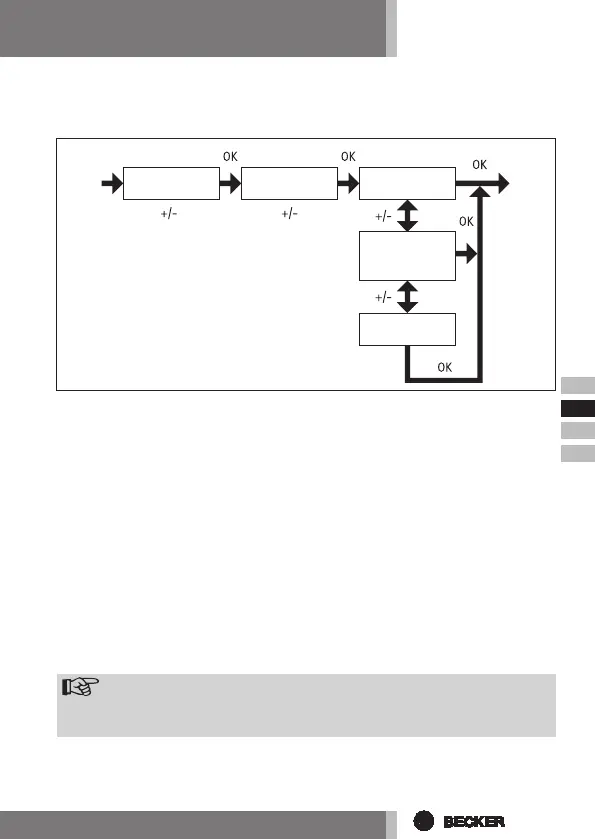
1. You have conrmed the HOLIDAY function. INTERMEDIATE POSITION ap-
pears.
2. The switching time for the INTERMEDIATE POSITION can be set using the
+/- buttons. The switching time can be set in a few seconds. Alternatively,
you can move the shutter from the upper end limit into the INTERMEDIATE
POSITION using the UP/DOWN buttons.
3. Press OK to conrm. VENTILATION/REVERSE appears.
4. The switching time for the VENTILATION/REVERSE position can be set using
the +/- buttons. The switching time can be set in a few seconds. Alternatively,
you can move the shutter from the lower end limit into the VENTILATION/
REVERSE position using the UP/DOWN buttons.
5. You have conrmed the VENTILATION/REVERSE menu option. PROG END
LIMIT appears.
6. You can choose between PROG END LIMIT, PROG INTERMEDIATE POSITION
and PROG VENTILATION/REVERSE using the +/- buttons.
Note
Thisfunctionallowsyoutoselectthepositionintowhichthecurtain/
canopywillbemovedatthepre-setswitchingtime.
7. Conrm your selection by pressing OK.
8. The PROG END LIMIT function is now set.
9.ForfurtherprogrammesettingsintheSETTINGmenu,seebelow.
INTERMEDIATE
POSITION
VENTILATION
(REVERSE)
PROG
END LIMIT
PROG
INTERMEDIATE
POSITION
PROG
VENTILATION



 To Next Page