PROGRAM
PROG1/ ASTRO EVENING WEEK (Astro evening function for week + switch-
ing time
+ blocking time )
PROG1/ ASTRO EVENING BLOCK (Astro evening function for block1/2 +
switching time
+ blocking time )
PROG1/ ASTRO EVENING INDIVIDUAL (Astro evening function for individual
+ switching time
+ blocking time )
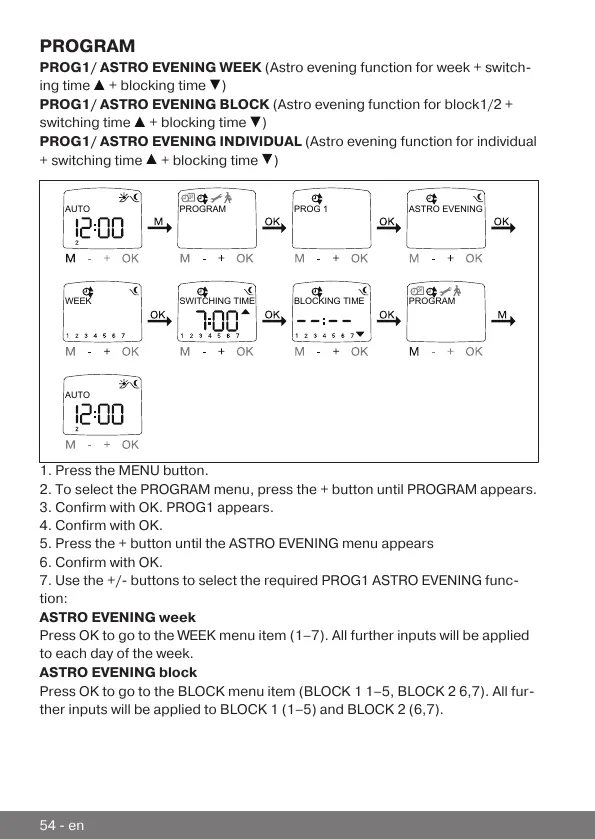
AUTO
WEEK
PROGRAM PROG 1 ASTRO EVENING
BLOCKING TIMESWITCHING TIME PROGRAM
AUTO
1. Press the MENU button.
2. To select the PROGRAM menu, press the + button until PROGRAM appears.
3. Confirm with OK. PROG1 appears.
4. Confirm with OK.
5. Press the + button until the ASTRO EVENING menu appears
6. Confirm with OK.
7. Use the +/- buttons to select the required PROG1 ASTRO EVENING func-
tion:
ASTRO EVENING week
Press OK to go to the WEEK menu item (1–7). All further inputs will be applied
to each day of the week.
ASTRO EVENING block
Press OK to go to the BLOCK menu item (BLOCK 1 1–5, BLOCK 2 6,7). All fur-
ther inputs will be applied to BLOCK 1 (1–5) and BLOCK 2 (6,7).
54-en



 To Next Page