KEY
OR
CONTROL
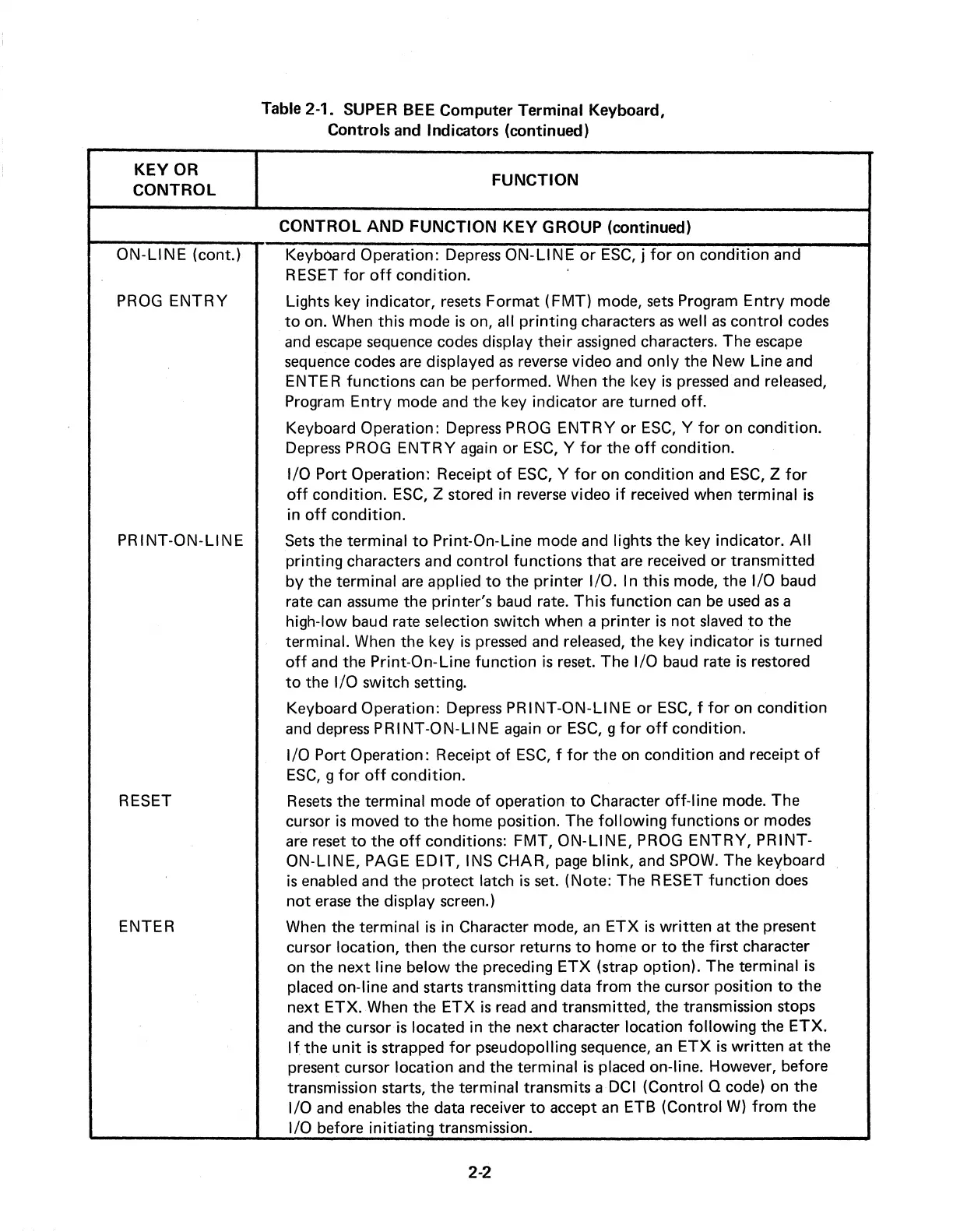
ON-LINE
(cont.)
PROG
ENTRY
PRINT-ON-LINE
RESET
ENTER
Table 2-1. SUPER BEE Computer Terminal Keyboard,
Controls and Indicators (continued)
FUNCTION
CONTROL
AND
FUNCTION
KEY
GROUP (continued)
Keyboard Operation:
Depress
ON-LINE
or
ESC,
j
for
on condition and
RESET
for
off
condition.
Lights key indicator,
resets
Format
(FMT)
mode,
sets
Program
Entry
mode
to
on. When this mode
is
on, all
printing
characters
as
well
as
control codes
and
escape
sequence codes display
their
assigned characters. The
escape
sequence codes are displayed
as
reverse
video and
only
the New Line and
ENTER functions
can
be
performed. When the key
is
pressed
and released,
Program
Entry
mode and the key indicator
are
turned
off.
Keyboard Operation: Depress PROG
ENTRY
or
ESC,
Y
for
on condition.
Depress
PROG
ENTRY
again
or
ESC,
Y
for
the
off
condition.
1/0
Port Operation: Receipt
of
ESC,
Y
for
on
condition
and
ESC,
Z
for
off
condition.
ESC,
Z stored in reverse video
if
received when terminal
is
in
off
condition.
Sets
the terminal
to
Print-On-Line mode and lights the key indicator.
All
printing characters and control functions
that
are received
or
transmitted
by
the terminal
are
applied
to
the
printer
1/0. Int.his mode, the 1/0 baud
rate
can
assume
the printer's baud rate. This
function
can
be
used
as
a
high-low baud rate selection switch when a
printer
is
not
slaved
to
the
terminal. When the key
is
pressed
and released, the key indicator
is
turned
off
and the Print-On-Line
function
is
reset. The
1/0
baud rate
is
restored
to
the
1/0
switch setting.
Keyboard Operation: Depress PRINT-ON-LINE
or
ESC,
f
for
on
condition
and depress
PRINT-ON-LINE
again
or
ESC,
g
for
off
condition.
1/0 Port Operation: Receipt
of
ESC,
f
for
the on
condition
and receipt
of
ESC,
g
for
off
condition.
Resets
the terminal mode
of
operation
to
Character off-line mode. The
cursor
is
moved
to
the
home position. The
following
functions
or
modes
are
reset
to
the
off
conditions: FMT,
ON-LINE,
PROG
ENTRY,
PRINT-
ON-LINE, PAGE
EDIT,
INS CHAR,
page
blink,
and
SPOW.
The keyboard
is
enabled and the protect latch
is
set. (Note: The RESET
function
does
not
erase
the display screen.)
When the terminal
is
in Character mode,
an
ETX
is
written
at the present
cursor location, then the cursor returns
to
home
or
to
the
first
character
on the
next
line below the preceding
ETX
(strap option). The terminal
is
placed on-line and starts transmitting data
from
the cursor position
to
the
next ETX. When the
ETX
is
read
and transmitted, the transmission stops
and the cursor
is
located in the next chara.cter location
following
the
ETX.
If
the
unit
is
strapped
for
pseudopolling sequence,
an
ETX
is
written
at
the
present cursor location and the terminal
is
placed on-line. However, before
transmission starts,
the
terminal transmits a DCI (Control Q code) on
the
1/0
and enables the data receiver
to
accept
an
ETB (Control
W)
from
the
1/0 before
initiating
transmission.
2-2



 To Next Page