2.1
INTRODUCTION
SECTION
II
OPERATION
2.2
OPERATOR
CONTROLS
AND
INDICATORS
This section provides operating instruc-
tions
for
the SUPER BEE Computer Terminal.
The operating instructions include descriptions
of
the operator controls and indicators, general
operating procedures and operating instructions.
The general operating procedures provide infor-
mation
for
operating personnel. The operation
instructions provide
information
that
allows a
programmer
to
vary the operational
format
to
the
extent
presented herein.
The operator
controls
and
indicator
are
defined in Tables
2-1
and 2-2 and
are
depicted
in Figures
2-1
and 2-2. Table
2-1
describes the
keyboard controls and indicators and Table 2-2
describes the
monitor
rear panel controls. Figure
2-1
depicts the keyboard and Figure 2-2 depicts
the
monitor
rear panel.
KEY
OR
CONTROL
F1
through
F8
FMT
(Format)
ON-LINE
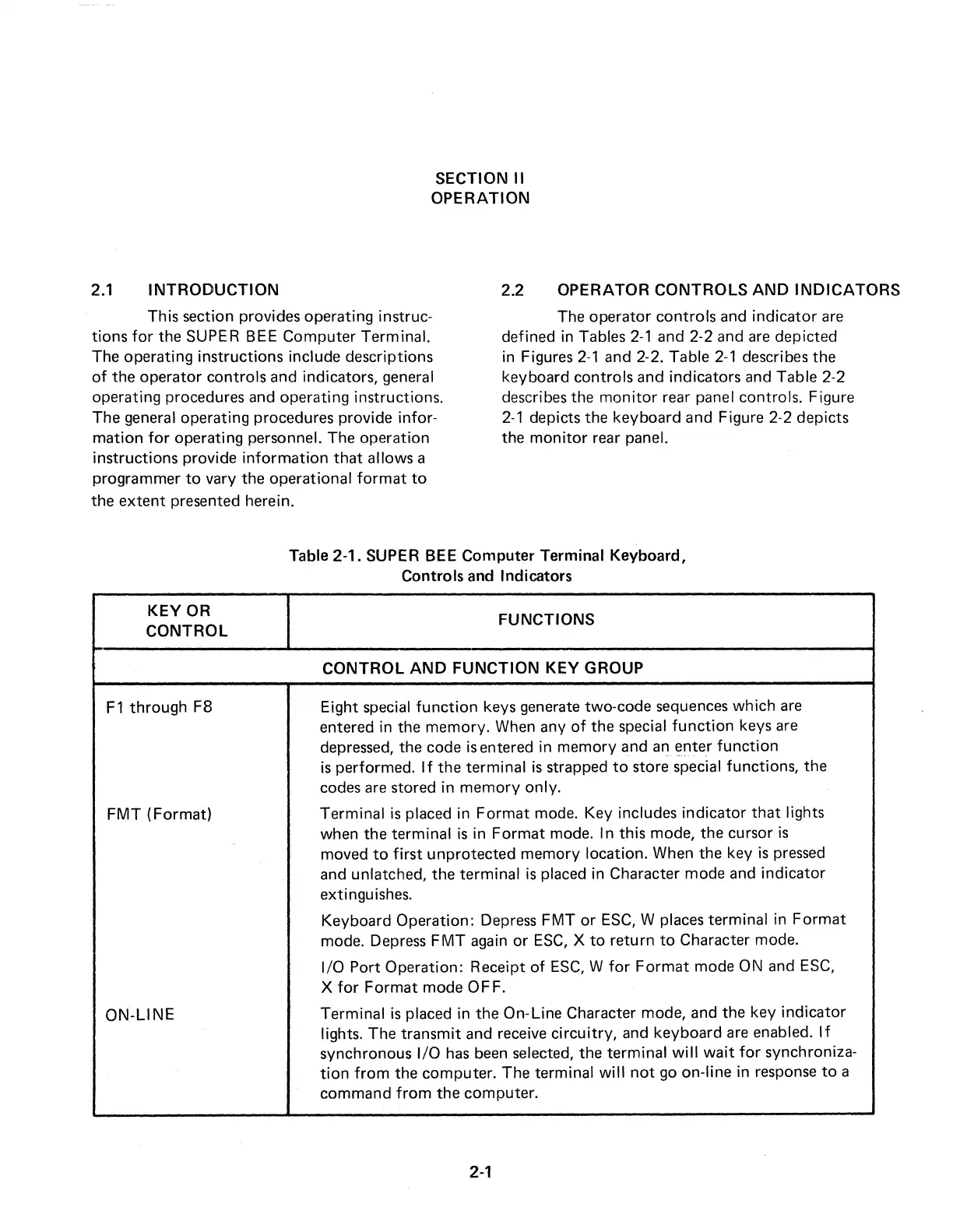
Table 2-1. SUPER BEE Computer Terminal Keyboard,
Controls and Indicators
FUNCTIONS
CONTROL
AND
FUNCTION
KEY
GROUP
Eight special
function
keys generate two-code sequences which
are
entered in the memory. When any
of
the special
function
keys
are
depressed, the code
is
entered in memory and
an
E)nter
function
is
performed.
If
the terminal
is
strapped
to
store special functions, the
codes
are
stored in
memory
only.
Terminal
is
placed in
Format
mode. Key includes indicator
that
lights
when the terminal
is
in
Format
mode. In this mode, the cursor
is
moved
to
first
unprotected memory location. When the key
is
pressed
and unlatched, the terminal
is
placed in Character mode and
indicator
ex
ti
ngu
is
hes.
Keyboard Operation: Depress
FMT
or
ESC,
W places terminal in
Format
mode. Depress
FMT
again
or
ESC,
X
to
return
to
Character mode.
1/0 Port Operation: Receipt
of
ESC,
W
for
Format
mode ON and
ESC,
X
for
Format
mode OFF.
Terminal
is
placed in the On-Line Character mode, and the key
indicator
lights. The
transmit
and receive
circuitry,
and keyboard
are
enabled.
If
synchronous 1/0
has
been
selected, the terminal
will
wait
for
synchroniza-
tion
from
the computer. The terminal
will
not
go
on-line in response
to
a
command
from
the computer.
2-1



 To Next Page