Using the product
36 / EN
Refrigerator / User manual
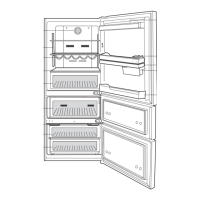
Vegetable bin Fruits and vegetables
Fresh food
compartment
Delicatessen (breakfast
food, meat products to
be consumed in short
notice)
5.11. Door open alert
(Optonal)
An audible alert will be heard if the product's
door remains open for at least 1 minute.
The audible alert will stop when the door
is closed or any button on the display (if
available) is pressed.
Door open alert is indicated to the user both
audibly and visually. Interior lighting will
turn of if the warning continues for 10 min.
5.12. Changing the opening
direction of the door
You can change the drecton of openng of
your refrgerator dependng on the locaton
where you use t. When you need ths, con-
sult the closest Authorzed Servce.
The explanaton above s a general state-
ment. You should check the warnng tag
located nsde the product package about
the changeablty of drecton of the door.
5.13. Interior light
Interior light uses a LED type lamp. Contact
the authorized service for any problems with
this lamp.
Lamp(s) used in this appliance cannot be
used for house lighting. Intended use of this
lamp is to help the user place food into the
refrigerator / freezer safely and comfortably.


 To Next Page