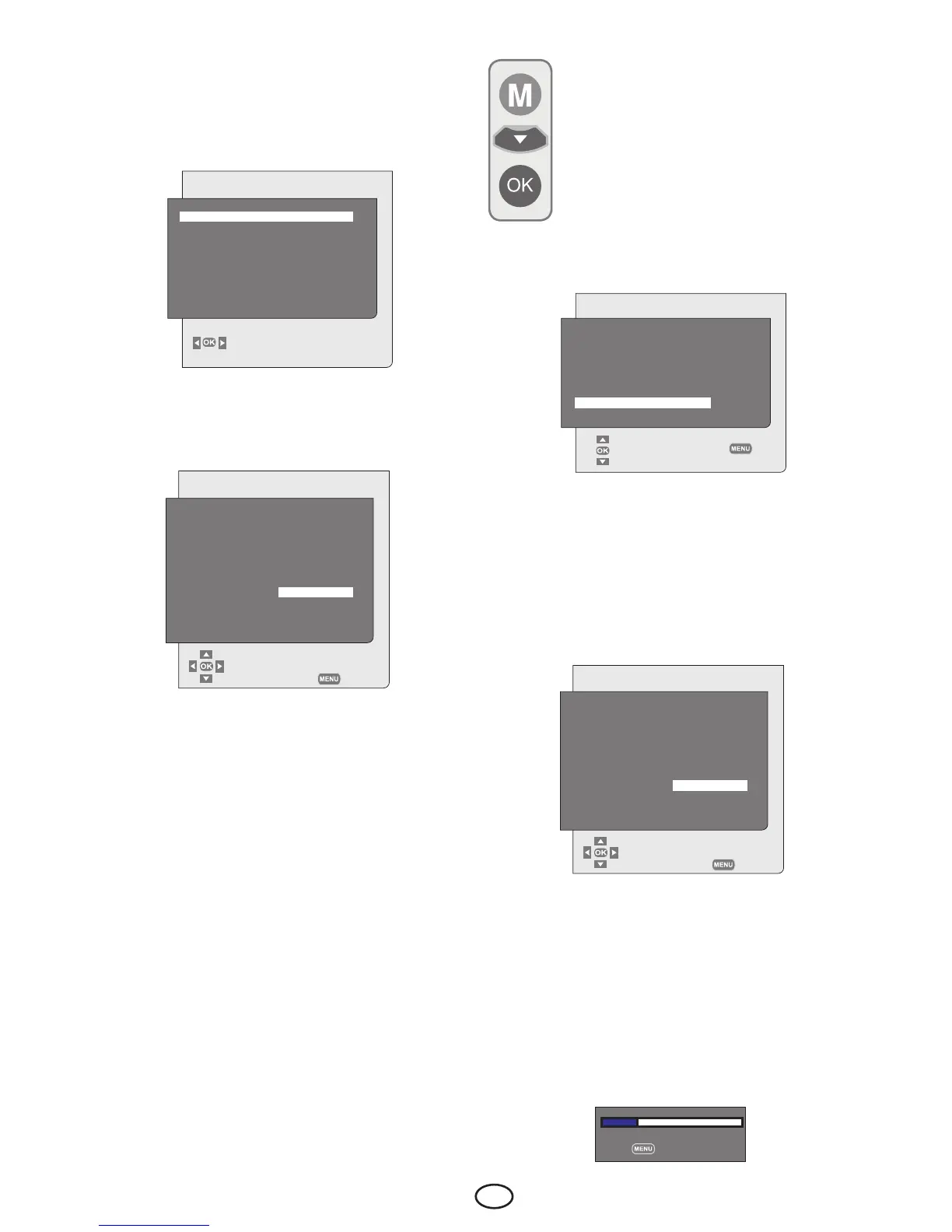
You can tune the programs
automatically with the Autoprogram
function of your television and then
sort the channels as you desire
by means of the Program Table.
Press the M button on your remote
control. Select SETUP by pressing
the down navigation button and
confirm your selection with OK button. Setup
menu is displayed.
6.2-Turning on the TV and
Setting the Channels
LANGUAGE menu will be displayed on the
screen when you turn on your television for
FEATURES
LANGUAGE ENGLISH
CHANGE
the first time. Select the language you would
like to use on your television and press OK
button to continue. COUNTRY SELECTION
menu will be displayed.
Iftheantennaconnectionsaremade
properly, select the country with Up/Down,
Left/Right navigation buttons and press
OK button to start autoprogramming. At
the same moment, the marker indicating
the progress of the autoprogramming will bi
displayed.
The Program Table, which will allow you
to sort the channels as you wish, will be
displayed after the search is complete.
6.2.1-Automatic tuning of channels
and storing in the memory
You can either tune the programs
Automatically or Manually and store them in
your television.
Note:Ifyourtelevisiondoesnotreceiveany
antenna broadcast for a period of 5 minutes,
it automatically switches to the stand-by
position. The countdown OSD is displayed
on the screen during the last 1 minute.
SETUP
SELECT
BACK
SYSTEM BG
CHANNEL S06
FINETUNE 0
SEARCH ◄►
PROGRAMNO P13
STORE
AUTOPROGRAM
COUNTRYSELECTION
BELGIUM
CZECHREP.
DANMARK
DEUTSCHLAND
ELLADA
ESPANA
FRANCE
HUNGARY
IRELAND
ITALIA
NETHERLANDS
NORGE
ÖSTERREICH
POLSKA
PORTUGAL
SCHWEIZ
SUOMI
SVERIGE
TÜRKİYE
U.K.
..........................
STARTAUTOPROGRAMMING
BACK
Select PROGRAM NO tab by pressing
the Up/Down navigation buttons in Setup
menu, enter the channel number to be
searched and stored automatically, then
select AUTOPROGRAM tab by using the
Up/Down navigation buttons and press
OK button; Country Selection menu will be
displayed.
COUNTRYSELECTION
BELGIUM
CZECHREP.
DANMARK
DEUTSCHLAND
ELLADA
ESPANA
FRANCE
HUNGARY
IRELAND
ITALIA
NETHERLANDS
NORGE
ÖSTERREICH
POLSKA
PORTUGAL
SCHWEIZ
SUOMI
SVERIGE
TÜRKİYE
U.K.
..........................
STARTAUTOPROGRAMMING
BACK
IntheCountrySelectionmenu,selectthe
country, whose broadcast you would like to
watch in priority, by pressing the Up/Down
and Right/Left navigation buttons and
start autoprogramming by pressing the OK
button. The channels will be automatically
searched and those found will be stored in
memory starting from the program selected
in the Setup menu. At the same moment,
the marker indicating the progress of the
autoprogramming will bi displayed.
SEARCHING %20
STOP



 To Next Page