5 Your new television
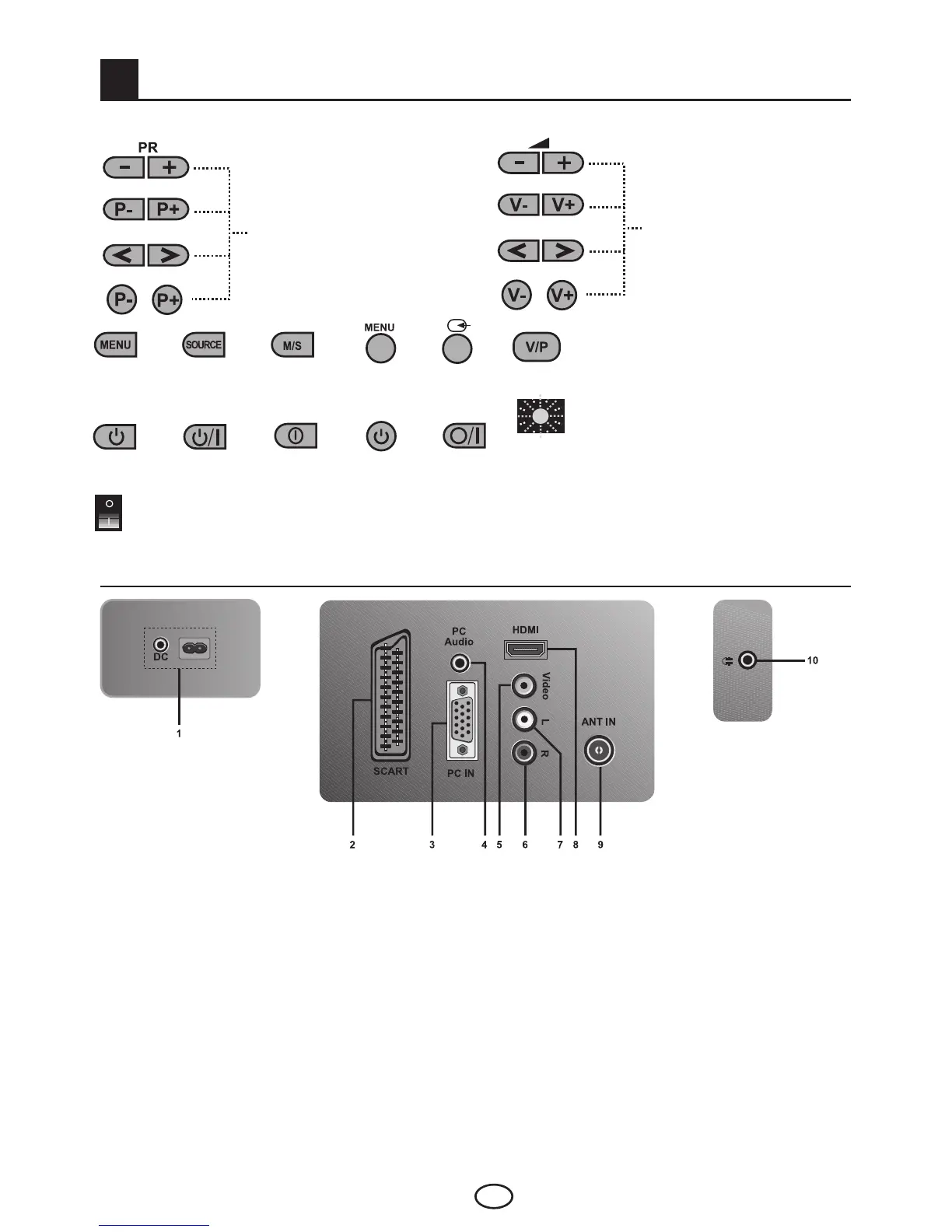
5.1-TV Control Panel
or
or
ProgrammeDown/Up
button
or
or
VolumeLevelDown/Up
button
Menubutton/Sourceselectionbutton/
Sound-Program Selection Button
or
or
or
or
Power/Standbybutton
or
or
or
Stand by indicator
Bright light: TV is in Stand-by
Dimmed light: TV is On
No light: Power Cable is not connected.
or
or
or
or
Mainpoweron/offbutton(optional)
5.2-Rear and Side External Connections
1- Power input
2-Scart/S-VHSinput
3-VGA(PC/COMBconnection)input
4-PC/COMBaudioinput
5-VideoinputCINCHconnector
6-SoundinputCINCHconnector(Right/R)
7-SoundinputCINCHconnector(Left/L)
8-HDMIinput
9-Antenna input
10-Headphone input
Important Note: DC power input is for models with an adaptor only.
Note 1:RGBinputviaScartoffersthebestpicturequality.
Note 2: Above drawing for external connections is representational. Their order and places
on your TV may be different.
Please see Technical Specifications Table on page 23 for the available external connections
on your television.



 To Next Page