- 18 -
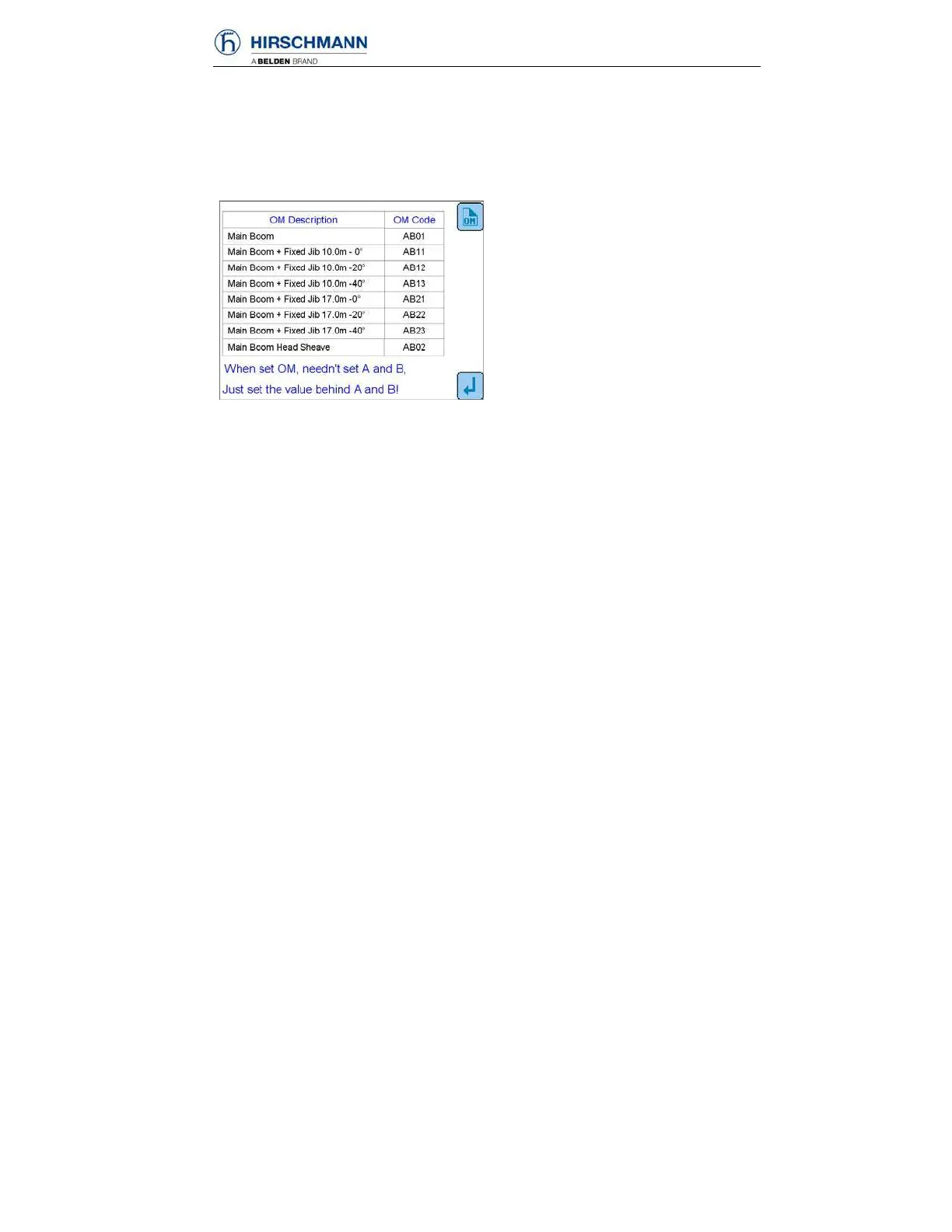
OM code query
Press numerical key 3 at the Function setup display to enter into OM code
information display
(please use the displayed actual data on console):
Operators can find OM code
information in accordance with every
different crane operating mode, which
offer great help for OM setup.
F1: Enter into OM setup display
(refer to 5.2)
F5: Back to the previous interface
OM code query interface
The OM Code is comprised of four digits – ABCD
A – Outrigger and Tire Configuration – number is automatically assigned
during OM Setup (refer to section 10 for OM List).
B – Swing Angle – number is automatically assigned based on input
from swing angle sensor.
0 – Swing angle is greater than 3° but less than 357°
1 – Swing angle is between 357° and 3°
NOTE: Number in B position will automatically change based on swing
angle.
C&D – Boom Configuration (refer to section 10 for OM List
)



 To Next Page