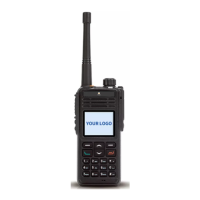
Turning the power on /off
Rotate the power switch/volume adjusting keys clockwise to turn the power on.
Rotate the power switch/volume adjusting keys anti-clockwise to turn the power off.
Adjusting the volume
After the radio is power on, you can rotate the power switch/volume adjust keys
to adjust the volume level, rotate the knob clockwise to increase the volume, or
rotate the knob anti-clockwise to decrease the volume.
Selecting a Channel
Turn the channel selector knob to select channel 1 to 16, rotate the knob
clockwise to increase the channel number, or rotate the knob anti-clockwise to
decrease the channel number, while enable all tone alert ,handover channel will
hear a channel number.
Note: If a channel is not programmed, the display appears:Un-programmed Channel
and prompt no channel, LED indicator flash red.
Selecting a Zone
The radio supports up to 32 zones, each with a maximum of 16 channels, 32
zones all support up to 512 channels. You may select a desire zone through
enter zone menu or setting zone selection function to orange button, button 1 or
button 2, then handover zone. While enable all tone alert, select zone will hear a
channel number.
Dual Modes Switching
If current channel mode is D/A compatible, press side button【AD Switch】
function to switch the channel mode. The current channel mode is digital
compatible analog , press 【AD Switch】button to switch to analog compatible
digital mode; the current channel mode is analog compatible digital, press 【AD
Switch】button to switch to digital compatible analog mode.
Note: AD Switch function only switching the channel mode temporarily, while you
restart the radio or rotate channel selector knob, the current channel will resume to
default mode.
08


 To Next Page