40
Alternate Setup Method
Setting your Internet Service Provider (ISP) Connection Type to
Point-to-Point Tunneling Protocol (PPTP)
[European countries only]
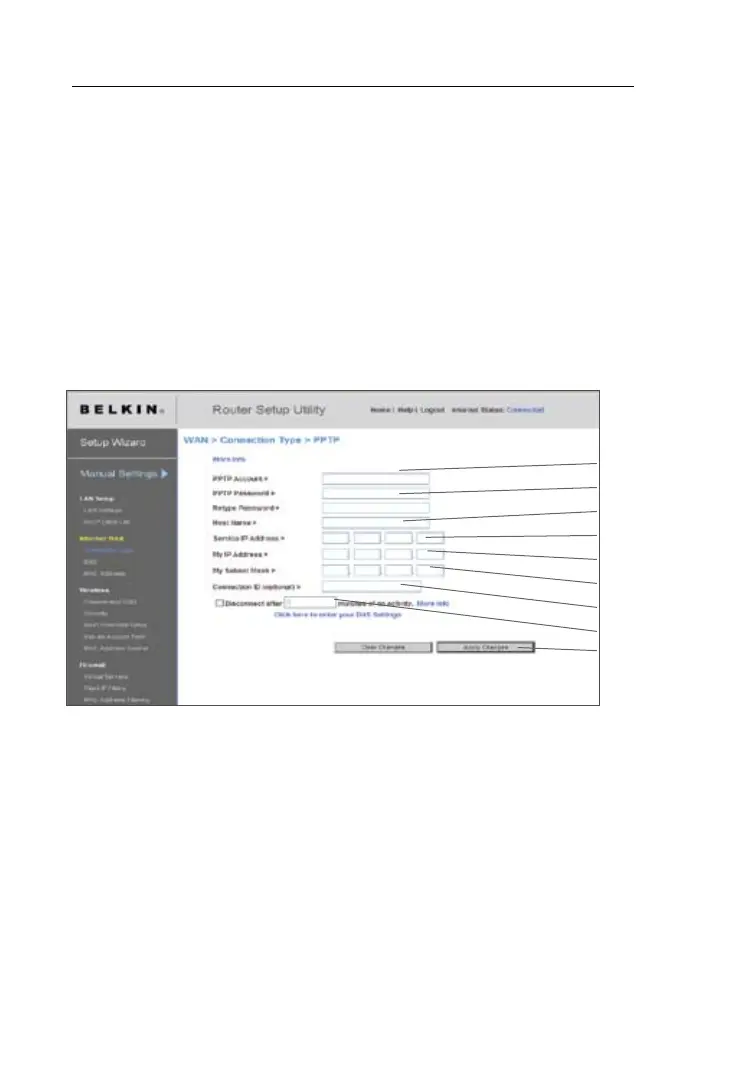
Some ISPs require a connection using PPTP protocol, a type of
connection most common in European countries. This sets up a direct
connection to the ISP’s system. Type in the information provided
by your ISP in the space provided. When you have finished, click
“Apply Changes”
(9). After you apply the changes, the Internet
Status indicator will read “connection OK” if your N1 Vision is set
up properly.
(1)
(2)
(4)
(5)
(7)
(3)
(6)
(8)
(9)
1. PPTP Account
Enter the PPTP account name that has been provided by your
ISP here.
2. PPTP Password
Type in your password and retype it into the “Retype Password”
box to confirm it.
3. Host Name
Enter the host name that has been provided by your ISP here.
4. Service IP Address
Enter the service IP address that has been provided by your ISP here.
5. My IP Address
Enter the IP address that has been provided by your ISP here.





 To Next Page