A
B
33
GETTING TO KNOW YOUR ROUTER
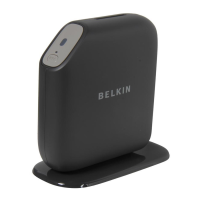
A) Router Status Light
Your Router’s status is shown by the light on the front.
Off: The Router is not plugged into a power source.
Blinking Blue: The Router is starting up.
Solid Blue: The Router is connected to the Internet.
Solid Amber: The modem is detected but the
router is not connected to the internet
Blinking Amber: The Router can’t detect the modem. Either the
modem is off, is not plugged into the Router, or is unresponsive.
B) Wi-Fi Protected Setup (WPS) Light and Button
The WPS button on the front of your Router can be used to
help establish a secure connection between your Router and
other WPS-enabled Wi-Fi devices such as computers. To use
the WPS feature on your Router, see “Getting Started > Adding
Computers to Your Network > Using the WPS Button”.
The small light near the WPS button shows what is happening
while you are using WPS to establish a connection.
Off: Idle
Blinking Blue: The Router is listening for a WPS-
enabled computer or other device.
Solid Blue: The Router has made a secure
connection with the computer or other device.
Amber: A connection was not created.
Front Panel



 To Next Page
 Loading...