 To Next PageTo Next Page
 Need help?
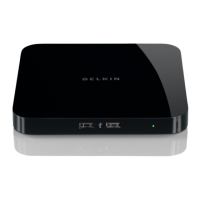
Do you have a question about the Belkin Network USB Hub and is the answer not in the manual?
Connect the AC adapter and Ethernet cable to the hub and router.
Begin software installation by inserting the CD and running the setup.
Continue Mac OS X software installation through welcome and destination screens.
Finalize software installation by clicking "Install", authenticating, and restarting.
How to connect, disconnect, and manage USB devices via the Control Center interface.
Explains the meaning of status indicators like Connected, Not Connected, and Unavailable.
Process for requesting a device currently in use by another user.
Set devices to automatically connect when the Control Center starts.
Configure a USB printer for network sharing among multiple users.
Modify general settings for the Control Center, such as startup behavior.
Access advanced network settings and firmware updates via the hub's web interface.
Information on potential compatibility issues with certain USB devices.
Importance of a stable WLAN connection for the Network USB Hub's operation.
Details on the Hub's support for a maximum of 15 device connections.
Notes on potential conflicts when using the Hub with VPN connections.
Official statements regarding the product's compliance with FCC and CE regulations.
Details the terms, coverage, and exclusions of the Belkin product warranty.
Step-by-step guide on how to contact Belkin for service or warranty claims.


 General