4
Back
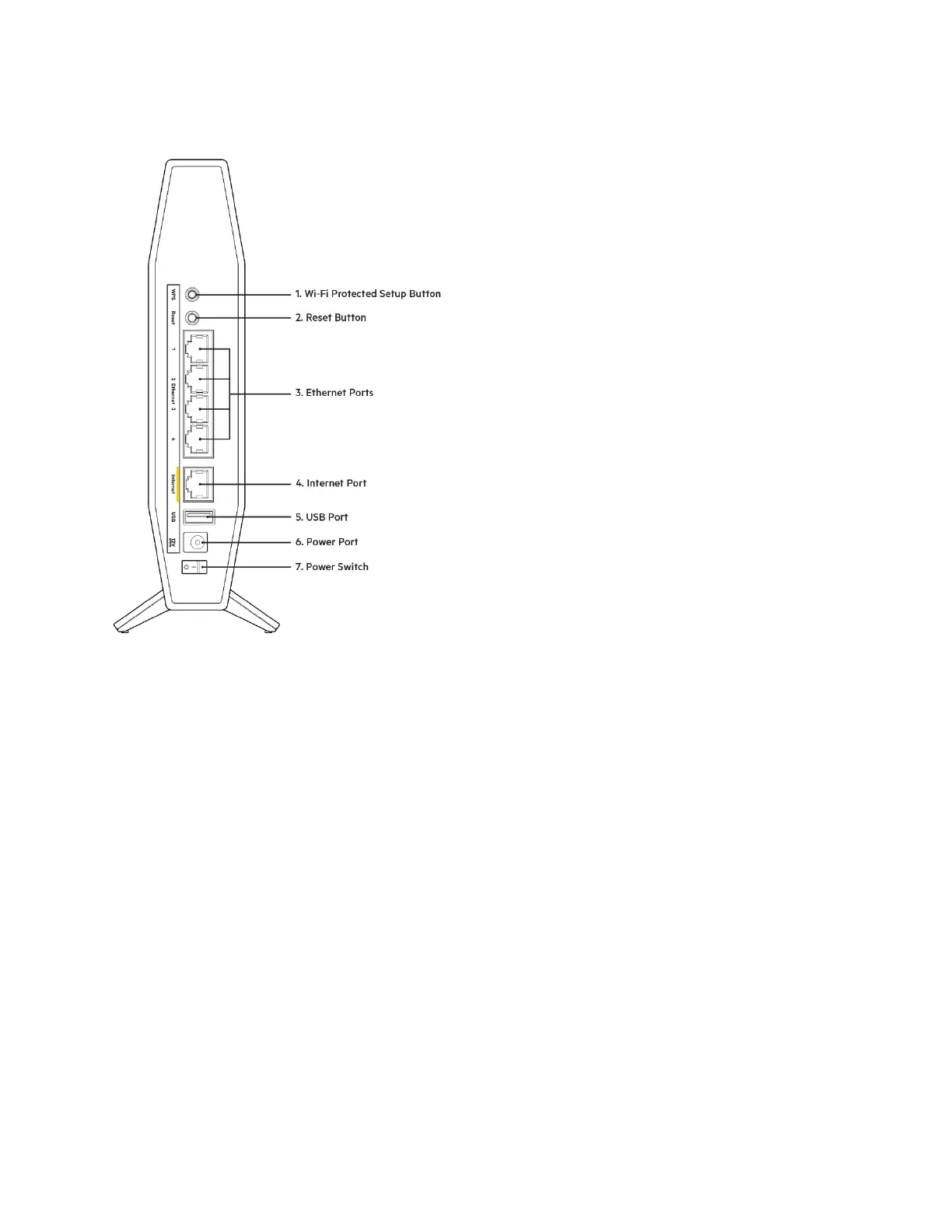
Wi-Fi Protected Setup™ (WPS) button (1)-----Press to easily configure wireless security on Wi-Fi
Protected Setup-enabled network devices. The power light on the front of the router will blink white
while WPS pairing is active.
Reset button (2)—Press and hold for until the power LED starts flashing to reset the router to
factory settings.
Ethernet ports (3)------Connect ethernet cables (also called network or internet cables) to these
gigabit ethernet (10/100/1000) ports and to other wired devices on your network.
Internet port (4)------Connect an Ethernet cable to this port and to your modem. The internet status light
on the front of the router will be white only when the router is connected to a modem that is connected
to the internet.
USB 2.0 port (5)
—
Connect and share a USB drive on your network.
Power port (6)------Connect the included AC power adapter to this port.
Power switch (7) -----Press | (ON) to turn on the router.


 To Next Page
 Loading...