13
Playback Edit Mode
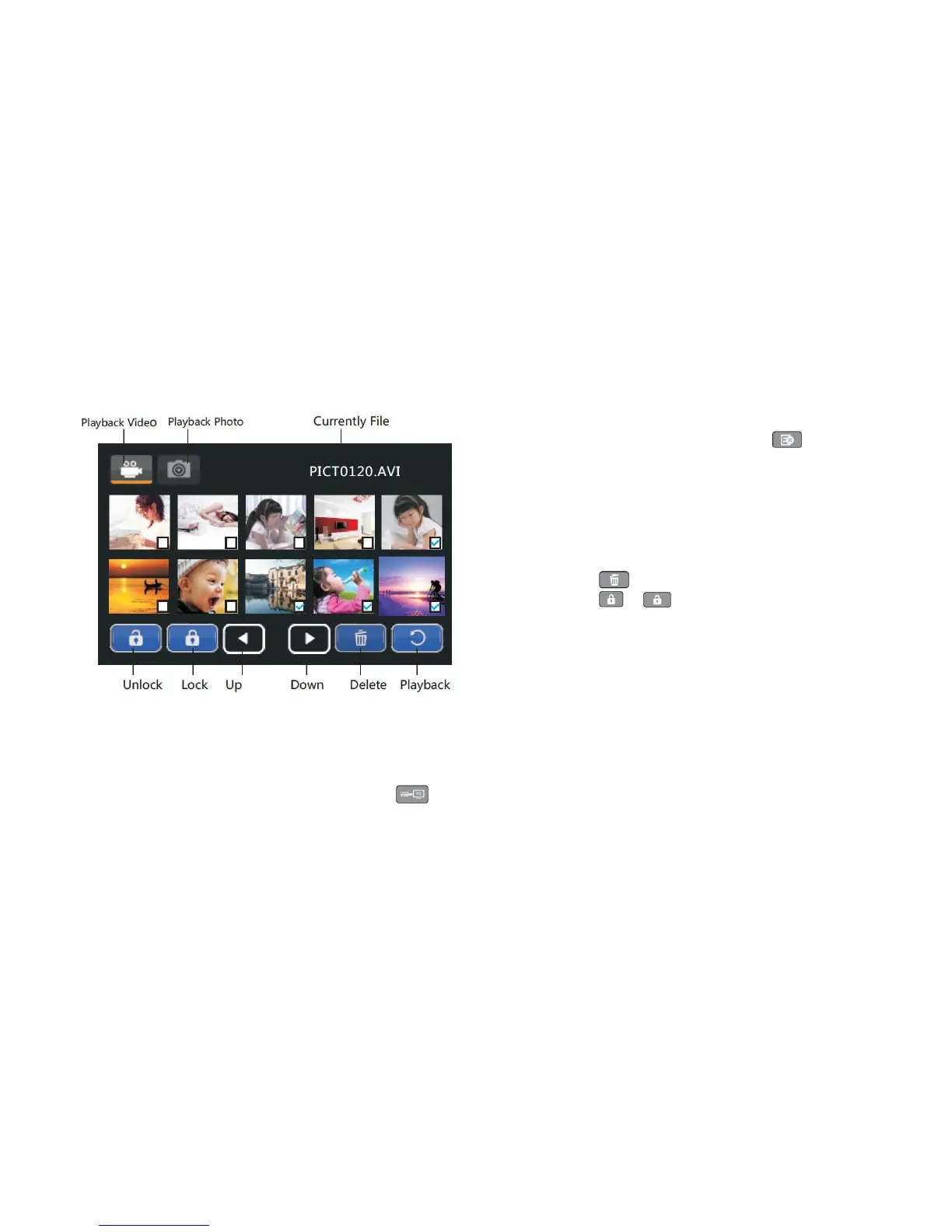
• To enter playback edit mode, press the on-screen [ ] edit
icon while in preview mode.
• Press the [UP] / [DOWN] / [ LEFT] / [RIGHT] buttons to select a
file for playback, and press the [OK] button to enter full screen display
interface.
Once a file(s) is selected, a set of touch icons will appear below the
bottom row of images.
•
Press the on-screen [ ] icon to delete the selected file(s).
•
Press the on-screen [ ] / [ ] icons to protect or unprotect the
selected file(s). This feature is to protect against accidental deletion of a
file.
•
Note: After locking, the file cannot be deleted or rotated.
Connecting to a Computer and Transferring/Copying Media
• Using the included USB cable, plug the smaller end into the camcorder's USB interface, and plug the larger plug into an available USB port on your
computer. Power the camcorder on and press the on-screen [ ] USB icon.
• Once the on-screen USB icon is selected, your computer will prompt you. Please wait a moment while your computer automatically installs the correct
drivers for your camcorder.


 To Next Page