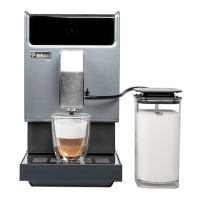
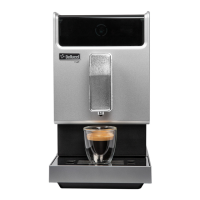
The Bellucci Slim Caffè Automatic Coffee Machine is designed for domestic use, offering a convenient way to prepare various coffee beverages. This appliance prioritizes user safety and ease of operation, with detailed instructions provided to ensure proper handling and maintenance. Users are advised to read the manual carefully before initial use and to save it for future reference. The machine is intended for preparing coffee and hot water, and misuse can lead to injury.
Function Description
The Bellucci Slim Caffè is an automatic coffee machine capable of brewing different types of coffee, including strong coffee, mild coffee, and Americano. It also features a hot water function. The machine grinds fresh coffee beans for each brew, ensuring optimal flavor. A control panel with various buttons allows users to select their desired beverage and adjust settings. The appliance includes an auto-rinsing function that activates upon startup, which can be deactivated if not needed.
Usage Features
- Setup and First Use: Before using the machine, all protective films and packing materials must be removed. The appliance should be placed on a firm, stable surface with easy access to a power supply, maintaining minimum distances from its sides. The external drip tray needs to be inserted correctly. The water tank should be filled with cold, fresh water up to the "Max" level, and the coffee bean container filled with coffee beans only. Ground coffee, instant coffee, caramelized coffee, or other objects should not be placed in the bean container, as this can damage the machine. The power cord should be unwound, straightened, and plugged into a suitable wall socket.
- Daily Operation: To start, press the power on/off button. The machine will perform an auto-rinsing cycle, dispensing a small cup of water. This can be stopped by pressing the Hot Water Button. Once in standby, a cup can be placed under the adjustable coffee spout, which can be raised or lowered to fit different cup sizes. The drip tray can also be adjusted or removed if necessary.
- Coffee Selection: Users can choose between strong coffee, mild coffee, or Americano by pressing the corresponding buttons on the control panel. The selected button will light up, along with the brewing coffee indicator and illumination under the spout, signaling that the coffee is being prepared. Brewing can be stopped by pressing the button again.
- Hot Water Function: The machine can dispense hot water by pressing the Hot Water Button. The button will light up, and the brewing coffee indicator and spout illumination will activate while the water heats. Once the lights turn off, the hot water is ready.
- Volume Adjustment: The desired volume for strong espresso, mild espresso, Americano, and hot water can be memorized, ranging from 25ml to 250ml. To do this, press and hold the desired beverage button during preparation. Release the button when the desired volume is reached; two beeps will confirm that the volume has been memorized.
- Favorite Function: This feature allows users to memorize their preferred volume for mild coffee, strong coffee, or Americano. To set it up, press and hold the favorite button for 2 seconds. The mild coffee, strong coffee, Americano, and hot water buttons will flash, allowing selection of a drink to memorize. While the drink is dispensing, press and hold the button to continue dispensing, and release to stop and memorize the volume. To use the favorite function, simply press the favorite function button, and the memorized drink will be dispensed.
- Grinding Adjustment: The fineness of the coffee grind can be adjusted to suit personal taste. This adjustment should only be made while the grinder is operating. Turning the adjuster knob in the bean container will change the grind fineness, indicated by dots on the knob. Attempting to adjust the grinder when it is not operating may cause damage.
- Mode Selection: The machine offers three operating modes: Default Setting, ECO Mode, and Speed Mode.
- ECO Mode: This mode helps save energy by turning off the illumination light, enabling pre-brewing, and setting an auto-shut off time of 10 minutes. Cup volume memory is retained.
- Speed Mode: This mode allows for faster coffee preparation by keeping the illumination light on, disabling pre-brewing, and setting an auto-shut off time of 30 minutes. Cup volume memory is retained.
- Default Setting: This is the standard mode, with the illumination light on, pre-brewing enabled, and an auto-shut off time of 20 minutes. Cup volume memory is retained.
- To change modes, press and hold the power button for 5 seconds while the machine is in standby. The Hot Water, Strong Coffee, and Mild Coffee buttons will display different indications for each setting (Lights on for ECO, Flashing for Speed, Flashing for Default). Press the corresponding button for the desired mode. Two beeps will confirm the selection. If no change is desired, press the power button again or wait 5 seconds to return to standby.
- Auto-Shut Off: The appliance is equipped with an auto-shut off feature, with timing varying based on the selected mode (10, 20, or 30 minutes).
Maintenance Features
Timely cleaning and maintenance are crucial for prolonging the life of the appliance.
- Daily Cleaning:
- Remove the external drip tray, empty it, wash with fresh water, and dry.
- Slide open the internal drip tray and the coffee grounds container. Empty the coffee grounds container, wash with fresh water, and dry. The machine will indicate when the coffee grounds container needs to be emptied.
- Pull down and remove the service door.
- Press the release knob and remove the brewer.
- Wash the brewer with fresh water and dry it.
- Reinsert the brewer into its original position and install the service door. The machine will indicate if the brewer or service door is missing or improperly installed.
- Place the coffee grounds container on the internal drip tray and insert it back into its original position. The machine will indicate if the coffee grounds container is missing.
- Place the external drip tray back into its original position.
- Descaling: The appliance will indicate when descaling is required. This function should be performed at least once a month, or more regularly depending on water hardness, to maintain optimal condition.
- Fill the water tank completely and add one pack of the included cleaning agent. Do not use vinegar or other cleaning agents, as they can damage the appliance.
- Plug in the appliance and place a large container under the coffee spout.
- In standby, press and hold the power button and strong coffee button for 5 seconds until a beep sounds and the descaling indicators flash.
- Press the strong coffee button to confirm the descaling process. To return to standby, press the power button.
- During descaling, the machine will indicate that the process is underway. Keep skin/body away from hot water.
- Once all water in the tank is dispensed, the descaling indicators will flash. Remove any remaining solution from the water tank and refill it with normal tap water to the "max" position. The descaling indicators will turn off.
- The appliance will continue the descaling process, brewing half a tank of water, pausing for about 1 minute, and then brewing the remaining water.
- The appliance will automatically switch off once descaling is complete. Patience is required to ensure the process finishes automatically.
- Empty System Function: This function is recommended before long periods of non-use, for frost protection, or before taking the machine for repair.
- In standby, press and hold the power button and mild coffee button for 5 seconds. The empty system indicator will flash.
- Remove the water tank from the appliance. The empty system indicator will light up stably, indicating the process is underway. Users can press the power button before removing the water tank to resume standby.
- The appliance will automatically switch off once the empty system function is completed.
- After performing this function, press the hot water button until water comes out of the spout when reusing the coffee maker.
- Manual Rinsing: A manual rinsing cycle can be performed to clean the coffee spout after use or if the appliance has not been used for a long time.
- In standby, press and hold the power button and hot water button together.
- The hot water, strong coffee, and mild coffee buttons will turn off. The coffee spout will then dispense a small amount of water for rinsing.
- Water from the spout is hot and collects in the drip tray; avoid contact with splashes.
- After rinsing, the appliance will return to standby.
- Cleaning the Appliance:
- Disconnect the power cord.
- Pour away all water from the internal and external drip trays.
- Use a damped cloth or non-scratching cleaner to clean water stains on the appliance. Do not use abrasive, vinegar, or descaling agents not included in the box.
- Cleaning Coffee Powder Outlet: Coffee powder may accumulate in the outlet over time.
- Push the service door recess area and take out the service door.
- Press the release knob of the brewer and take it out.
- Use the provided cleanness brush to clean the powder outlet.


 To Next Page
 General