
 Need help?
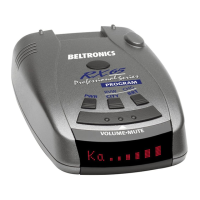
Do you have a question about the Beltronics XR70 and is the answer not in the manual?
Connects the device to the vehicle's power source and provides mounting guidance.
Covers power button, volume adjustment, and display indications.
Explains voice alerts, AutoMute, Mute button, and mode selection.
Details on adjusting display brightness and using Dark Mode.
Explains alert tones for radar/laser and the device's power jack.
Details on the LED display for signal strength and frequency.
Step-by-step guide for accessing and changing device settings.
Details on the 7 user-selectable options for customization.
Customizing what is displayed when the device powers on.
Settings for voice announcements and startup sequence.
Configuration for signal display and automatic volume reduction.
Adjusting sensitivity modes and enabling/disabling radar bands.
Lists operating bands, receiver type, and power requirements.
Details on sensitivity modes and auto-calibration circuitry.
Physical size of the device and its patented technologies.
Guidance on understanding different alert patterns and their meanings.
Explanation of the principles behind radar and laser speed detection.
Information on the Safety Warning System and its messages.
Solutions for common problems like false alerts or sensitivity issues.
Describes various codes and messages shown on the device display.
Steps to follow if the device requires service or repair.
Information on registering the product online or via mail.
Details of the warranty coverage and terms for the device.
List of optional accessories and replacement parts for the XR70.
 General
| Brand | Beltronics |
|---|---|
| Model | XR70 |
| Category | Radar Detector |
| Language | English |







 To Next Page