30
15- JACKPOT MAXIMUM
Limit-value for the common Jackpot. (Note: each unit represents one ticket)
Credits after this value is reached won’t increment it further.
Value Range: 100 – 9999 Default: 9999
16- RESET TOTAL COINS
Total amount of coins in game.
Hit ‘Enter’ to take this back to zero (you will be prompted for confirmation).
17- RESET TOTAL TICKETS
Total amount of tickets dispensed. Separate Ticket total allows estimation of Ticket Dispenser service schedule.
Hit ‘Enter’ to take this back to zero (you will be prompted for confirmation).
- EXIT
Back to normal game operation, game-play will resume.
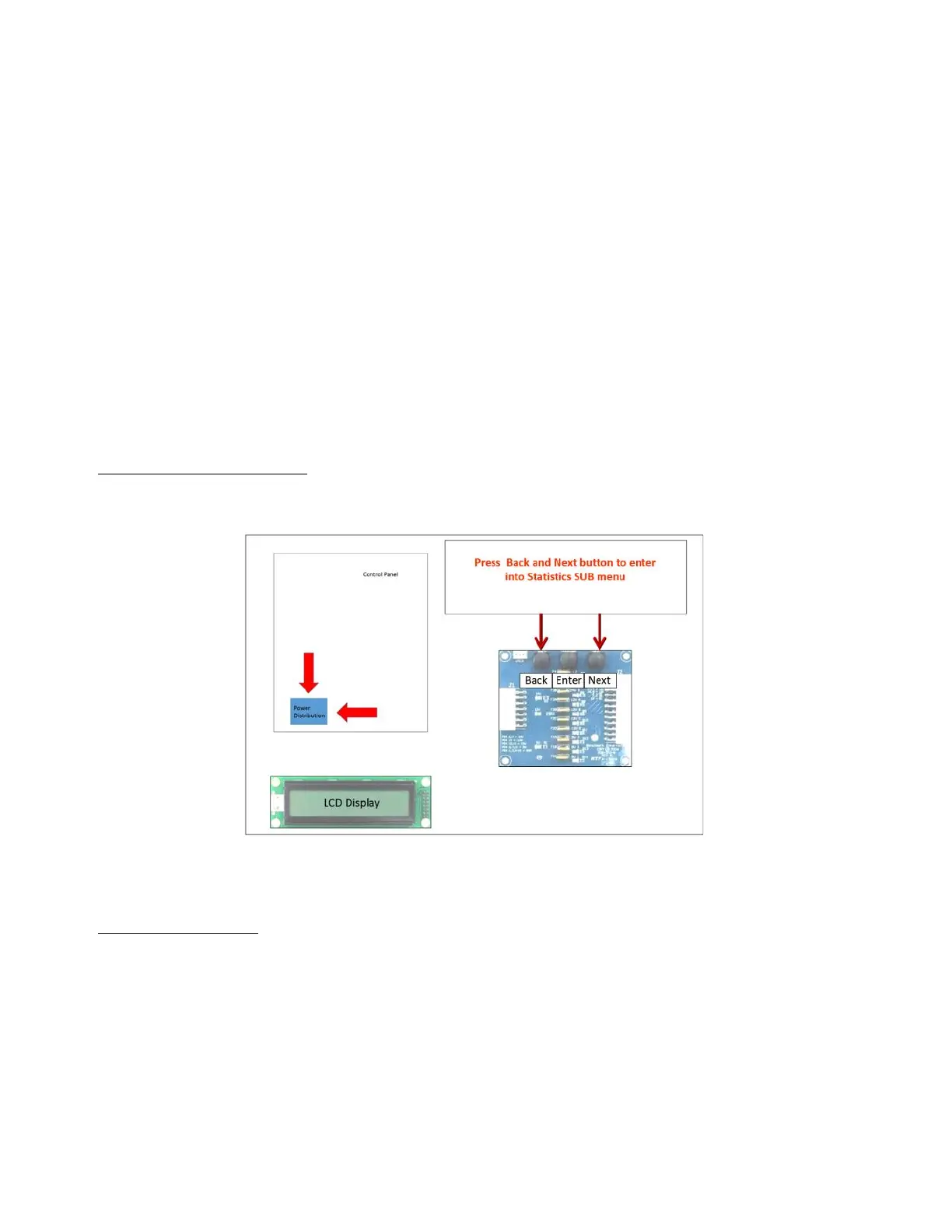
Entering Statistics SUB MENU
To enter statistics SUB menu mode, press the back and next button, simultaneously, on the Power
Distribution Board, by reaching down to the board in the Control Panel, on the right, as shown in figure.
The LCD screen will then begin to show the statistics as follows:
STATISTICS SUB MENU
- 0 TARGETS HIT
How many times target “0” has been hit
Hit ‘Enter’ to take this back to zero (you will be prompted for confirmation).
- 1 TARGETS HIT
How many times target “1” has been hit
Hit ‘Enter’ to take this back to zero (you will be prompted for confirmation).



 To Next Page