Need help?
Do you have a question about the Benchmark Games BLASTER and is the answer not in the manual?
Describes the 10-second sequence of events when the game is powered on.
Details the light patterns and background sounds displayed when the game is idle.
Explains how to insert coins, bills, or use card swipe systems to add credits.
Describes the game state when a player starts playing, including sounds and displays.
Details the sequence of events when a player presses the shoot button.
Explains the conditions for entering the bonus round and gameplay within it.
Describes what happens after a game concludes, including credit handling and mode return.
Provides instructions for unpacking and assembling the game machine.
Instructions for configuring the coin comparator to accept specific tokens or coins.
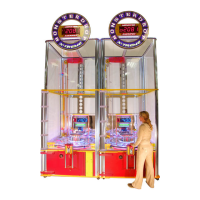
Guidelines for positioning two Blaster games side-by-side for competitive play.
Instructions for positioning the game header between two linked Blaster units.
Details the cable connections required for linking multiple Blaster units.
Steps for integrating Blaster units acquired at different times.
Details the different types of IO-Expander boards used in the game.
Procedure for synchronizing Zigbee boards by setting their frequency channels.
Explains the 485 serial network used for communication between circuit boards.
Accesses a sub-menu to view game statistics and data.
Allows modification of the programming mode entry password.
Adjusts the brightness and contrast of the LCD screen for readability.
Controls background music and event volume when the player has credits.
Adjusts background music volume when the game is in attract mode.
Sets volume for music and events during bonus rounds or jackpots.
Defines the duration of the attraction sequence before gameplay starts.
Sets the number of coin-mech pulses required to add one credit.
Configures the number of shots a player receives per game.
Determines how redemption tickets are rewarded (tickets or cards).
Enables communication between up to three Blasters for a common jackpot.
Selects from four predefined payout tables based on credit value.
Sets the amount the common jackpot increases with each coin added.
Sets the initial value for the common jackpot after it's awarded.
Sets the upper limit for the common jackpot value.
Resets the total count of coins collected in the game.
Resets the total count of tickets dispensed by the machine.
Returns the game to normal operation from the programming menu.
Shows how many times each target (0 through 11) has been hit.
Shows bonus round target hit counts for targets 0 through 3.
Displays the total number of jackpots awarded during the game's operation.
Shows the number of credits currently available on the machine.
Indicates tickets due from the Ticket Dispenser, stopping it if reset.
Displays the last five game results with symbols for blank entries, tickets, or jackpots.
Navigates back to the main list of options from the statistics menu.
Instructions for replacing coin-mech with card swipe for credits or e-tickets.
General approach to isolating faults by checking input, process, and output.
Steps to resolve communication errors with the IO Expander board.
Steps to resolve communication errors with the Sound board.
Procedure for resolving ticket dispenser issues like empty tickets or jams.
Steps to resolve communication errors with the Quad Stepper board.
Steps to resolve router communication errors when games are linked.
Steps to resolve errors related to the SD card on the Router board.
Detailed exploded view and parts list for the target assembly.
Detailed exploded view and parts list for the playfield assembly.
 General
| Brand | Benchmark Games |
|---|---|
| Model | BLASTER |
| Category | Arcade Game Machines |
| Language | English |

 To Next Page