26
5-Technical Operation
Inter-Board Communication: 485 Serial pair
The Circuit Boards communicate with each other using a 485
differential wire-pair network, using the SNAP software protocol
layer.
- On this machine, this wire pair has colors Blue and Gray.
- The Main CPU Board acts as the master, initiating commands and
receiving responses from the slave boards.
- Like-boards differentiate from each other by means of an ID-Switch
setting.
See the following pages to find each board’s ID-Switch location and
setting.
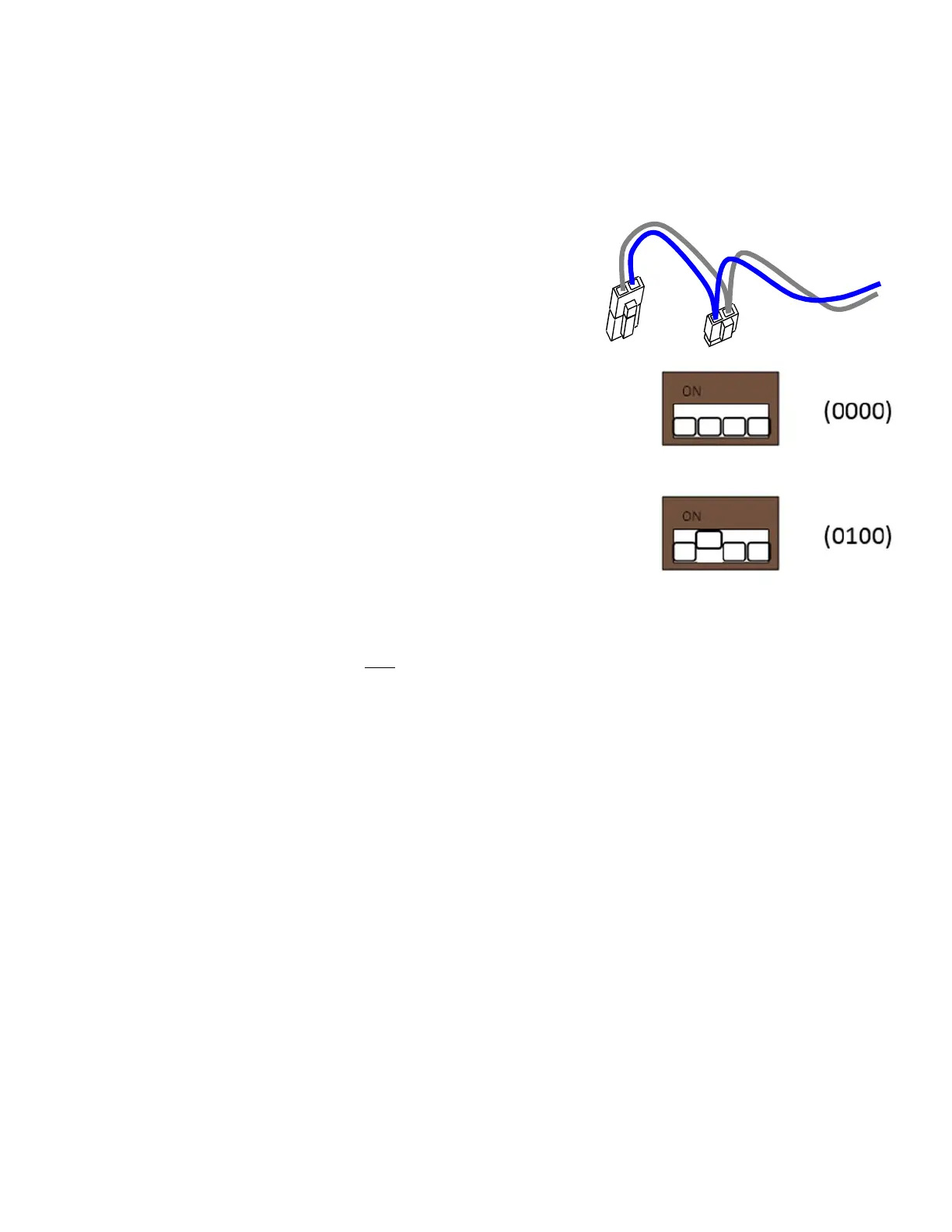
Note that we indicate the required on-off state of each micro
switch in the previous pages with 1’s and 0’s, respectively.
- The following PCB boards are NOT connected to the 485 network:
The Power distribution board.
The Ticket Dispensers
Mini High Current Board
-Note that the 485 network wire-pair chain jumps from board to board:
The Marquee IO-expander is not connected by a physical 485 wire, but operates using a
Zigbee board, which communicates with the Main-CPU board.
In some places the chaining is done by double-crimps at the connector (these are usually 2-
pin connectors)
In other places, PCB traces on the board itself carry the chain from a pair of connector pins to
the next (usually a four-pin connector); thus, disconnecting such a board’s 485 might actually
disconnect the rest of the 485 chain. Keep this in mind when troubleshooting or replacing
parts.


 To Next Page