6
II- Attract Mode
- Various light patterns are shown while some background sound plays on.
*Note: that, there is a low-activity rest period (which is programmable). See section 6-
programming options, before these sequences are re-triggered, to avoid being too repetitive.
III- Adding money (Coin-Mech/Bill Acceptor/Card-swipe system)
- “Coin-in” or “bill-in” sound is heard on corresponding speaker.
- When enough money is added to buy credit(s), the current credits value will be shown on the
four-digit display, and the game will enter Play-Mode.
IV- Play Mode
- Play-mode start sound “GO”
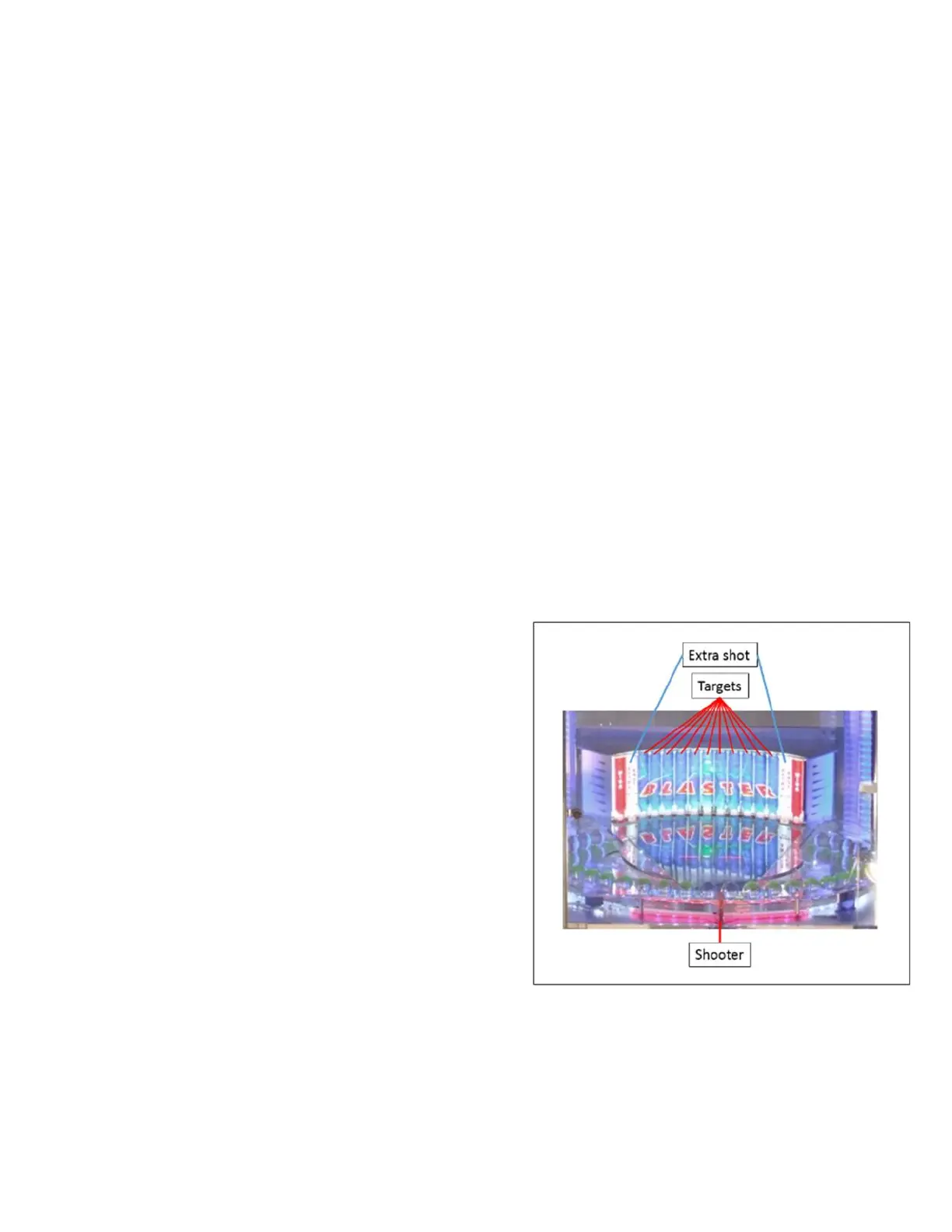
- The Play-field lights behind targets go solid and 2-digit display reads shot chances.
V- Player hits button
- Credit will be decreased.
- Player gets a predetermined amount of shot
chances as displayed on playfield.
- Pressing the shoot button will release the
shooter, hitting an acrylic ball on the spinning
platform and reduce the ball count by one until all
shots are used.
- The ball travels up the ramp and hits a lit target.
- When target is hit by ball, the light will turn off,
and remain off for the remainder of the player’s
paid play.
- Tickets will be dispensed at the end of the game.
- *Note: If shoot button is pushed and the target ball is not in designated area of shooter, Blaster
will make a “buzzer” noise and a shot will not be taken. This will not affect the shot chances for
the round.


 To Next Page