Instruction Manual for LA4 with 1.0.X Firmware – REV A Page 10
Remote Control
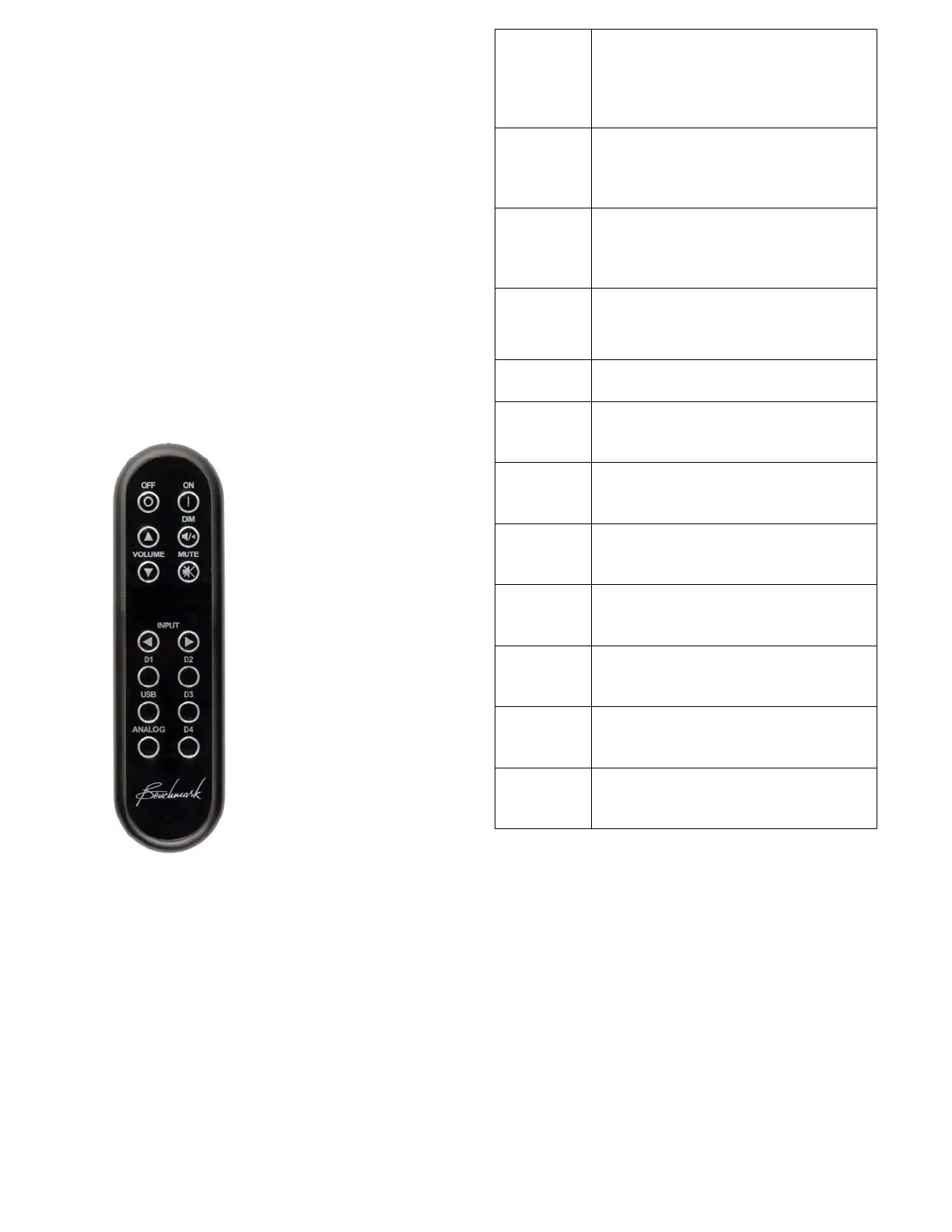
The remote control is designed to control the
LA4 and any Benchmark D/A converter that
supports remote control.
The bottom six input selection buttons select
the DAC inputs if the DAC MODE is enabled
(on the REMOTE setup screen).
The LA4 inputs are controlled with the
INPUT ARROWS.
The chart at the right summarizes the
functions of the IR remote control.
Turns the LA4 on. Any devices
slaved to the 12V TRIGGER will
also turn on in a controlled
Turns the unit off. Any devices
slaved to the 12V TRIGGER will
turn off in a controlled sequence.
ARROWS
Turns the volume up or down.
Volume up cancels MUTE and
DIM
Toggles the -20 dB audio DIM
function.
Toggles the MUTE function.
Scrolls through the enabled
inputs on the LA4.
Selects input D1 on Benchmark
DAC if connected.
Selects input D2 on Benchmark
DAC if connected.
Selects input D3 on Benchmark
DAC if connected.
Selects input D4 on Benchmark
DAC if connected.
Selects USB input on Benchmark
DAC if connected.
Selects analog input(s) on
Benchmark DAC if connected.



 To Next Page