MAIN MENU: ACCESSORIES 59
Beeping sounds
In case you try to do an illegal action, such as con-
tinue writing the note when there is no space left,
or press a key that does not match to the keystroke
sequence entered, the T9 will beep and ignore the
action.
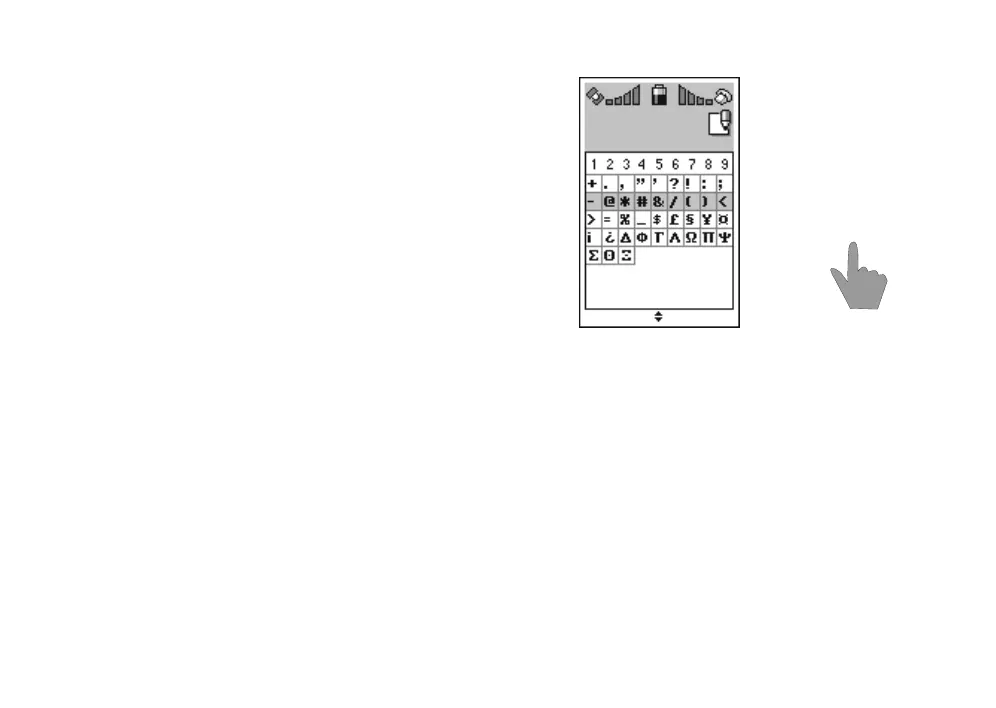
Adding special characters
By pressing and holding 0 for a few seconds, a
wide selection of special characters is made avail-
able to you.
Select a row with
n and press the numeric key
which corresponds to the desired character.
For example, when you wish to add the & character
into text, first press and hold
0 for a few seconds.
Then scroll to the second row by pressing
n and
press
5.
When the key has been pressed, you will automat-
ically return to the text you are writing at the mo-
ment.
Making final corrections
You can scroll through your note by pressing n. To
change a word, move the cursor to the right side of
the incorrect word and press
. CLEAR.
Write the word once again. You can also switch
into the spelling mode (by pressing
1).
QUIT
Notepad
n
1
2
3
46
7
8
9
5



 To Next Page