MAIN MENU: ACCESSORIES 65
•The &, M, and z can alternatively be keyed in
by subsequent presses of the
+ key. Similarly, _
and # can be keyed in with §.
•A decimal point can also be keyed in by pressing
and holding the
0 key.
•By pressing
. CLEAR you can correct any incor-
rect numbers and symbols you may have keyed
in.
The maximum size of a number is 8 digits. When
using a decimal point, the amount of digits will be
7 plus the decimal point (for example: 123456.7).
In case you try to key in an illegal mathematical ex-
pression (for example 5/0), the text
Error is dis-
played.
The accuracy of the calculation is up to 6-digits.
When needed, the result will be displayed with the
exponent (for example: the result 1234567 is dis-
played as 1.23457E6).
An example of the percent calculation
50.2+50-6%=94.188
1. Enter the number 50.2 by pressing the numeric
keys. Press and hold
0 to get the decimal
point.
2. Select the desired operator (
&) with n and
press
- SELECT. The chosen operator appears
on the display.
3. Enter the number 50 by pressing
50.
4. Select the desired operator (
_) with n and
press
- SELECT.
5. Enter the number 6 by pressing
6.
6. Select the desired operator (
z) with n and
press
- SELECT.
7. Select the equal sign (
=). Press - SELECT to
get the result.
Calculation can be continued from the last result.
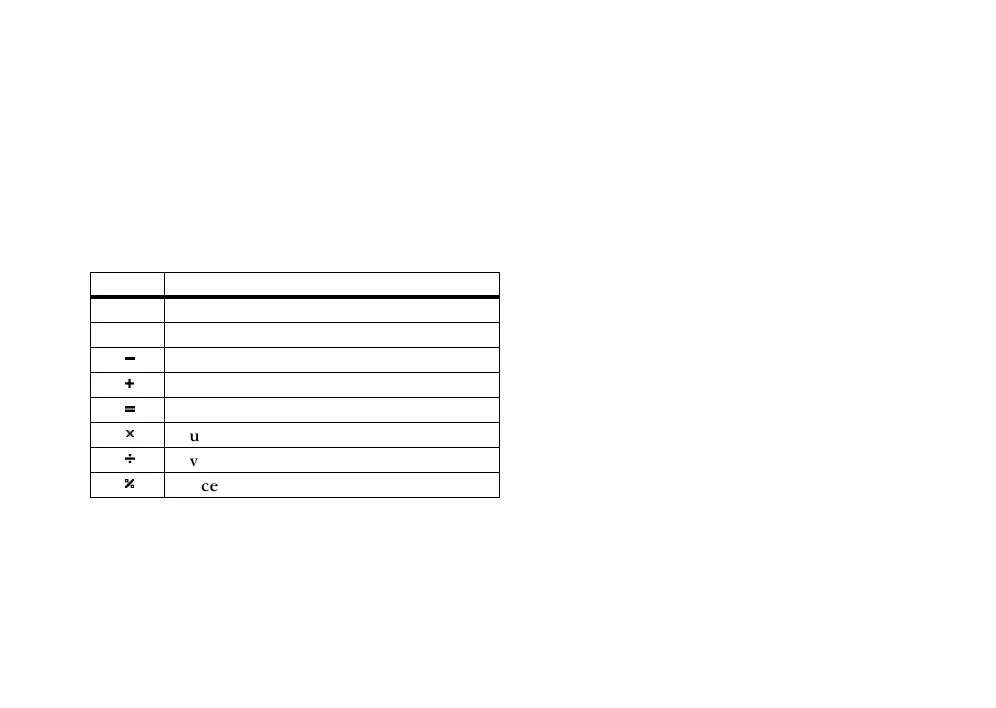
sign function
(
resets the display
.
decimal point
_
subtraction
&
addition
=
gives result
M
multiplication
#
division
}
percent



 To Next Page