SJ-PM-TFmini Plus-T-01 A01
Benewake (Beijing) Co. Ltd.
Page15
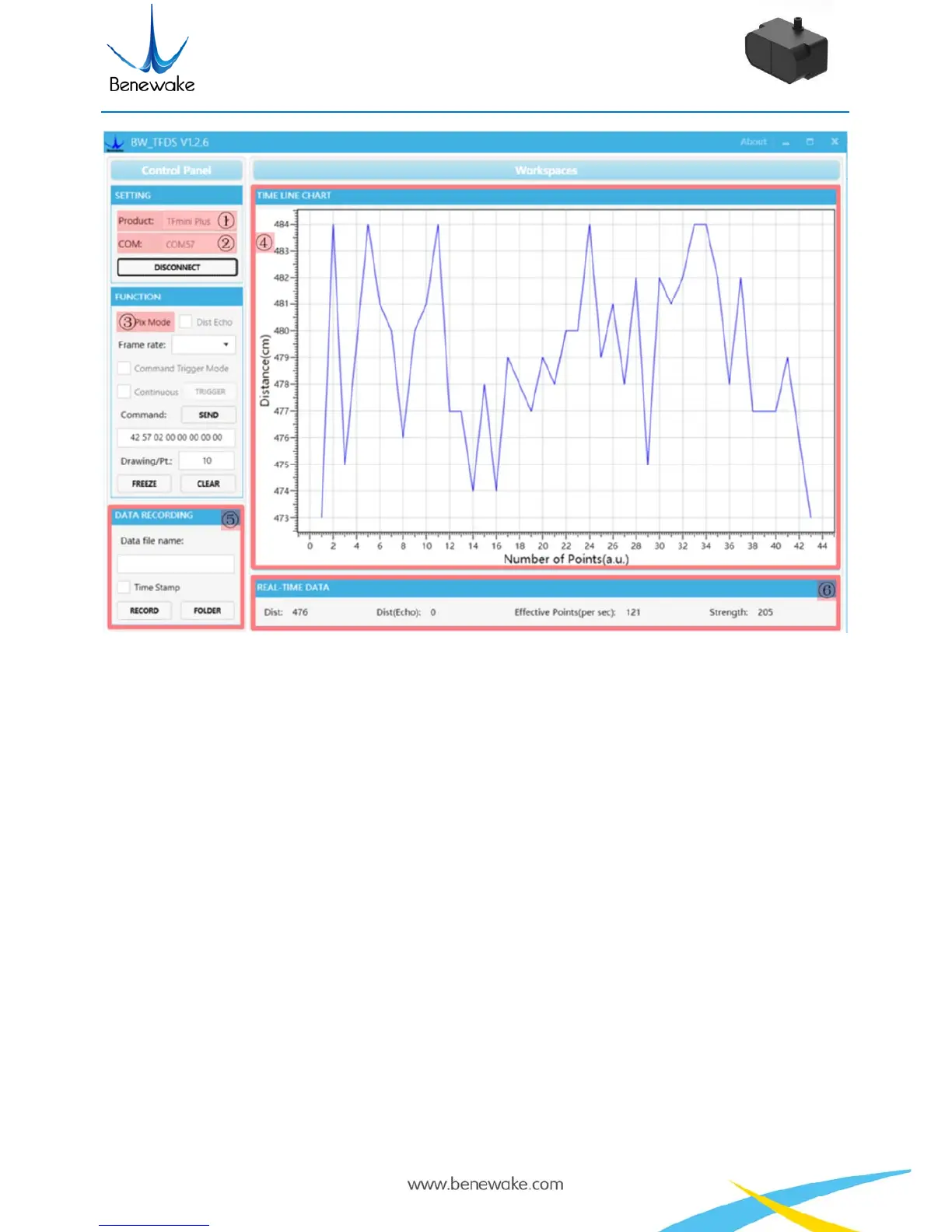
Figure 6 PC software Interface and Display
Notes:
a) If no data is available in area “④TIME LINE CHART”, please check the line connection and
line sequence. When TFmini Plus is successfully powered on, there will be a red indicator light
inside transmitting lens viewing from the front.
b) If the user want the TFmini Plus output in the Pixhawk format, please select “③Pix Mode” at
first, otherwise area “④TIME LINE CHART” will not output the right data image normally.
After Pix Mode is checked, the unit of distance will be changed into m automatically.
c) The value of distance output Dist may vary with the output unit, which is cm by default. If the
unit of distance is changed to the unit-mm with specific command, and the PC software will be
unable to identify it, and so the unit of “④TIME LINE CHART” will still be cm. For example,
the actual TFmini Plus measurement is 1m, the distance value of TFmini Plus is 1000 in mm, the
value read by the PC software also is 1000, but the unit will not change and still display cm.


 To Next Page