01/ 2019
BENNING PV 3
11
5.4 Activating/deactivating the radio transmission of the BENNING SUN 2
+
To activate/deactivate the radio transmission, press and hold
the -key of the BENNING SUN 2 and simultaneously press
the -key.
A flashing triangle above the -key shows that the radio
transmission has been enabled.
Note:
The automatic switch-off ("APO”) is enabled.
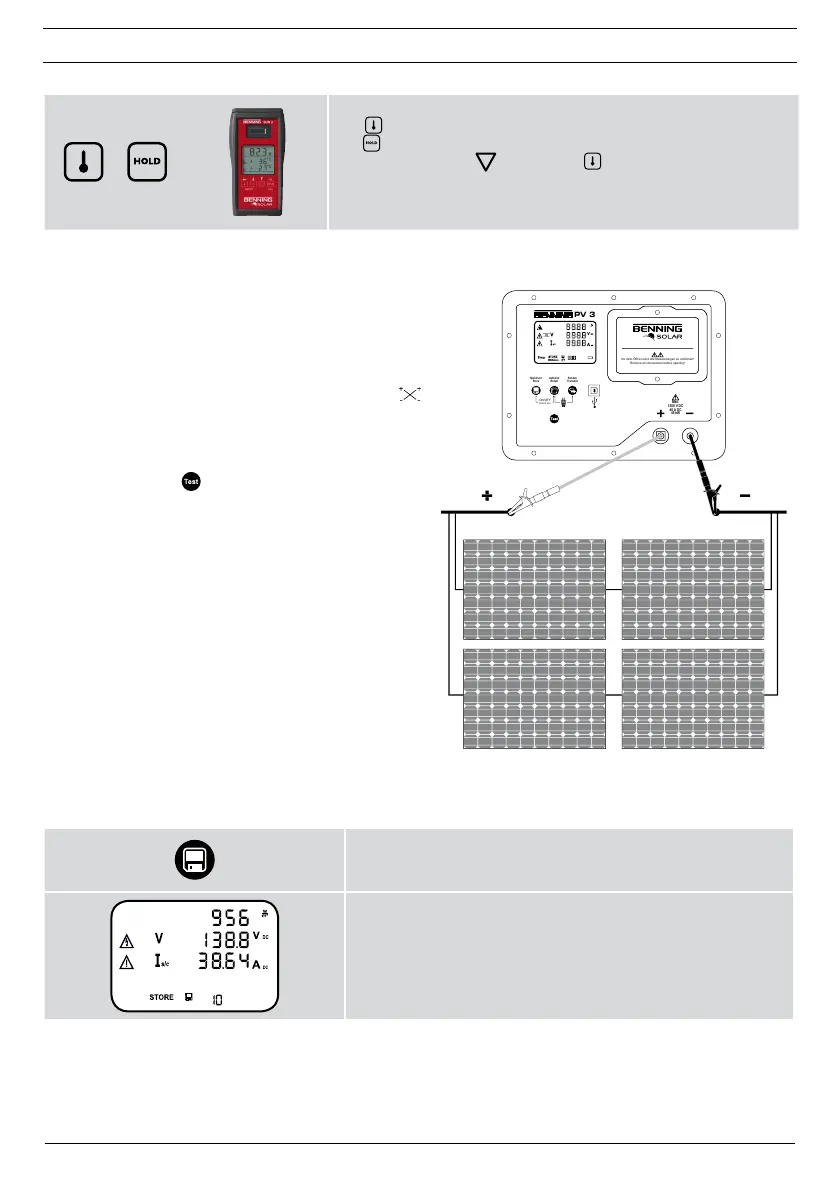
5.5 Measurements on the PV generator
1. Connect the BENNING PV 3 to the PV gen-
erator by means of the included measuring
leads.
2. The PV open-circuit voltage is measured auto-
matically if a DC voltage is applied.
3. In case of reversed polarity of the DC voltage,
the polarity indication is flashing and the “ ”
symbol is shown on the display
1
.
4. As soon as a voltage of > 30 V is applied,
the warning symbol is flashing. Attention!
Dangerous voltage
1
!
5. Press the -key
6
to start the automatic
measurement.
6. The measured values will be shown on the
display
1
for approx. 20 seconds or until a
key is pressed.
Note:
If the DC voltage is applied with reversed polarity or
outside the measuring range (< 5 V or > 1500 V), the
measurement is blocked.
Max.
Uo/c ≤ 1500 V
Is/c ≤ 40 A
P ≤ 45 kW
PV 3
Speichern
Store
Aufrufen
Recall
Senden
Transmit
Max.
1500 V DC
40 A DC
45 kW
ON/OFF
press 2 sec.
Vor dem Öffnen sind alle Messleitungen zu entfernen!
Remove all connections before opening!
5
%
NULL
5.6 Storing measured values
Press the key
2
to store the displayed measured values to
the next free storage location. The BENNING PV 3 can store
up to 999 display indications.
Successful storage will be confirmed by the “STORE” symbol.
If there is no more storage location available, an acoustic
signal is emitted.



 To Next Page