BenQ DC 5530 User’s Manual
English
Using the DC C4204
3 USING THE DC C420
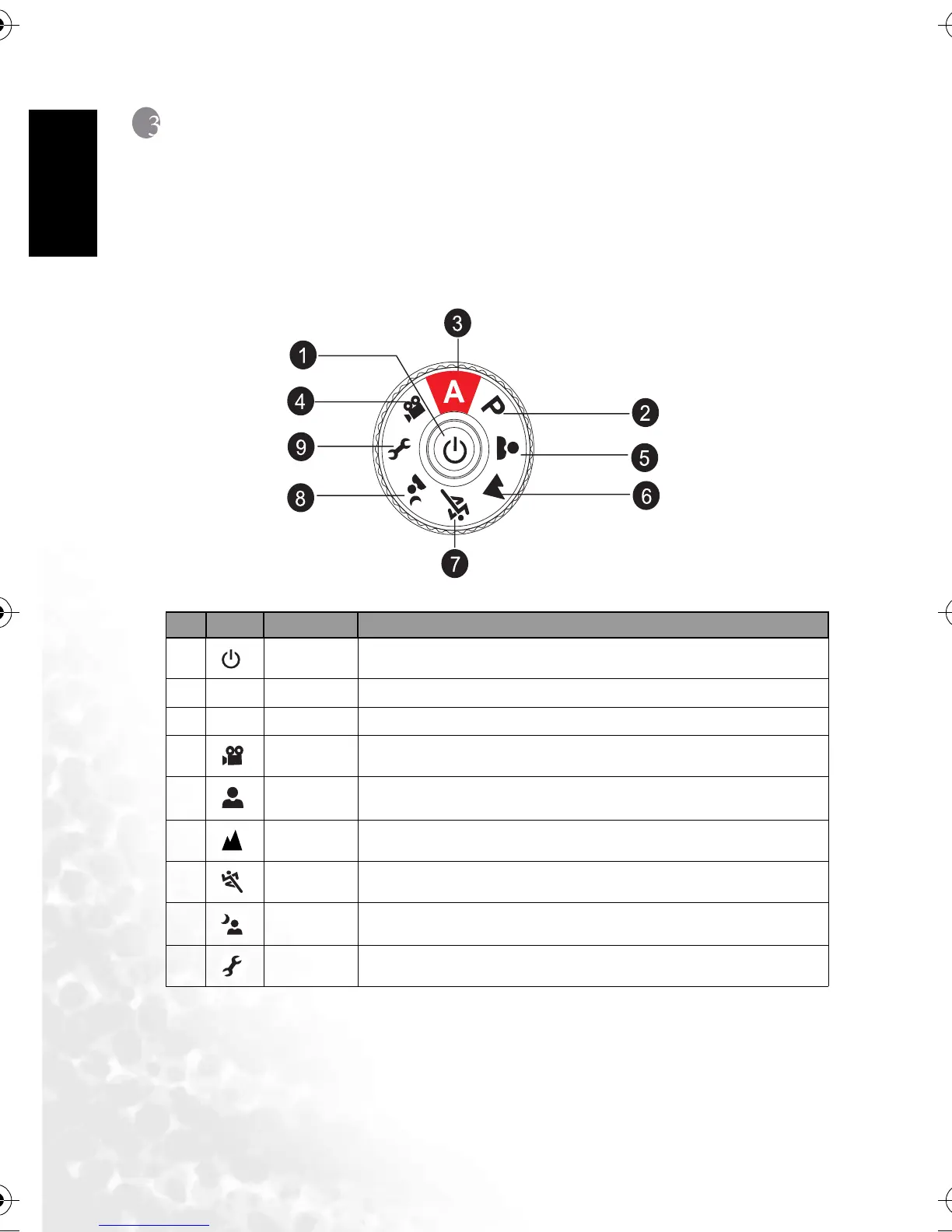
3.1 Mode dial
You can select from seven shooting modes and setup mode according to shooting conditions
to achieve the desired effect.
No. Icon Mode Description
1
[]
Power button
Press to turn on / off the power.
2
[ P ]
Program
Select this mode to access advanced features.
3
[ A ]
Auto Select this mode to adjust point-and-shoot action automatically.
4
[]
Video Select this mode to record video clips.
5
[]
Portrait
Select this mode to make people stand out with the background out-of-
focus.
6
[]
Landscape
Select this mode to take photographs of distant scenery or landscapes.
7
[]
Sports
Select this mode to capture fast-moving subjects.
8
[]
Night
Select this mode to take photographs of people against a dusk or night-time
background.
9
[]
Setup
Select this mode to adjust the camera settings.
DC_C420_UM.book Page 4 Wednesday, June 22, 2005 5:49 PM



 To Next Page