English
Using the DC E6006
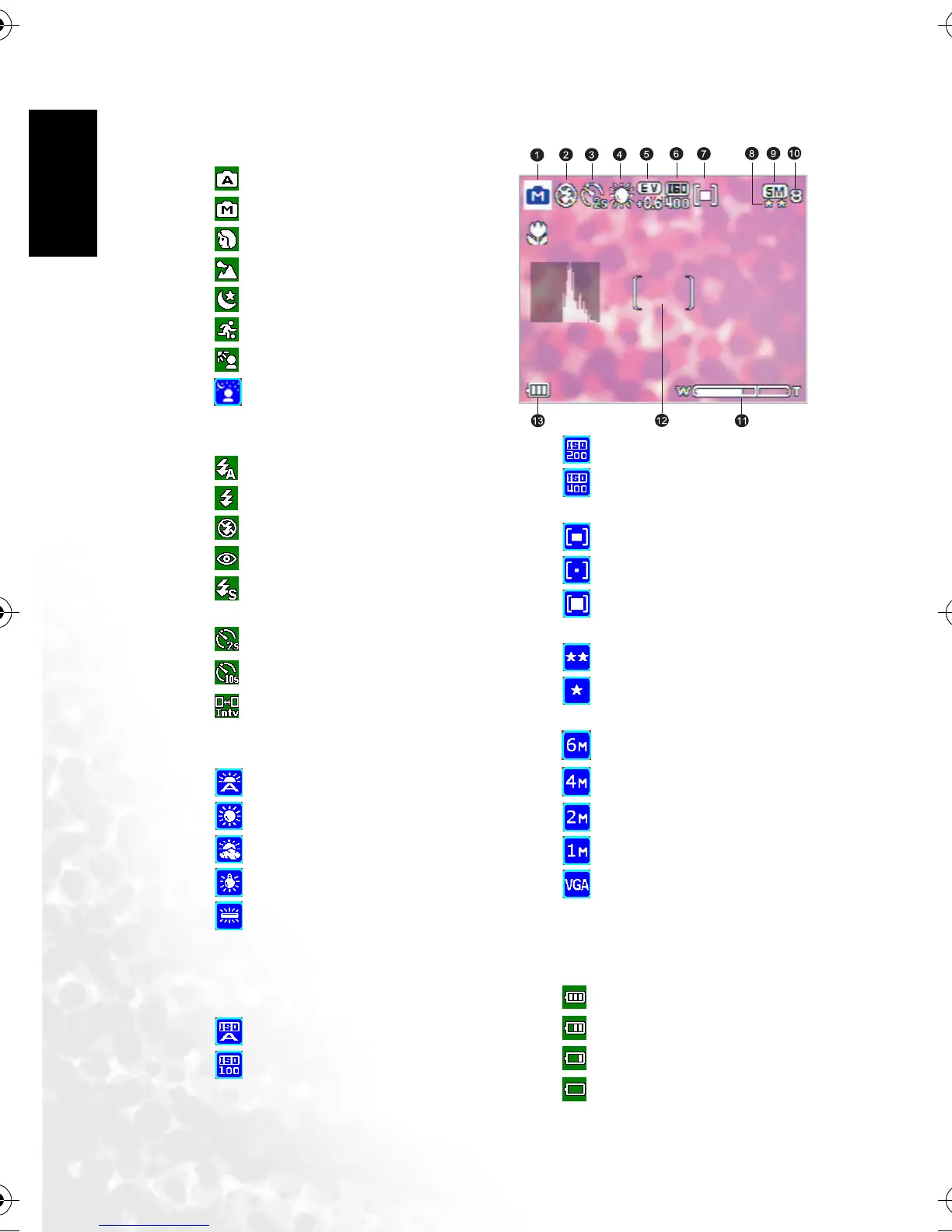
3.1.2 Snapshot Mode LCD Monitor Information
1. Shooting Mode
[]Auto
[]Manual
[]Portrait
[]Landscape
[]Night Scene
[]Sport
[]Back Light
[]Night Scene Portrait
2. Flash mode
[]Flash Auto
[]Flash On
[]Flash Off
[]Red Eye
[]Slow Sync
3. Self-timer icon (if used)
[]Self-timer (2s)
[ ] Self-timer (10s)
[]Interval Shoot
4. White Balance (if chosen [Detailed
Info] display)
[]Auto WB
[]Sunny
[]Cloudy
[]Tungsten
[]Fluorescent
5. EV (Exposure Value)
-0.3, -0.6, -1.0, -1.3, -1.6, -2.0, +0.3,
+0.6, +1.0, +1.3, +1.6, +2.0
6. ISO
[]ISO Auto
[ ] ISO 100
[ ] ISO 200
[ ] ISO 400
7. Metering
[]Center Avg.
[]Spot
[]Average
8. Image Quality
[]Fine
[]
Normal
9. Resolution (Image size)
[ ] 2816 x 2112
[ ] 2304 x 1728
[ ] 1600 x 1200
[ ] 1280 x 960
[ ] 640 x 480
10. Available number of shots
11. zoom status
12. AF Area
13. Battery power level indicator
[ ] Full battery power
[ ] Medium battery power
[ ] Low battery power
[ ] Virtually no battery power
DC_E600_UM.book Page 6 Wednesday, February 8, 2006 10:04 AM



 To Next Page