9 Introduction
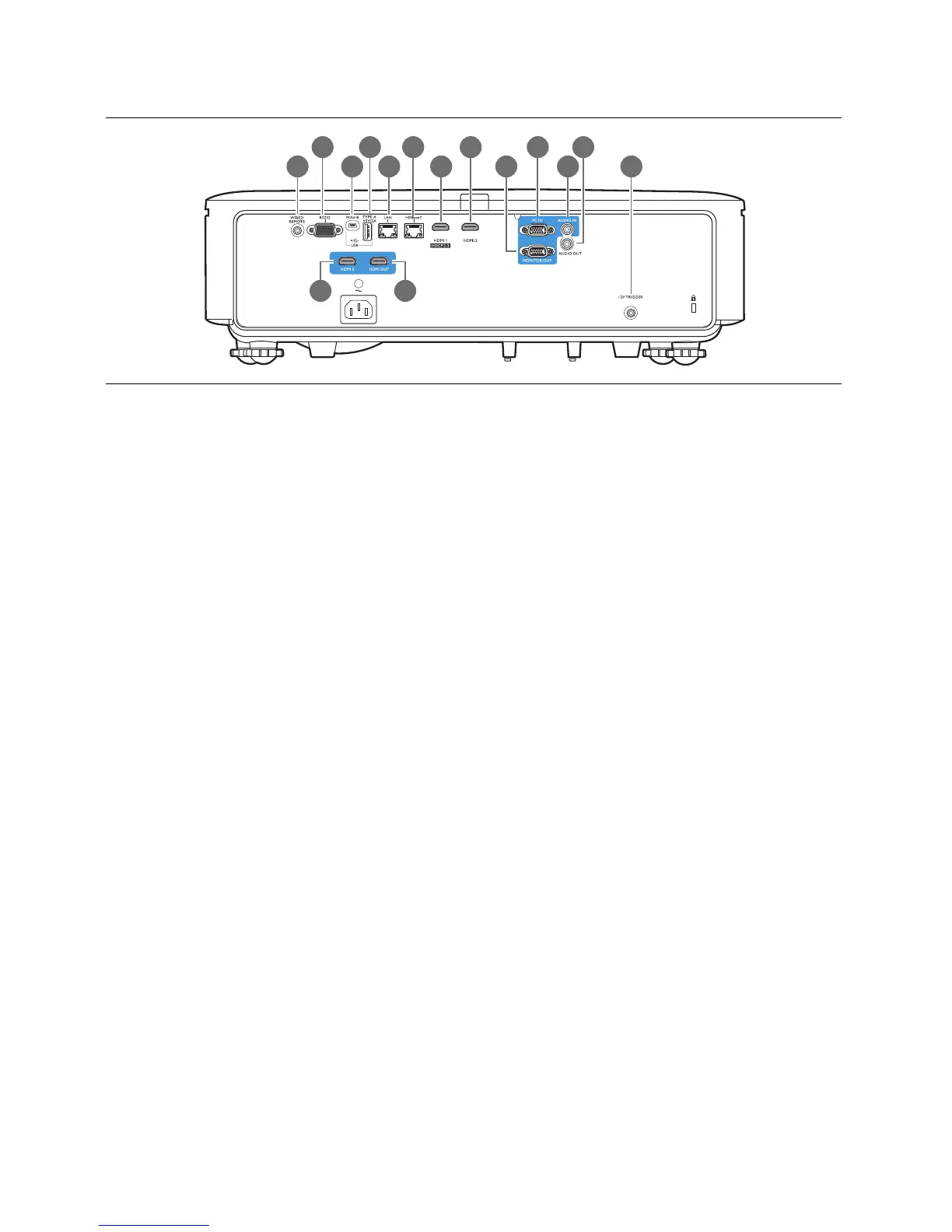
Control terminals
1. WIRED REMOTE
For connection to a wired remote control.
2. RS232
Standard 9-pin D-sub interface for connection
to PC control system and projector
maintenance.
3. USB MINI-B
For firmware upgrade only.
4. USB TYPE A
Support 5V/2A output.
5. LAN
For connection to RJ45 Cat5/Cat6 Ethernet
cable to control the projector through a
network.
6. HDBaseT
For connection to RJ45 Cat5/Cat6 cable to
input uncompressed high-definition video
(HD).
7. HDMI 1 (HDCP2.2)
Connection to HDMI (4K) source.
8. HDMI 2
Connection to HDMI source.
9. MONITOR OUT
Connection to other display equipment for
concurrent playback display. (Used with PC
IN port.)
10. PC IN
15-pin VGA port for connection to RGB
source or PC.
11. AUDIO IN
Connection to an audio input source via an
audio cable. (Used with PC IN port.)
12. AUDIO OUT
Connection to a speaker or headset.
13. 12V TRIGGER
Trigger external devices such as an electric
screen or light control, etc.
14. HDMI 3
Connection to HDMI source.
15. HDMI OUT
Connection to other display equipment for
concurrent playback display. (Used with
HDMI 3 port.)



 To Next Page