Introduction
6
BenQ PB8230/ PB8220/ PB8120 User’s Guide
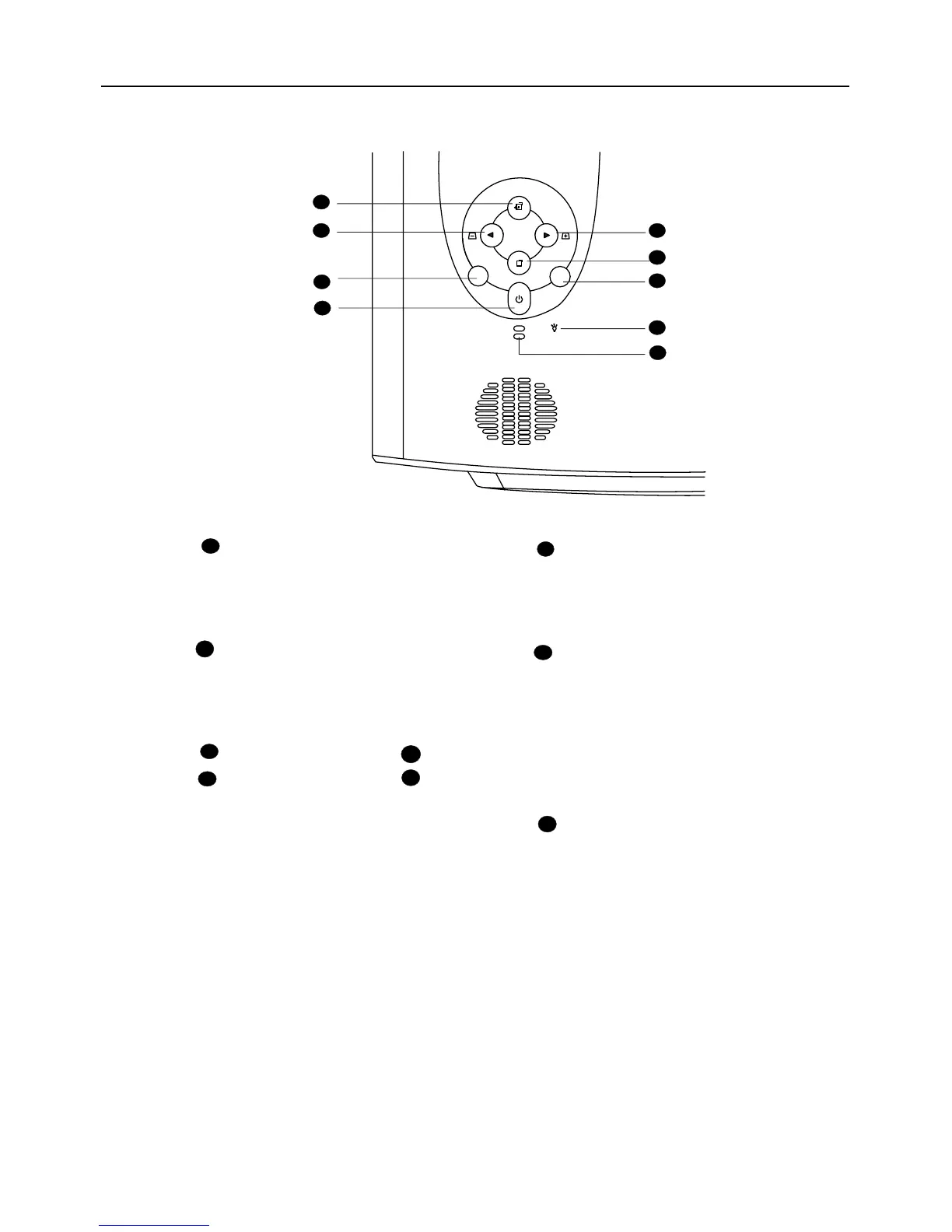
External Control Panel
LAMP
TEMP
53
4
2
6
7
8
9
1
Power
Presses and holds the Power key
to turn the projector on or off.
Auto
Automatically determines the best
picture settings for current received
signals.
Menu will display the menu system
on screen. Press Menu again to
access the sub-menus. Left and
Right help you navigate among
choices and settings in the menus
and sub-menus. However, when the
on-screen menu is not activated, the
Left and Right buttons will function
as Keystone +/- hot keys.
Press the Exit button to go back to
the main menu. Press Exit again to
leave the menu system.
1
2
3
5
4
6
Source
Selects signal sources from among
PC, Video, S-Video and YP
BPR.
Lamp Indicator
The Lamp Indicator will light up
when the lamp needs service,
cooling or replacement. See “Lamp
Information” on page 22 for more
detailed information.
Temp indicator
The Temp indicator will flash when
the system temperature is too high,
which may occur if the projector is
operated improperly. See "Temp
Information" on page 24 for more
detailed information.
7
8
9
Left/ Keystone -
Right/ Keystone +
Exit
Menu



 To Next Page