EasyManua.ls Logo

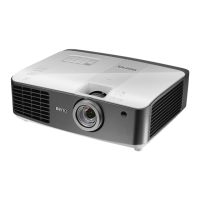
BenQ W1800 - User Manual

BenQ W1800
58 pages
Print Icon
To Next Page IconTo Next Page
Loading...
Digital Projector
User Manual
Home Entertainment Series I W1800/HT2650
V 1.02

Questions and Answers

  • V
    Vanessa GrantJul 29, 2025
    How to fix a BenQ W1800 Projector that does not turn on?
    • S
      smithstephanieJul 30, 2025
      If your BenQ Projector doesn't turn on, it could be due to a couple of reasons: * There might be no power. Ensure the power cord is securely plugged into both the projector's AC power jack and a functioning power outlet. If the outlet has a switch, make sure it's turned on. * The projector might be in the cooling process. Wait for the cooling process to complete before attempting to turn it on again.
  • L
    Lawrence RiveraAug 6, 2025
    Why is my BenQ W1800 remote control not working?
    • P
      Paul McfarlandAug 6, 2025
      If the remote control for your BenQ Projector isn't working, consider these possibilities: * The batteries may be dead. Replace both batteries with new ones. * There might be an obstruction. Remove any obstacles between the remote control and the projector. * You might be too far away. Ensure you are within 8 meters (26 feet) of the projector.
  • J
    Jasmine JonesAug 13, 2025
    What to do if there is no picture on my BenQ W1800 Projector?
    • J
      Julie JordanAug 13, 2025
      If your BenQ Projector is not displaying a picture, there are several possible causes: * The video source might not be turned on or properly connected. Ensure the video source is on and the signal cable is securely connected. * The projector might not be correctly connected to the input signal device. Verify the connection. * The input signal might not be correctly selected. Use the /SOURCE key to select the correct input signal.
  • B
    Brandy SimpsonAug 21, 2025
    How to fix a blurred image on my BenQ W1800?
    • J
      Jennifer LiuAug 21, 2025
      If you're experiencing a blurred image with your BenQ Projector, try the following: * The projection lens might not be correctly focused. Adjust the focus of the lens using the focus ring. * The projector and screen might not be properly aligned. Adjust the projection angle, direction, and height of the projector as needed.

Summary

Important Safety Instructions

Safety Guidelines

Essential safety advice for projector operation and handling.

Introduction

Controls and Functions

Explains the operation of the remote control and projector buttons.

Positioning Your Projector

Mounting the Projector

Guidelines and recommendations for securely mounting the projector.

Connection

Operation

Starting Up the Projector

Instructions for powering on the projector and initial setup wizard.

Securing the Projector

Guides on setting a password and using security features.

Menu Operation

Picture Mode Settings

How to select and customize picture modes for optimal viewing.

Advanced Color Settings

Adjusting gamma, color temperature, and color management.

Maintenance

Care of the Projector

Instructions for cleaning the lens, case, and proper storage.

Extending Light Source Life

Tips and modes to prolong the projector lamp's lifespan.

Troubleshooting

Common Projector Issues and Solutions

Solutions for common problems like no power, no picture, or remote issues.

Specifications

BenQ W1800 Specifications

General IconGeneral
Brightness2000 ANSI lumens
Contrast Ratio10, 000:1
Light SourceLamp
Zoom Ratio1.3x
Speaker5W x 1
Display TechnologyDLP
Wireless ConnectivityNo
3D ReadyYes
Color Wheel6-segment (RGBRGB)
Resolution4K UHD (3840 x 2160)
Lamp Life4, 000 / 10, 000 / 15, 000 hours (Normal / Economic / SmartEco)
Keystone CorrectionVertical ±40°
HDRHDR10/HLG
HDMI2 (HDMI 2.0b)
Power Consumption310W (Normal), 240W (Eco)
Projection Size30" - 300"
Noise Level29/28 dBA (Normal/Eco)
USB Port1 (Type A, for power supply)
Audio Output1 (3.5mm Mini Jack)
Color Reproduction1.07 Billion Colors

Related product manuals