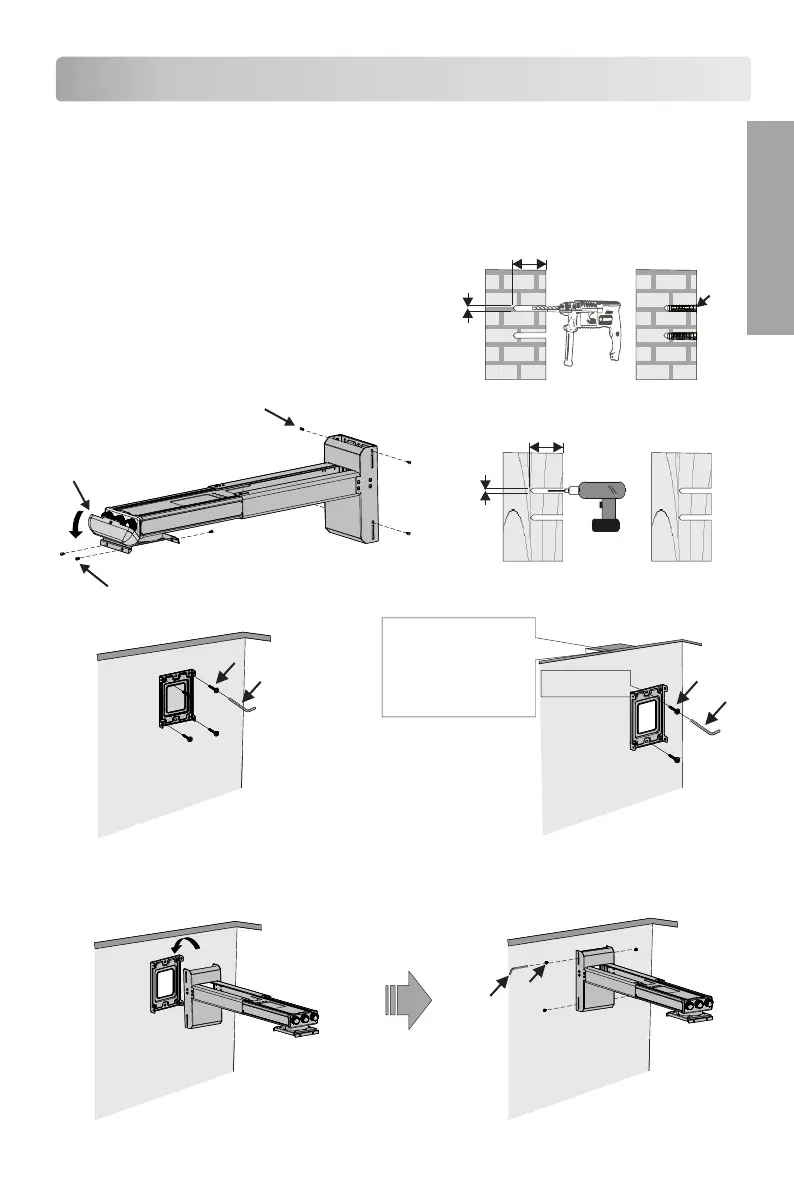
To Set The Projector Wall Mount On The Wall
● The bracket is suitable for concrete wall mounting or wooden stud wall.
● Concrete wall mounting thickness must be a minimum 100mm. Anchor bolt and screw
(M6 × 55) are needed to be used for installation.
● Dry-wall mounting thickness must be a minimum 70mm. Only screw(M6 × 55) is needed
to be used for installation, and gypsum board
thickness not greater than 3/8 inch. If the wall
is not strong enough, reinforce it sufficiently
before installation.
● Please contact manufacturer if you have
any questions about mounting surface issue.
>55mm
ø10~11mm
b
Concrete wall mounting
Use anchor bolt
>55mm
ø3mm
Dry-wall mounting
Not use anchor bolt
Remove the decorative cover
Loose the screws e
Loose the screws f
c
a
screw (M6 × 55) are needed to be used
for installation in concrete wall mounting
c
f
c
a
scr e w c e n t ra l
poi n t
When installation on the
wood stud wall,the stud
position of the mount wall
surface shall be defined,
the fixed screw central
point shall be aligned with
the central line of stud.
To set the projector wall mount on the wall Tighten up the screws
screw (M6 × 55) are needed to be used
for installation in dry-wall mounting
E N G L I S H



 To Next Page