Receiver 3
Ø
Receiver3 IP – This is the IP address assigned to the receiver of the domotics
system with which you wish to interact. It is supplied by the receiver itself.
Default value: 40000.
Receiver3 Local Port and Receiver3 Remote Port – These values represent the
ports to be used when communicating with the domotics system receiver. They are
supplied by the receiver itself.
Default value: 40001.
Details- Read-only Option These values cannot be modified. They display infor
-
mation relating to the connected IP Module.
Ø
MAC Address –Displays the MAC address of theIP Module:the MACaddress is a
unique identification number assigned to every IP Module throughout the world.
Ø
Software Version – Displays the version of the program running on the IPModule.
Ø
Boot Version – Displays the boot version.
Ø
Current IP Address – Displays the IP address assigned to the IP Module.
Ø
Network module - name of IP module.
n
Restore default settings
The default settings may be restored as described below.
+
When the default settings are restored, it will NO LONGER be possible to commu
-
nicate with the IP Module and the control unit via the LAN; communication will only
be possible using the proceduredescribed in theparagraph “Initial programming”.
Via hardware Proceed as follows:
1. Disconnect the IP Module from the power supply: disconnect terminal [+V] on
terminal block 1.
2. Disconnect the PC-Link cable (11) from connector 2.
3. Short-circuit the first two terminals on connector 2, marked with the symbol
.
4. Restore the IP Module power supply (reconnect the [+V] terminal on terminal
block 1) while keeping the terminals onconnector 2 short-circuited, untilthe S
indicator light (4) begins to flash.
5. Reconnect the PC-Link cable (11) to connector 2.
Via Software
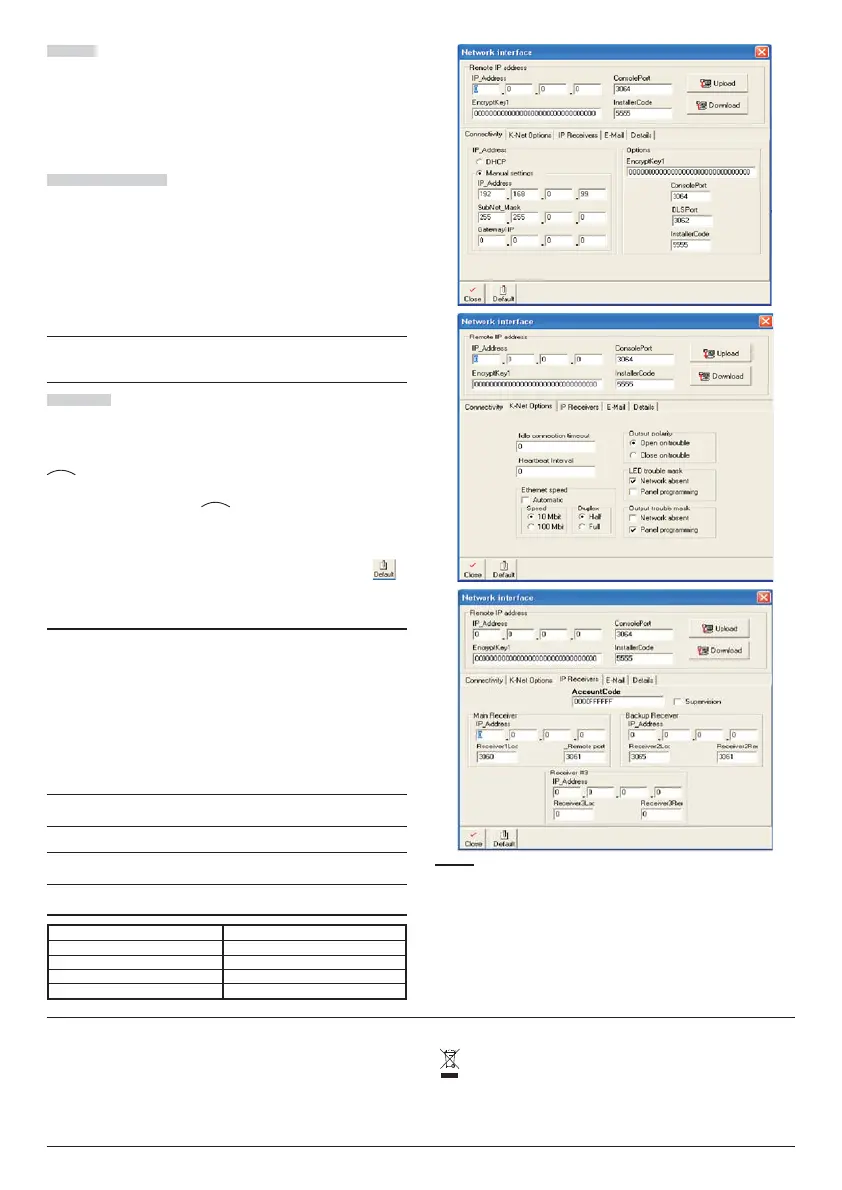
The software screens (see Fig. 1) have a Default button. Click this button to
restore the default settings.
Viewing the IP Address
The IP address assigned to the IP Module If the DHCP is configured, the current
IP address of the KNET circuit board may be checked in 2 ways:
-- using a keypad connected to the KYO320 control unit with the network P.C.B. pre
-
sent and configured (see procedure in the Initial programming section), after ente
-
ring the Installer menu, press the A or B buttons to display the SERIAL PORTS
option, followed by the ENTER button. View the IPaddress and return to the Installer
menu by pressing the ESC button. (see also the Kyo320 Installation manual Vol.2 –
Keypad procedures);
-for advanced users only: from the control screen of a Windows PC connected to the
same network, use the command “PING KNET-xxyyzz”,
where xxyyzz are the last 6 digits of the MAC-ADDRESS printed on the KNET label.
+
A Windows PC may be configured so that it does NOT allow this type of com
-
mand, meaning this type of procedure will not be available.
+
The KYO320 software application offers alternative KNET programming options
which are not described in the manual; these are intended for future use.
Technical features
Power supply 9.6 ÷ 27.6 V_
Max. absorption 250 mA
Resting absorption 50 mA
Operating temperature -5 ÷ +40 °C
Dimensions L*H) 95*65 mm
8 K-NET IP Module
Recycling information
BENTEL SECURITY recommends that customers dispose of their used
equipments (panels, detectors, sirens and other devices) in an
environmentally sound manner. Potential methods include reuse of parts or
whole products and recycling of products, components, and/or materials.
For specific information see www.bentelsecurity.com/en/environment.htm
Waste Electrical and Electronic Equipment Directive (RAEE – WEEE)
In the European Union, this label indicates that this product should
NOT be disposed of with household waste. It should be deposited at an
appropriate facility to enable recovery and recycling.
For specific information see www.bentelsecurity.com/en/environment.htm
Figure 1 Programming the IP Module using the KYO320-300-100 application.


 To Next Page
 Loading...





