14
operating instructions TC95
Firmware-Update
Die Funktionen unserer Regler werden kontinuierlich ver-
bessert und erweitert. Profitieren Sie davon und bringen
Ihren TC95 wie folgt auf den neuesten Stand: Laden Sie
die neueste Firmware von www.bentrup.de/ service.
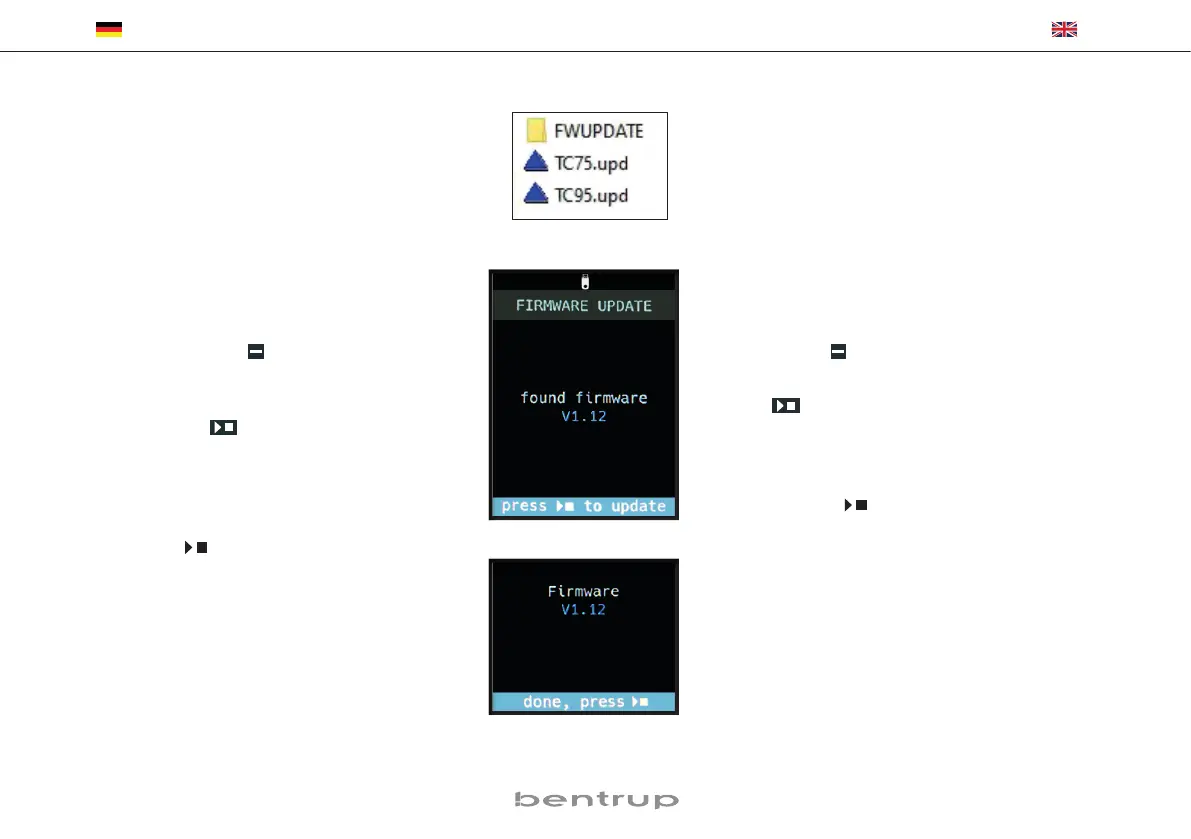
Entpacken Sie diese auf einen FAT32-formatierten
Stick. Es sind dann mehrere *.upd Dateien sowie ein
FWUPDATE Ordner sichtbar (Bild A).
Stecken Sie den USB-Stick in den TC 95 und schalten
Sie ihn mit gedrückter
Taste ein. Die auf dem Stick
installierte Firmware wird gelesen und die gefundene Ver-
sion wird im Display angezeigt (Bild B).
Mit Drücken der
Taste starten Sie die Installation
des Updates. Während der Installation zeigt die untere
Anzeige „updating ...“ an.
Ist das Update erfolgreich installiert, erscheint im Display
die neue Version der Firmware und in der unteren Anzeige
„done, press
“ (Bild C).
Der USB-Stick kann nun entfernt werden
.
Firmware update
The features of our controllers are continuously im-
proved and expanded. To take advantage of this period-
ically check the latest firmware on www.bentrup.de/
service and proceed as follows for an update. Unpack
it onto a FAT32 formatted stick. You will then see several
*.upd files and a FWUPDATE folder (fig. A).
Insert the USB stick into the TC 95 and switch it on while
holding down the
key. The firmware installed on the
stick is read and its version is displayed (fig. B).
Press the
key to start the installation of the update.
During installation, the display shows “updating ...”.
If the update has been installed successfully, the new
version appears in the display and in the bottom display
shows “done, press
“ (fig. C).
The USB stick can be removed.
(A)
(B)
(C)


 To Next Page