AUDIO PARTNER/MLTI/NORMAL
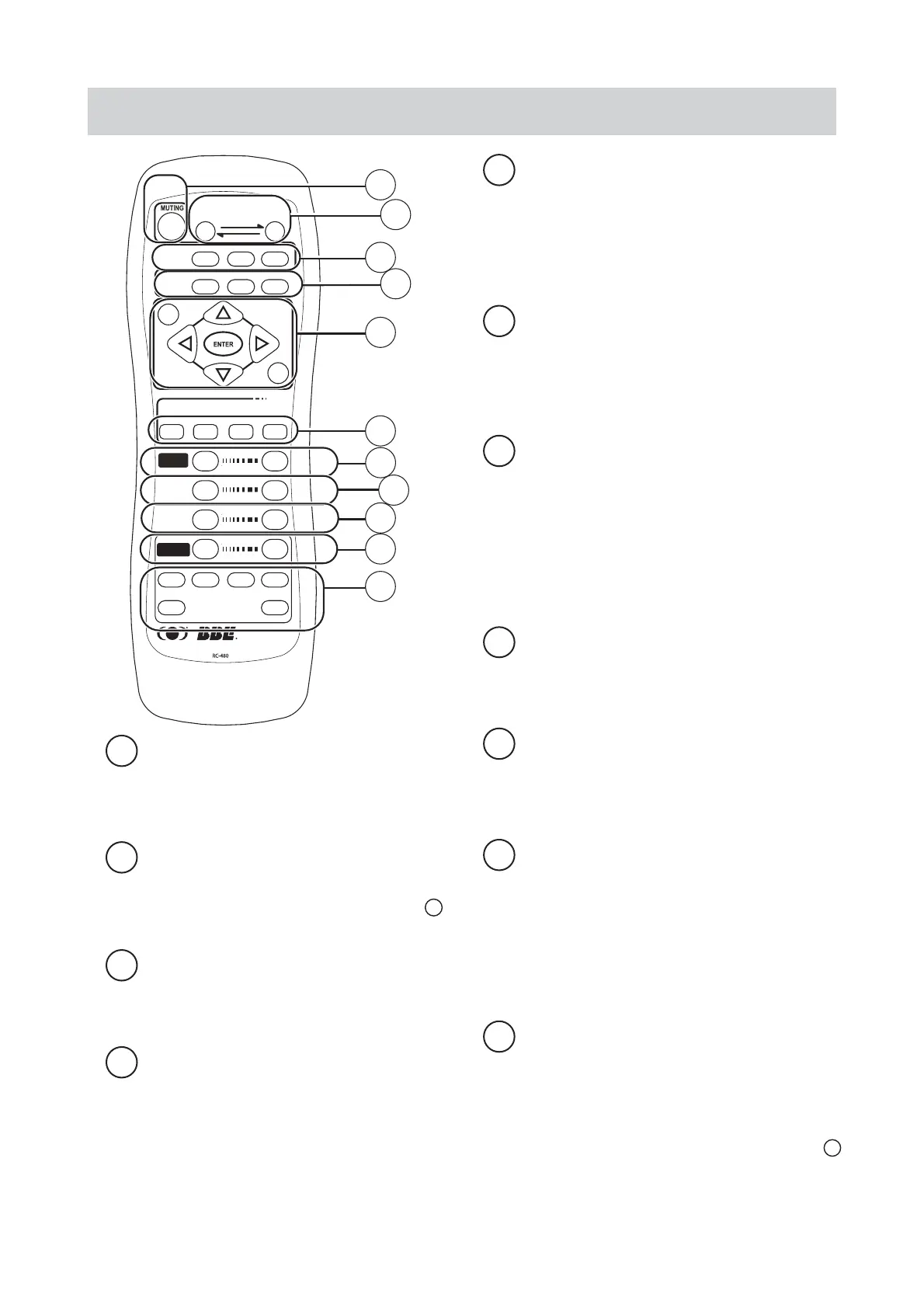
Pushbutton to select automatic linking and singing
function and accompanying function.
PURE / MONO
-
Pushbutton to select the sound
effect and the pure sound of music
Switches are provided to select 4 types of sound
effect for music available when listening to the
music is desired so that the music can be further
vivid and felt just like at the fi eld.
PURE :
To control the pure sound output; function of E
- group will be cancelled when used.
MONO :
Pushbutton to control the output of subwoofer.
MUTING
-
Muting switch
Mute control switch, the indicators aside the music
and microphone’s volume adjustment knobs will
blink at the same time.
A
INPUT SELECT
Depress left or right selection pushbutton to select
the channel with thereof status displayed in 6 on
front panel.
B
C
D
AUDIO PARTNER/MLTI/NORMAL
General playing and singing.
Automatic linking and singing function
Accompanying function
.
*
Effective only when the playing source is a video &
audio fi le in KARAOKE format.
NORMAL :
PARTNER :
MULTI :
SETUP
-
Pushbutton group to set up the
function
Pushbutton group for manipulating the setup
screen. Depress the SETUP to enter into the setup
screen. Other pushbuttons will be disabled when
manipulating the setup screen.
E
ECHO
-
Pushbutton to adjust the volume of
echo
To adjust the output volume of echo effect for
microphone.
H
K
MUSIC
-
Pushbutton to adjust the music
volume
To adjust the output volume of music.
*
If automatic volume setup function is enabled, the
restricted setting of the maximum volume will be
activated under the remote control mode; therefore, the
volume can only be reached the preset maximum value.
J
MIC
-
Pushbutton to adjust the volume of
microphone
Depress to adjust the output volume of
microphone.
*
If automatic volume setup function is enabled, the
restricted setting of the maximum volume will be
activated under the remote control mode; therefore, the
volume can only be reached the preset maximum value.
G
ECHO
REVERB
RC-480
SETUP
RETURN
MIC EFFECTS
EFF 1 EFF 2 EFF 3 EFF 4
SIMBBE
DOWN
KEY
AUDIO
PARTNER
MULTI
NORMAL
INPUT SELECT
RESET UP
SRS 1 SRS 2
PURE MONO
MIC
MUSIC
A
B
C
D
E
F
G
H
K
I
J
Remote controller
EFF1/EFF2/EFF3/EFF4
-
Pushbutton to
select the sound effect of microphone
Four types of sound effect selection for microphone
available; can be set up from the functional setup
item.
F
REVERB
-
Pushbutton to adjust the volume
of reverberation
To adjust the output volume of reverberant effect
for microphone.
I


 To Next Page
 Loading...