●
●
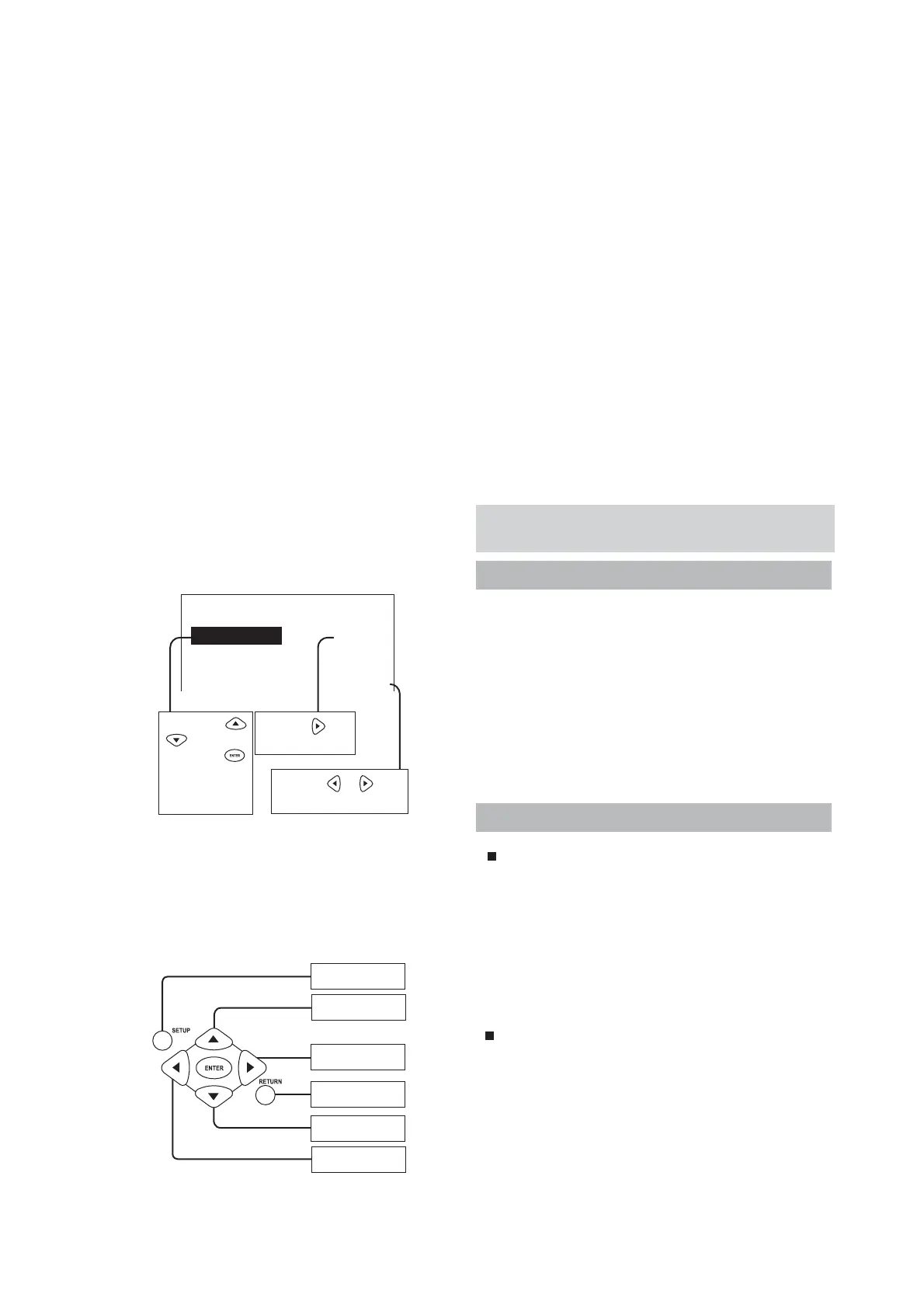
Depress the SETUP from the remote
controller to enter into the setup function
screen.
Seven (7) pushbuttons on the remote
controller shall be used for functional setup.
●
●
●
●
●
The effective distance of remote controller is
about 5 meters at an angular travel of 30
left and right respectively.
Remote controller will fail to perform its
functions when failed to aim at the controlled
object or be blocked by obstacle.
Please note the positive and negative
polarity when loading the battery cells.
Do not mix the new and used battery cells for
application.
Please take out the battery cells when
the use of machine is not desired for an
extended period of time.
Attention! !
●
●
●
●
When entering into the setup screen is
desired, please hook up the TV or monitor
fi rst and turn off the PURE listening mode.
After entering into the setup screen, other
pushbutton on the remote controller will be
disabled their functions; meanwhile, the
indicators in the front panel will make their
indication correspondingly.
Function setup menu can be used to
establish different settings according to
various environment and personal interests.
When performing the function setup, the
normal use of music and microphone is still
available; however, because of the items
of setup may be different, certain action of
music or microphone will be affected. All the
established numerical values will be reserved
after exiting the selection menu.
INCRENENT or ENTER
BACK TO PREVIOUS
PAGE
DOWN
ENTER SETUP
FUNCTION
DECREASE
UP
DEMO
Input Level adj. ► SET
AGC level : 600mV SET
Bass 0
Treble ◄ ± 1 ►
Operate with button
when this sign shows up.
In general, use
buttons to select
an item, press
button to enter a selec-
tion, and press
RETURN
button to exit.
Operate with and buttons
when this sign shows up.
Setup Menu
Main setup screen
System setup
AUTO Input Select
Able to select signal input automatically; depress
the rightward direction key to access the following
functions and sequence:
OFF : Disable the auto selection of signal input.
ON : Detect the music signal only. * When there
is no signal input, take BGM as the fi rst choice.
1.SYSTEM SETUP
2.MUSIC SETUP
3.EFFECT SETUP
EXIT
IR Key Shift
Infrared remote controller controls the up & down
keys of music.
ON:
Able to control the up & down keys of music.
OFF:
Disable the control for the up & down keys of music.
Its purpose is to prevent the functions for increasing &
decreasing the keys inside the computerized karaoke
from interfering with one another.


 To Next Page
 Loading...