P
age | 12
O
PERATION OF THE CONTROL PANEL:
1
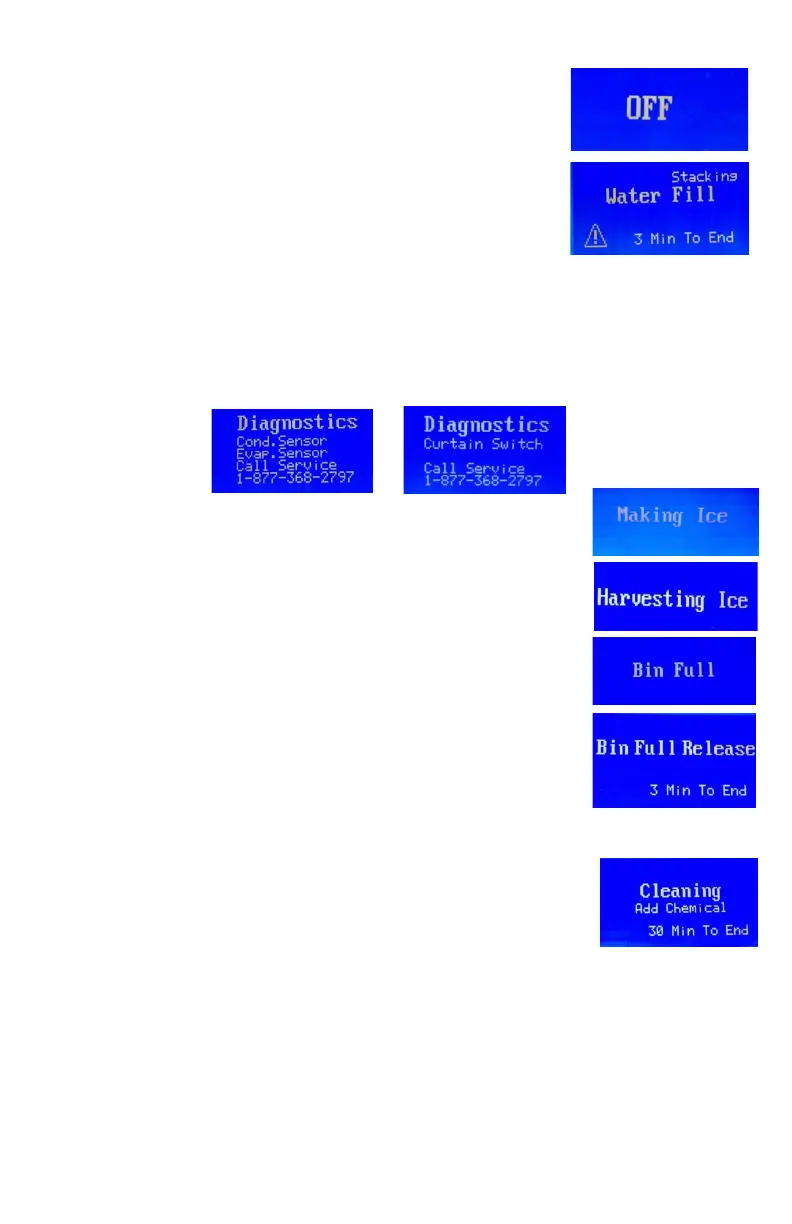
. When the unit is plugged in and turn on the power switch. Only
“OFF” displays on the LCD screen.
2. Press the ON/OFF button, the LCD screen lights. If normal, only the
words of “Water Fill” and “3 Min To End” displays on the LCD screen.
The ice maker will start to make ice automatically when the words
of “3 Min To End” changes to “0 Min To End".
Note:
Only when the double ice machine heads stacked, the words of “Stacking” may be
displayed on the LCD screen.
When the ice machine runs in “Water Fill” process, the control board will check the
condenser probe, evaporator probe and water curtain function, if one of them defaults, the
exclamation mark will appear and blink on the left bottom corner of the LCD screen. At this
time press “ADJUST” button, the Diagnostics for Curtain switch, condenser sensor and
evaporator sensor will appear on the LCD screen.
or
3. After three minutes, the ice maker will start to make ice automatically.
The words of “Making Ice” displays on the LCD screen.
4. When the ice machine runs in harvest process, the words of
“Harvesting Ice” displays on the LCD screen.
5. When the ice storage bin is full, the words of “Bin Full” displays on the
LCD screen. The unit stops working.
6. When ice cubes are taken out from the ice storage bin, releasing the
water curtain, the machine will judge the status for three minutes.
During this period, the LCD screen will display the words of “Bin Full
Release” and “3 Min To End”. "Bin Full Release” flashes until the words
“3 Min To End” changes to“0 Min To End”. At this time, the ice maker
will start to make ice automatically.
7. TO CLEAN THE MACHINE, press the ON/OFF button first, then press it on again.
• During “Water Fill” process, press the “CLEAN” button, the ice maker
will start the cleaning process, the words of “Cleaning”, “Add
chemical” and “30 Min To End” display on the LCD screen.
• At the first one minute, the words of “Add chemical” flash to remind
pouring the Ice Maker Cleaner Solution into the water tank until the
words of “30 Min To End” changed into “29 Min To End”, the words of “Add chemical”
disappear and the water pump runs, the ice maker goes into cleaning process.
• The ice-making system cleaning cycle will continue until the words of “30 Min To End” changed
into “0 Min To End”, the cleaning process stops and the ice machine is in suspend mode.
• You can press the ON/OFF button to stop the cleaning cycle any time during the cleaning
mode.
• If you want to make ice cubes after cleaning, press the ON/OFF twice, the next ice-making
cycle will begin. See photo below.
NOTE:
Pressing the CLEAN BUTTON has no effect when the ice maker runs in ice-making, harvest and bin
full process.



 To Next Page