My BERNINA
8
BERNINA SEWING MACHINE WORKBOOK
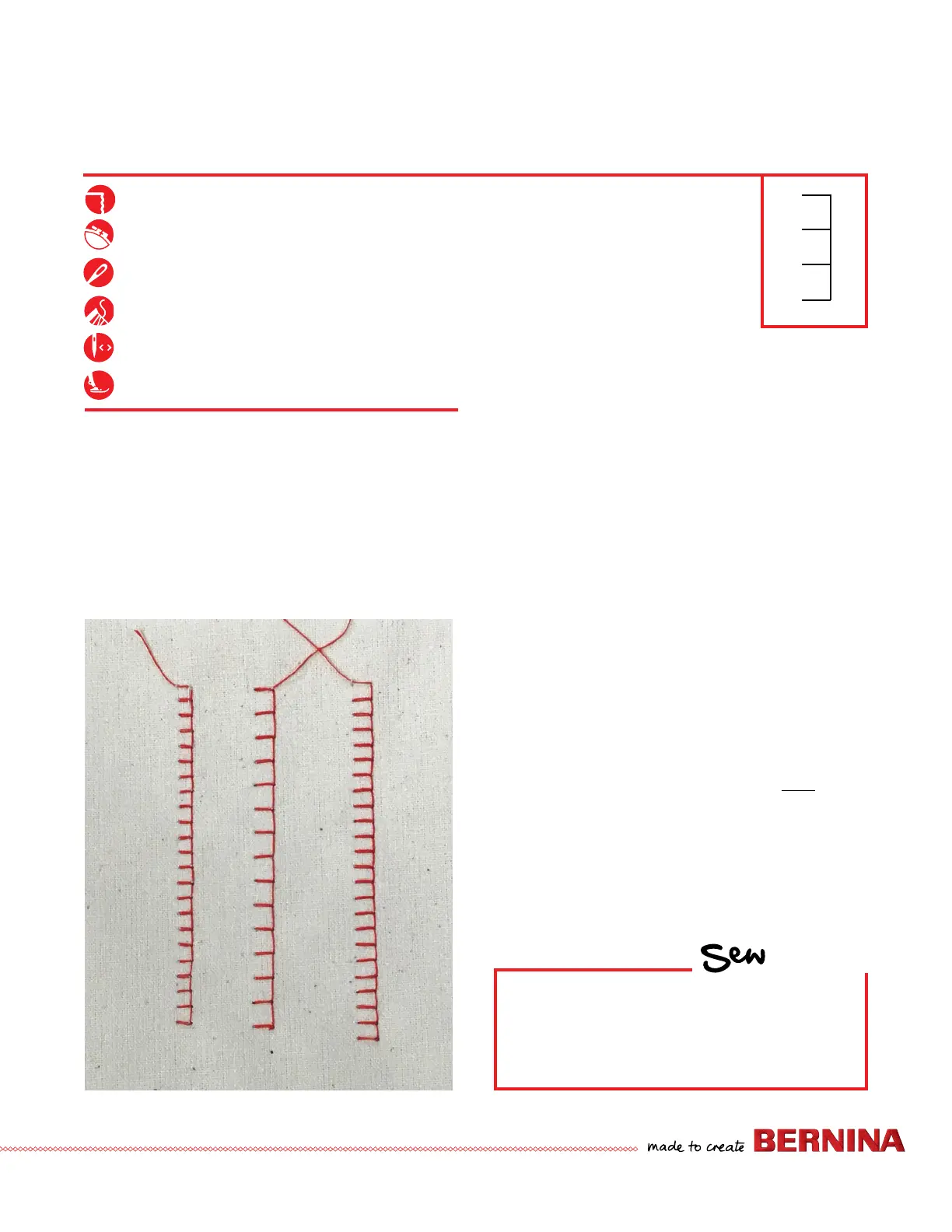
ALTERED STITCHES
Programmed
settings
3.5 mm width
4.1 mm length
3.5 mm width
Default length
Instructions Below for B 335 and 325 ONLY
B 215: Pick any stitch (#2 through #9) and
experiment with the length and width settings.
1. Attach Open Embroidery Sole #20.
2. Place the stabilizer behind the fabric.
3. Select Blanket Stitch (B 325 #39, B 335 #107, B 215 use
Blind Stitch #5).
4. Sew a row of stitches.
5. Adjust stitch width to 3.5 mm and stitch length to 4.1
mm. Sew a second row of stitching next to the rst.
6. Change the stitch length back to its default setting.
7. Sew a third row of stitching next to the previously sewn
rows.
NOTE: Stitch width and length can be altered while sewing.
Firm woven fabric, 4” x 6”
Lightweight tear-away stabilizer 4” x 6”
80/12 Universal
Polyester or cotton embroidery thread
Default
Open Embroidery Sole #20
HOW
Do you know how to:
• Access stitches on your model?
• Reset the stitch length and width to the
preprogrammed settings?


 To Next Page