8
2. USE
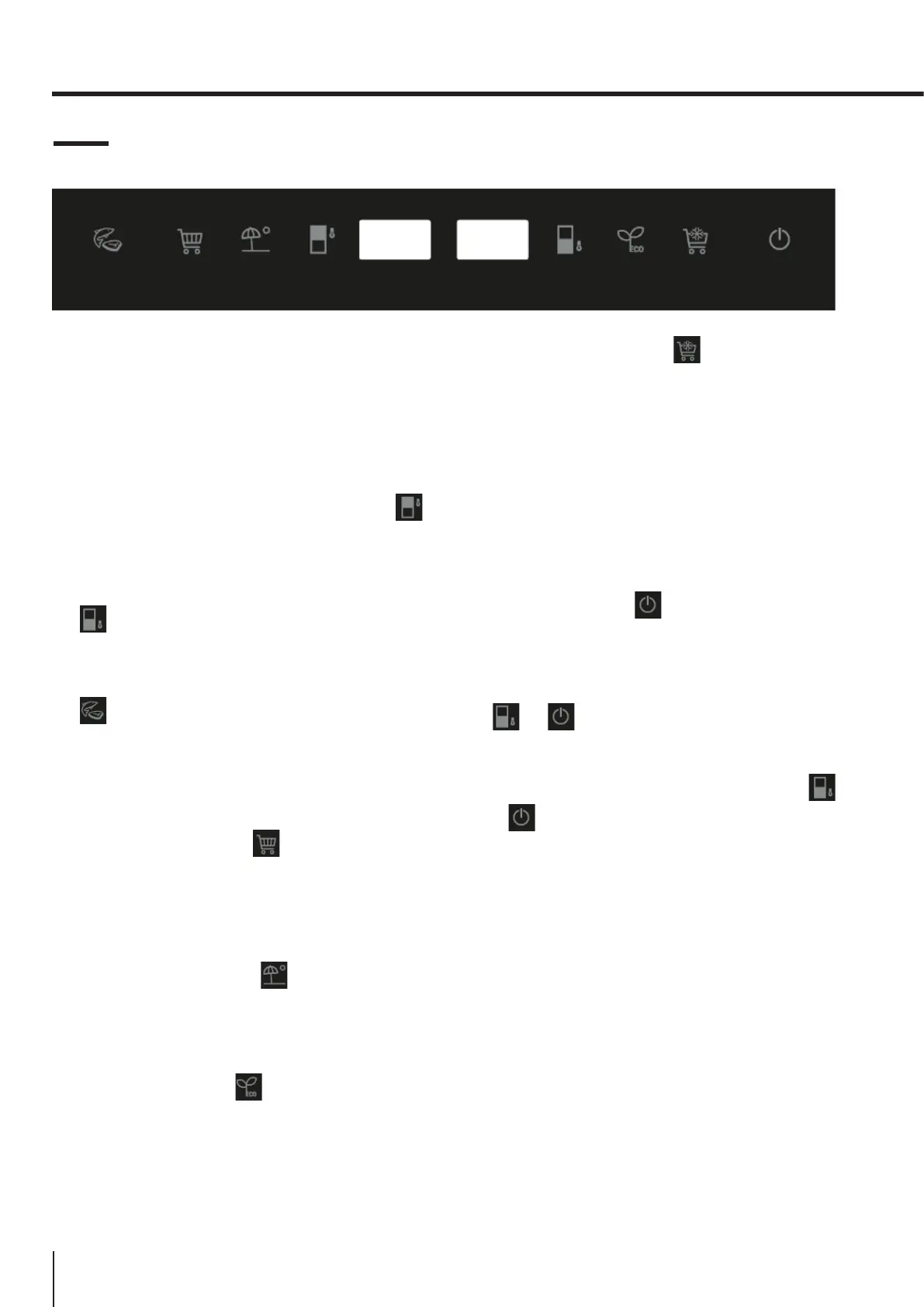
2.5 Control panel
1. When the appliance is switched on for the
first time, it will be operating at the following
settings: 5°C for the fridge, 0°C for the Chiller
and -18°C for the freezer. If you wish to adjust
the temperature or functions manually, use
the appropriate button to perform the desired
operation. The temperature range for the Chiller
is from -3°C to 3°C.
2. Fridge temperature adjustment: Press the
button on the left-hand side of the control panel
to adjust the temperature within a range of
between 2°C and 8°C.
3. Freezer temperature adjustment: Press the
button on the right-hand side of the control
panel to adjust the temperature within a range
of between -15°C and -25°C.
4. Chiller drawer temperature adjustment: The
button controls temperature. By pressing
on this button, you can adjust the temperature
within a range of between -3° and +3°. This
function can be turned on/o by pressing and
holding the button for three seconds (OFF is
displayed).
5. Super Cool: Press the button; the button
lights up and the fast cooling function is turned
on. The fridge automatically begins running at
a temperature setting of 2°C and continues for
24 hours, after which it returns to its normal
setting and the symbol is no longer lit.
6. Holiday Mode: Press the button; the button
lights up, the holiday function is turned on
and the whole appliance automatically begins
running at the following settings: fridge at 17°C
and freezer at -18°C.
7. Eco Mode: Press the button on the control
panel; the Eco function is turned on and the
button lights up. The fridge compartment runs
at a setting of 5°C and the freezer compartment
runs at a setting of -18°C. The Chiller works at a
setting of 3°C.
8. Super Freeze: Press the button; the button
lights up and the freezer begins to run the fast
freezing function, with a temperature setting of
-25°C. After 24 hours, the fast freezing function
quits automatically.
9. Press and hold the power button for 3 seconds
to switch o your appliance. The button lights
up and the power is shut o. The interior lamps
switch o and the compressor stops operating.
Press and hold the button for 3 seconds to
switch on your appliance. The symbol lights up
and power is restored.
10. No Frost models are equipped with a manual
defrosting function. Press and hold buttons
+ for 5 seconds to switch on the
manual defrosting function to clean the freezer
evaporator. The freezer temperature symbol
remains steadily lit. Press and hold buttons
+ for 3 seconds to switch o the manual
defrosting function. The freezer temperature
symbol goes dark.
11. Fault Display
This appliance has a "Fault Display & Alarm"
function. Once the sensors detect a fault, alerts
are shown on the temperature display; the
appliance still cools, but a professional service
engineer should be called in to check it.
F2 – Chiller sensor
F3 – Fridge compartment sensor
F4 – Freezer compartment sensor
F5 – Defrosting sensor
2E – Freezer fan/motor fault
CE– Communication fault between main board
and display panel
The above Faults are only shown on the display;
there is no audible alarm signal.





 To Next Page