28
part, the blood pressure monitor loses the date and time set
-
ting but the saved measured values are retained.
Adjusting the settings
Make sure that the device’s settings have been set correctly so
you can make full use of all its functions. Otherwise you will not
be able to save your measured values with the date and time and
access them later.
There are two dierent ways to access the settings menu:
• Before initial use and after each time you replace the battery:
When inserting batteries into the device, you will be taken to
the relevant menu automatically.
• If the batteries have already been inserted:
With the device switched o, press and hold the setting but
-
ton SET for approx. 5 seconds.
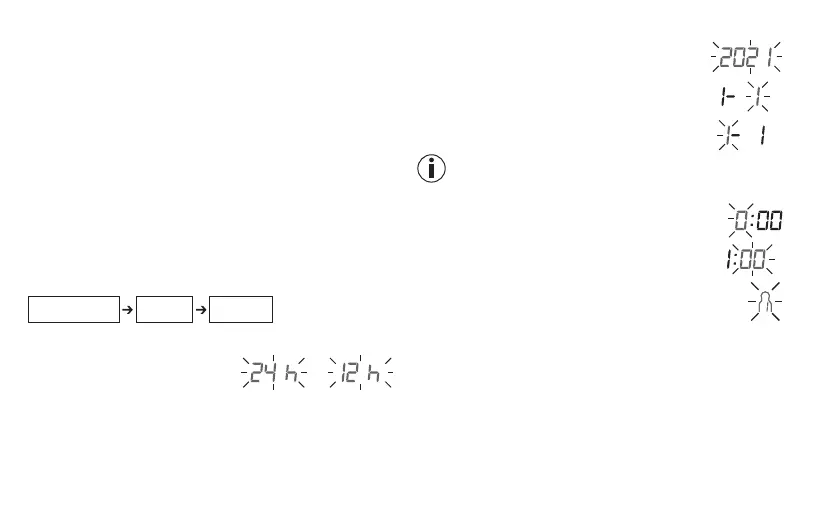
Set these settings in the order shown below:
Hour format Date Time
Press SET to confirm your selection each time.
Time format
Time format flashes:
• Press -/+ to select the time for
-
mat.
Date
The year flashes:
• Press -/+ to select the year.
The month flashes:
• Press -/+ to select the month.
The day flashes:
• Press -/+ to select the day.
If the time format is set to the 12-hour format, the order in
which the day and month are displayed is reversed.
Time
The hour flashes:
• Press -/+ to select the hour.
The minutes flash:
• Press -/+ to select the minutes.
User
The user symbol flashes:
• Press -/+ to select the user.
• The device switches o automatically.
6.2 Before the blood pressure measurement
General rules when measuring your own blood
pressure
• In order to generate an informative profile of changes in your
blood pressure that can be used for comparisons, you should


 To Next Page