44
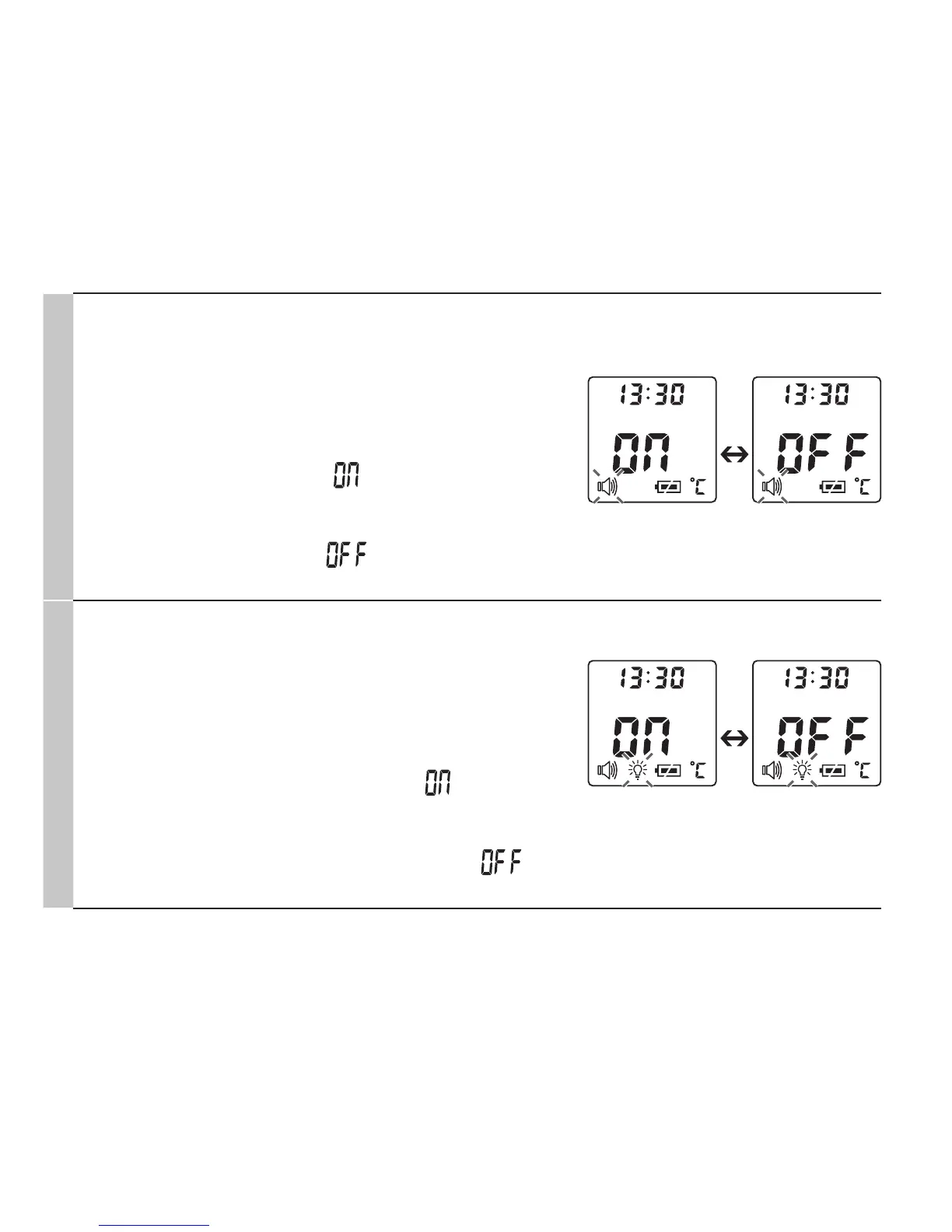
Acoustic signal
The acoustic signal symbol flashes on the display
(Fig. 7).
You can activate/deactivate the acoustic signals (de-
vice activation, measurement in progress, measure-
ment completion).
•
To activate the acoustic signals, use the MODE/
MEM button to select , and confirm with the
LIGHT/SET button.
•
To deactivate the acoustic signals, use the MODE/
MEM button to select , and confirm with the
LIGHT/SET button.
Fig. 7
Illuminated display
The illuminated display symbol flashes on the dis-
play (Fig. 8).
You can activate or deactivate the automatic illumi-
nated display (appears following forehead tempera-
ture measurement).
•
To activate the automatic illuminated display, use
the MODE/MEM button to select , and confirm
with the LIGHT/SET button.
•
To deactivate the automatic illuminated display,
use the MODE/MEM button to select , and
confirm with the LIGHT/SET button.
Fig. 8


 To Next Page